




ActiveCampaign email automation is a behavioral automation system built around a visual workflow editor that triggers multi-step sequences based on subscriber actions - including page visits, email opens, and purchases. This ActiveCampaign email automation tutorial covers plans starting at $15/month, with higher tiers adding CRM integration, conditional branching, and AI-powered predictive sending to optimize delivery times for individual contacts.
Most email marketing fails for the same reason: marketers send batch-and-blast campaigns instead of building automated sequences that respond to what subscribers actually do. The difference between a 2% conversion rate and a 15% conversion rate usually comes down to whether you have the right automation workflows running in the background.
ActiveCampaign is built specifically for this kind of behavioral automation. Its visual workflow builder lets you create multi-step sequences triggered by subscriber actions - page visits, email opens, purchases, form submissions, and dozens of other signals. Based on user feedback and campaign performance data, these 10 workflows consistently produce the strongest results for businesses at every stage.
This guide walks through each workflow with setup details, timing recommendations, and the specific ActiveCampaign features that make them work. You can get started using ActiveCampaign login with email to access your dashboard, and whether you are on the Starter plan at $15/month or running advanced automations on Professional, every workflow here can be adapted to your tier.
Why Choose ActiveCampaign Email Automation
Before diving into the activecampaign email automation workflows, it is worth understanding why ActiveCampaign stands out for automation specifically. Plenty of platforms handle basic email sends, but ActiveCampaign’s automation builder goes several layers deeper.
Visual workflow editor - You build automations by dragging triggers, conditions, and actions onto a canvas. This makes complex multi-branch workflows readable at a glance, which matters when you are managing dozens of active sequences.
Conditional logic and branching - Workflows can split based on any contact data point: tags, custom fields, engagement score, deal stage, or site behavior. A single automation can serve different segments without creating separate campaigns.
CRM integration - Unlike standalone email marketing tools, ActiveCampaign includes a built-in sales CRM on the Plus plan and above. This means your automation workflows can update deal stages, notify sales reps, and score leads automatically. Agencies can also access the ActiveCampaign Partner Portal for client management, and our ActiveCampaign CRM setup guide covers initial pipeline configuration.
AI-powered optimization - The Professional plan includes predictive sending, which uses machine learning to determine the optimal send time for each individual contact. ActiveCampaign’s AI features also include win probability scoring and content recommendations.
ActiveCampaign holds across major review platforms, with users consistently praising the automation builder as the platform’s strongest feature.
1. Welcome Series for New Subscribers
The welcome series is the highest-ROI activecampaign email automation you can build. New subscribers are at peak engagement - open rates for welcome emails run 50-80% compared to 20-25% for regular campaigns. Failing to send a welcome sequence means wasting your best window to build a relationship. Our ActiveCampaign email campaign setup guide covers the foundation work this series builds on.
Workflow structure:
- Email 1 (immediate): Thank them for subscribing, deliver the promised lead magnet or confirmation, and set expectations for what they will receive
- Email 2 (day 2): Share your best content or most popular resource. This builds credibility before you ask for anything
- Email 3 (day 4): Introduce your product or service with a soft sell. Focus on the problem it solves, not features
- Email 4 (day 7): Social proof - customer stories, testimonials, or case study results
- Email 5 (day 10): Direct offer with a time-sensitive incentive for new subscribers
ActiveCampaign setup tip: Use the “Subscribes to a list” trigger, then add wait steps between emails. Add a condition after Email 3 that checks whether the contact has already purchased - if yes, skip the remaining sales emails and move them to a customer onboarding sequence instead.
2. Abandoned Cart Recovery
Cart abandonment rates average 70% across industries. An automated recovery sequence can recapture 5-15% of those lost sales without any manual effort.
Workflow structure:
- Email 1 (1 hour after abandonment): Simple reminder with cart contents and images. No discount yet - many shoppers just got distracted
- Email 2 (24 hours): Address common objections. Include shipping information, return policy, or FAQ answers relevant to the products in their cart
- Email 3 (72 hours): Offer an incentive - free shipping, 10% discount, or bonus item. Create urgency with an expiration on the offer
ActiveCampaign setup tip: Use the ecommerce deep data integration (available for Shopify, WooCommerce, BigCommerce, and others) to trigger the automation when a cart is abandoned. The ActiveCampaign conditional content guide walks through dynamically inserting the specific products each subscriber left behind, so every recovery email feels personalized rather than generic. Pair it with our ActiveCampaign Shopify integration walkthrough if you sell on Shopify.
3. Post-Purchase Follow-Up and Cross-Sell
The sale is not the end of the customer journey - it is the beginning of the most profitable phase. Post-purchase automations drive repeat purchases, increase lifetime value, and generate the reviews that bring in new customers.
Workflow structure:
- Email 1 (immediate): Order confirmation and what to expect next. Set delivery timeline expectations
- Email 2 (delivery day + 2): Check-in asking if they received the product and if everything looks good. Include support contact information
- Email 3 (delivery + 7): Usage tips, getting-started guide, or how other customers are using the product
- Email 4 (delivery + 14): Request a review or testimonial. Make it easy with a direct link to your review platform
- Email 5 (delivery + 30): Cross-sell related products based on their purchase history. Use conditional content to show relevant recommendations
ActiveCampaign setup tip: Use the “Makes a purchase” trigger combined with deal custom fields to segment by product category. This lets you serve different cross-sell recommendations to someone who bought shoes versus someone who bought a jacket, all within the same automation.
4. Lead Nurture Sequence (B2B)
B2B sales cycles are long. Prospects rarely buy after one interaction. A lead nurture sequence keeps your brand top-of-mind while progressively qualifying leads based on their engagement.
Workflow structure:
- Email 1 (immediate after lead capture): Deliver the gated content they requested and introduce your company briefly
- Email 2 (day 3): Share a relevant blog post or industry report. Position yourself as a thought leader, not a vendor
- Email 3 (day 7): Case study showing results for a company similar to theirs. Include specific numbers
- Email 4 (day 14): Invite to a webinar, demo, or consultation. This is the first direct ask
- Email 5 (day 21): Address the most common objection your sales team hears. Preempt it with data
- Email 6 (day 30): Final value-add email with a personalized CTA based on their engagement with previous emails
ActiveCampaign setup tip: This is where ActiveCampaign’s lead scoring shines. Assign points for email opens (1 point), link clicks (5 points), and page visits (10 points). When a contact hits your threshold score, the automation can add a task in the CRM for your sales rep to follow up personally. This bridges the gap between marketing automation and sales outreach. For a deeper dive into scoring configuration, see our ActiveCampaign lead scoring guide.
5. Re-Engagement Campaign for Inactive Subscribers
Every email list has subscribers who stop opening emails. Keeping them costs money (ActiveCampaign charges based on contact count) and hurts your deliverability. A re-engagement campaign either wins them back or cleans your list.
Workflow structure:
- Email 1 (after 60 days of no opens): “We miss you” email with your best-performing content from the past month. Subject line should be curiosity-driven
- Email 2 (7 days later, if no open): Offer something exclusive - a discount, free resource, or early access to something new
- Email 3 (14 days later, if still no open): “Last chance” email explaining you will remove them from the list. Include a one-click “keep me subscribed” link
ActiveCampaign setup tip: Use the “Contact has not opened an email in X days” condition to trigger this automation. After the third email, add an action to remove the tag or unsubscribe contacts who did not engage. This keeps your list clean and your sender reputation healthy - our ActiveCampaign deliverability guide explains why pruning matters. Combine this with site tracking - if someone visits your website but is not opening emails, they might just have images blocked by default rather than being truly disengaged.
6. Birthday and Anniversary Automation
Personal touches drive loyalty. Birthday and anniversary emails have significantly higher open rates than standard campaigns because they feel individual rather than broadcast.
Workflow structure:
- Email 1 (on the date): Birthday or anniversary greeting with a special offer - discount code, free gift, or exclusive access
- Email 2 (3 days later, if offer not redeemed): Gentle reminder that their special offer expires soon
ActiveCampaign setup tip: Create a date-based custom field for birthday or signup anniversary. Use the “Date-based” trigger to fire the automation annually. The conditional content feature lets you personalize the discount amount based on customer tier - loyal customers get a bigger reward, which reinforces the behavior you want.
7. Event Registration Follow-Up
Webinars, conferences, and live events have high no-show rates. Automated follow-up sequences maximize attendance and convert registrants who could not make it.
Workflow structure:
- Email 1 (immediately after registration): Confirmation with calendar invite link, event details, and preparation materials
- Email 2 (24 hours before event): Reminder with agenda and any pre-event action items
- Email 3 (1 hour before event): Final reminder with the join link prominently placed
- Email 4 (post-event, for attendees): Thank you with recording, slides, and key takeaways. Include a CTA relevant to the event topic
- Email 5 (post-event, for no-shows): Send the recording with a note acknowledging they could not attend. Different tone than the attendee email
ActiveCampaign setup tip: Use tags to separate attendees from no-shows, then add an if/else condition after the event to send different follow-up emails. If you integrate with a webinar platform like Zoom through ActiveCampaign’s 900+ integrations, attendance data can flow in automatically.
8. Product Launch Sequence
Launching a new product or feature without a dedicated email sequence means relying on a single announcement that most subscribers will miss. A structured launch sequence builds anticipation and maximizes day-one sales.
Workflow structure:
- Email 1 (7 days before launch): Teaser announcing something new is coming. Build curiosity without revealing details
- Email 2 (3 days before): Behind-the-scenes look at the product. Share the problem it solves and early testimonials from beta users
- Email 3 (launch day): Full announcement with product details, pricing, and a strong CTA. Include a launch-day incentive
- Email 4 (launch + 2 days): Address FAQ and overcome objections. Include social proof from early adopters
- Email 5 (launch + 5 days): Last chance for launch pricing or early-bird offer. Create genuine urgency
ActiveCampaign setup tip: Segment your list before the launch using the techniques in our ActiveCampaign segmentation strategies guide. Send the teaser to your most engaged subscribers first (use engagement scoring), then expand to the full list for the main announcement. This creates early momentum and lets you gather testimonials from superfans before the broader audience sees the offer.
9. Customer Feedback and Review Requests
Reviews drive purchasing decisions, but most customers do not leave them without a prompt. An automated feedback sequence captures reviews at the moment when customer satisfaction is highest.
Workflow structure:
- Email 1 (after positive interaction): Short satisfaction survey - one question with a rating scale. Keep it under 30 seconds to complete
- Email 2 (if rating is 4-5 stars): Thank them and ask for a public review on Google or your preferred review platform. Provide direct links
- Email 3 (if rating is 1-3 stars): Route to customer support with a personal apology and a commitment to resolve the issue. Do not ask for a public review
ActiveCampaign setup tip: Use conditional branching based on the survey response. The ActiveCampaign forms setup guide shows how to capture the rating and add it as a custom field, which then triggers the appropriate branch of the automation. This prevents unhappy customers from being asked to leave public reviews while capturing their feedback for internal improvement.
10. Win-Back Campaign
Customers who have purchased before but gone quiet are significantly easier to convert than cold leads. A win-back campaign targets lapsed customers with personalized offers that reference their purchase history.
Workflow structure:
- Email 1 (90 days after last purchase): “It has been a while” email highlighting what is new since their last purchase. Reference their specific purchase history
- Email 2 (7 days later): Special return offer - a discount, free upgrade, or loyalty bonus exclusive to returning customers
- Email 3 (14 days later): Final attempt with your strongest offer. Include a one-click re-engagement link and a note about what they are missing
ActiveCampaign setup tip: Use the “Has not made a purchase in X days” condition combined with conditional content that dynamically pulls their last purchase. ActiveCampaign’s deal pipeline data lets you reference specific products, which makes these emails feel personal rather than automated. The predictive sending feature on the Professional plan optimizes delivery timing for each individual contact, which can lift open rates by 25-30% on re-engagement emails.
Which ActiveCampaign Plan Do You Need for These Workflows?
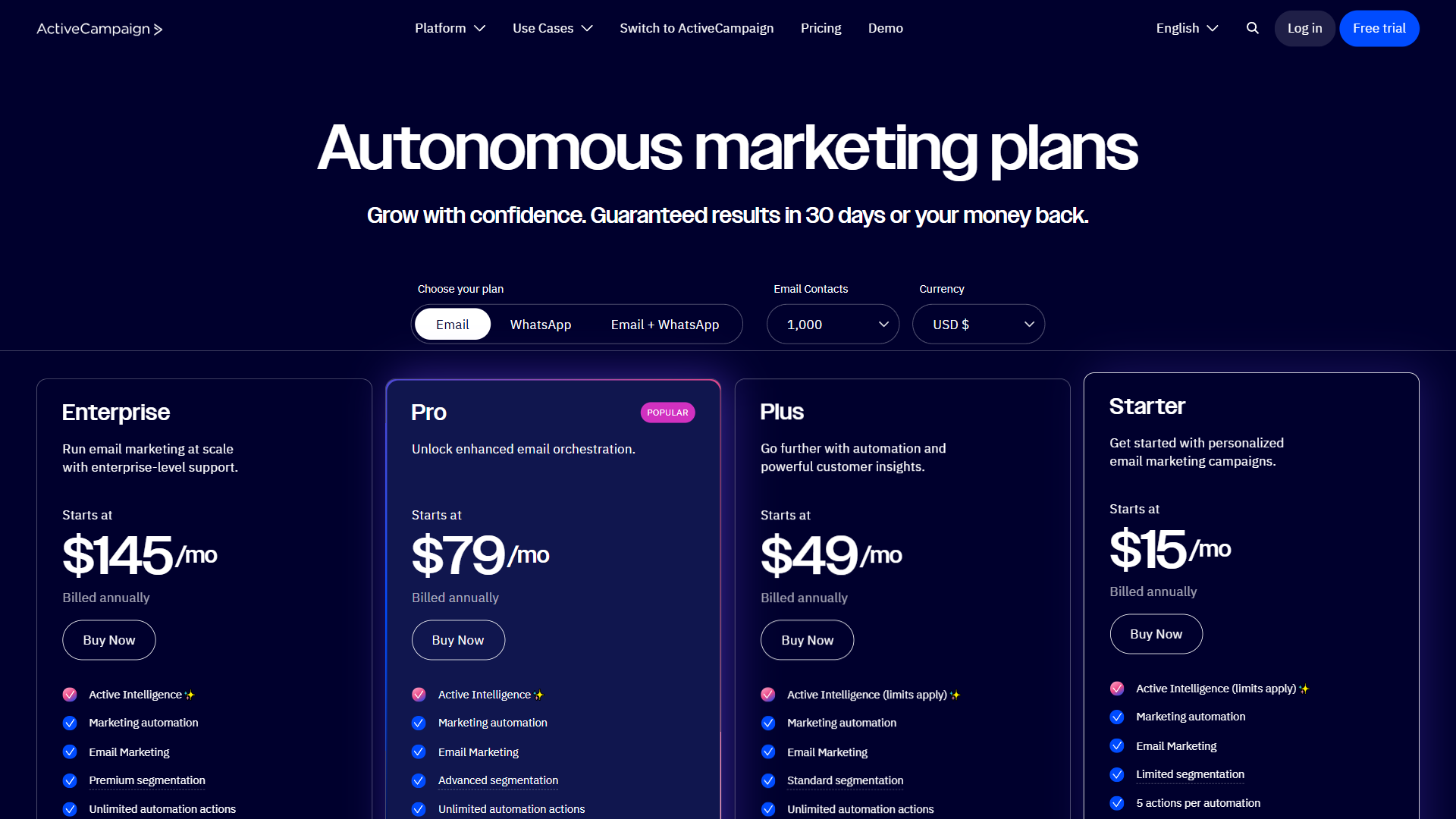
Not all of these activecampaign email automation workflows require the same plan tier. Here is what you need to know:
| Plan | Monthly Price | Key Automation Features |
|---|---|---|
| Starter | $15/month | Basic automation, email marketing, site tracking |
| Plus | $49/month | CRM, lead scoring, landing pages, SMS marketing |
| Professional | $149/month | Predictive sending, split automations, attribution |
| Enterprise | Custom | Custom reporting, dedicated rep, custom mail server |
For most businesses: The Plus plan at $49/month hits the sweet spot. You get the CRM integration needed for lead scoring (Workflow 4), deal tracking (Workflow 3), and sales handoff. The Starter plan works for straightforward sequences like welcome series and cart recovery, but you will outgrow it quickly if you are building multiple workflows.
For advanced automation: The Professional plan at $149/month unlocks predictive sending and split automation testing. If you are running all 10 workflows simultaneously, the ability to A/B test entire automation branches (not just email subject lines) pays for the upgrade through higher conversion rates.
All plans include a 14-day free trial, so you can build and test these workflows before committing. Annual billing saves 20% across all tiers, and switching from Mailchimp is straightforward with our Mailchimp migration guide.
How ActiveCampaign AI Enhances These Workflows
ActiveCampaign’s machine learning features add an optimization layer on top of manual automation. Here is how AI improves the workflows covered in this guide:
Predictive sending analyzes each contact’s historical engagement patterns and delivers emails at the time they are most likely to open. Instead of guessing whether 9 AM or 2 PM works better, the system optimizes per-contact. This is particularly valuable for the re-engagement (Workflow 5) and win-back (Workflow 10) sequences where timing can make or break the open. Our ActiveCampaign predictive sending guide walks through the full setup.
Predictive content recommends which content blocks to include based on a contact’s behavior history. If a subscriber consistently engages with video content over text, the system can prioritize video-first layouts.
Win probability scoring in the CRM predicts which deals are most likely to close. Combined with the B2B lead nurture sequence (Workflow 4), this helps sales teams prioritize follow-up on the leads most likely to convert.
Who Should Use ActiveCampaign for Email Automation
Best fit:
- B2B companies with multi-touch sales cycles that need lead scoring and CRM integration
- Small businesses wanting email marketing and CRM in one platform without paying for Salesforce
- Agencies managing multiple client accounts who need scalable automation
- Email marketers who have outgrown Mailchimp and need more sophisticated workflow logic
- Ecommerce businesses running complex post-purchase and lifecycle campaigns
Not ideal for:
- Businesses that only need basic newsletter sends - simpler tools like Mailchimp cost less
- Pure ecommerce companies deeply embedded in Shopify who may find Klaviyo’s native integration more seamless
- Teams with zero automation experience who want a plug-and-play solution (ActiveCampaign has a learning curve for advanced features)
Is ActiveCampaign Worth It for Email Automation?
Email automation is not about sending more emails - it is about sending the right email at the right moment based on what each subscriber actually does. These 10 activecampaign email automation workflows cover the full customer lifecycle from first subscription through repeat purchase and win-back, and they run continuously once built.
The platform’s combination of a visual workflow builder, built-in CRM, and AI-powered optimization makes it one of the strongest options for businesses that take email seriously. Starting at $15/month for basic automation and $49/month for the CRM integration that most of these workflows benefit from, the pricing is competitive for the depth of automation you get.
Start with the welcome series and one revenue-focused workflow (abandoned cart or post-purchase). Once those are running and generating data, layer in the remaining sequences. You can explore ActiveCampaign’s full feature set on our tool page and take advantage of their 14-day free trial to build your first workflows risk-free.
Want to learn more about ActiveCampaign?
Frequently Asked Questions
Is ActiveCampaign like Mailchimp?
ActiveCampaign and Mailchimp are both email marketing platforms, but they differ significantly in depth. ActiveCampaign suits marketers who have outgrown Mailchimp and need more sophisticated workflow logic, a built-in CRM, and advanced lead scoring. Mailchimp remains a simpler, cheaper option for businesses that only need basic newsletter sends.
What email automation workflow has the highest ROI?
The welcome series is the highest-ROI ActiveCampaign email automation you can build. New subscribers are at peak engagement - open rates for welcome emails run 50-80% compared to 20-25% for regular campaigns, so a five-email welcome sequence usually outperforms any other automation in absolute revenue.
Does ActiveCampaign include lead scoring?
Yes. Lead scoring is included on the Plus plan and above. A common starting framework assigns 1 point for email opens, 5 points for link clicks, and 10 points for high-intent page visits, then triggers a sales handoff once a contact crosses your defined threshold.
What ActiveCampaign plan do I need for email automation?
The Starter plan at $15/month covers basic automation, welcome series, and cart recovery. The Plus plan at $49/month adds CRM, lead scoring, and deal tracking - the sweet spot for most businesses running multiple workflows. The Professional plan at $149/month unlocks predictive sending and split automation testing. All plans include a 14-day free trial, and annual billing saves 20%.
How does ActiveCampaign predictive sending work?
Predictive sending analyzes each contact’s historical engagement patterns and delivers emails at the time that individual is most likely to open - rather than using a single send time for everyone. It is available on the Professional plan and is particularly valuable for re-engagement and win-back sequences, where timing can significantly affect open rates.
Related Guides
- ActiveCampaign Getting Started Guide
- ActiveCampaign Automation Builder Guide
- ActiveCampaign Segmentation Strategies
- ActiveCampaign CRM Setup Guide
External Resources
- ActiveCampaign Learning Center - Official guides and tutorials for building automation workflows
- ActiveCampaign Pricing - Current plan comparison with automation features by tier
- ActiveCampaign Help Center - Knowledge base covering trigger types, automation recipes, and deliverability best practices
Related Guides
- 15 Calendly Tips and Tricks to Save 4+ Hours Weekly
- Activecampaign AI Content Generation: Complete 2026 Guide
- ActiveCampaign AI Features: Active Intelligence Guide
- Activecampaign Automation Builder: Complete 2026 Guide
- Activecampaign Brand Kit: 2026 Walkthrough for Teams
- ActiveCampaign Conditional Content: Personalization Guide
- ActiveCampaign CRM Setup: How to Set Up ActiveCampaign CRM
- ActiveCampaign Deals Pipeline: Stages & Automation
- ActiveCampaign Deliverability: Best Practices Guide
- ActiveCampaign Email Campaign Setup: Step-by-Step Guide