



ActiveCampaign deals pipeline is a built-in visual CRM feature that organizes sales opportunities through configurable deal stages, owner assignments, win probability scoring, and automation triggers tied to deal movement. Available on Plus plans and above, it removes the need for a separate CRM tool - making it especially useful for B2B, SaaS, and agency sales workflows.
The ActiveCampaign deals pipeline is one of the most underused features on the platform - a strong ActiveCampaign deals pipeline example of this is teams that sign up for the email marketing and automation, then keep tracking their sales in spreadsheets or a separate CRM they are already paying for. Meanwhile, ActiveCampaign includes a full visual pipeline with deal stages, owner assignments, win probability scoring, and automation triggers that fire based on deal movement - all built into the same account.
The gap between “we have a CRM” and “our CRM actually works” usually comes down to pipeline design and ActiveCampaign sales engagement strategy. A poorly structured pipeline creates busywork. A well-designed one moves deals forward without your sales team manually updating records after every call. This guide covers the complete ActiveCampaign deals pipeline setup - from creating your first pipeline and configuring stages to building the automation workflows that keep deals progressing and flag the ones that stall.
Whether you are running a B2B sales team, managing an agency with multiple client pipelines, or tracking a SaaS sales cycle, ActiveCampaign and its sales CRM module give you the structure to manage it without bolting on another tool. Active Campaign training resources and Active campaign videos can help your team get up to speed quickly, and our best CRM software 2026 comparison covers how it stacks up against dedicated CRM platforms. If you are already on a Plus plan or above, everything covered here is included in your subscription.
ActiveCampaign Deals Pipeline: When to Use Deals and Pipelines
ActiveCampaign Deals Pipeline covers the strategies and tools that deliver real productivity gains in this space. The ActiveCampaign deals pipeline is one of the most underused features on the platform. This guide walks through the practical steps from setup through advanced optimization.
Not every business needs a deals pipeline. If you sell a single product through a checkout page and never speak to a customer before they buy, contact management and email automation will handle your workflow. Pipelines become essential when there is a sales process - when deals require multiple touchpoints, involve negotiation, or take days to weeks to close.
The deals pipeline is the right fit when:
- B2B services and consulting - Proposals, discovery calls, contract negotiations, and onboarding steps that need tracking
- SaaS sales - Free trial to paid conversion, enterprise deal cycles with multiple stakeholders, and upsell motions
- Agencies - Client acquisition pipelines, project pipelines, and renewal pipelines running in parallel
- High-value products - Anything where the sale involves a conversation rather than a cart checkout
- Service businesses - Contractors, freelancers, and professional services tracking quotes to signed contracts
The difference from contact management: Contacts represent people. Deals represent revenue opportunities. A single contact can have multiple deals across different pipelines. Your email automations nurture the contact. Your pipeline automations move the deal. Separating the two means your marketing team and sales team can operate on the same platform without stepping on each other - a structure echoed in HBR’s research on aligning marketing and sales functions.
Plan Requirements
The ActiveCampaign deals pipeline requires a Plus plan or higher. The Starter plan includes email marketing and basic automation but does not give you access to deals, pipelines, or CRM functionality.
Plan breakdown for deals features:
- Starter ($15/month) - No deals or pipeline access
- Plus ($49/month, $39/month annual annual) - Full pipeline access, deal creation, custom deal fields, deal automations, and contact scoring
- Professional ($149/month, $119/month annual annual) - Everything in Plus, plus win probability scoring, attribution reporting, split automations, and predictive sending
- Enterprise (custom pricing) - Adds custom reporting objects, HIPAA compliance, and a dedicated account representative
If you want the win probability and AI scoring features covered later in this guide, you will need the Professional plan. For everything else - pipeline creation, deal management, automation workflows - the Plus plan is sufficient. See our ActiveCampaign getting started guide for a walkthrough on choosing the right tier.
ActiveCampaign offers a 14-day free trial with full access to all features, so you can test the pipeline before committing. Compare tiers on the pricing page, or read the official ActiveCampaign sales pipeline management primer for the vendor’s framing.
Setting Up Your First Pipeline
The pipeline is the visual representation of your sales process. Each column is a stage, and deals move from left to right as they progress. Getting your stages right from the start saves you from restructuring later when you have hundreds of deals imotionon.
Creating the pipeline:
Navigate to Deals in the left sidebar, then click Pipelines and Add Pipeline. Give it a clear name that describes the sales motion - “New Business,” “Inbound Sales,” or “Partner Referrals” are better than generic names like “Sales Pipeline.” If you run different sales processes for different products or customer segments, you will create separate pipelines for each. Start with one.
Designing your stages:
Each stage should represent a meaningful milestone in the sales process - a point where something changes about the deal. Avoid creating stages for internal tasks (“send follow-up email”) that can be handled by automation instead.
For inspiration on stage design from outside ActiveCampaign, HubSpot’s breakdown of sales pipeline stages shows how other CRM vendors structure the same flow.
Recommended B2B pipeline stages:
- Lead - New opportunity has been identified but no outreach has happened
- Qualified - Discovery call completed, budget and timeline confirmed, deal fits your ideal customer profile
- Proposal - A formal proposal, quote, or SOW has been sent to the prospect
- Negotiation - Active discussion on pricing, terms, scope, or timeline adjustments
- Won - Deal closed and contract signed
- Lost - Deal did not close (track the reason in a custom field for reporting)
Stage configuration tips:
- Keep stages under seven. More than that and deals get stuck in intermediate stages that do not represent real progress. If you need more granularity, use deal tasks and notes within a stage rather than adding new stages.
- Name stages from the buyer’s perspective. “Proposal Sent” is clearer than “Stage 4” and helps new team members understand the pipeline immediately.
- Set stage colors. ActiveCampaign lets you assign colors to stages. Use green for early stages, yellow for middle, and red for late stages to create visual urgency across the board.
- Define exit criteria. Before a deal moves to the next stage, what needs to happen? Write this down even if you do not enforce it in the tool - it keeps your team consistent.
Industry-specific variations:
| Field | Value |
|---|---|
| SaaS | Lead > Demo Scheduled > Trial Active > Proposal > Negotiation > Won/Lost |
| Agency | Inquiry > Discovery Call > Scope Defined > Proposal > Contract Review > Won/Lost |
| Consulting | Referral > Needs Assessment > Statement of Work > Approval > Won/Lost |
| Real estate | New Lead > Property Viewing > Offer Made > Under Contract > Closed/Withdrawn |
Creating and Managing Deals
With your pipeline structure in place, the next step is getting deals into it. ActiveCampaign supports both manual deal creation and automated deal creation triggered by contact behavior.
Manual deal creation:
Click the + button within any pipeline stage or navigate to Deals > Add a Deal. Fill in the essential fields:
- Deal title - Use a consistent naming convention. “Company Name - Product/Service” works well for B2B (e.g., “Acme Corp - Annual License”)
- Deal value - The estimated revenue for this opportunity. This powers your pipeline value reports and forecasting
- Deal owner - The sales rep responsible for moving this deal forward. Owner assignment triggers notifications and filters pipeline views by team member
- Contact - Link the deal to an existing contact or create a new one. Every deal must be associated with at least one contact
- Pipeline and stage - Select which pipeline and starting stage for the deal
Automated deal creation:
This is where ActiveCampaign’s integration between marketing and sales becomes powerful. Instead of manually creating deals when leads qualify, set up automations that create deals based on contact actions.
The predictive sending guide covers how to combine these triggers with AI-optimized send timing for follow-up emails.
Common triggers for automatic deal creation:
- Form submission - A contact fills out a “Request a Demo” or “Get a Quote” form. The automation creates a deal in the Lead stage and assigns it to a rep
- Tag applied - When a contact is tagged as “MQL” (marketing qualified lead) by your lead scoring automation, a deal is created automatically
- Page visit - A contact visits your pricing page three times in a week, signaling purchase intent via site tracking. The automation creates a deal and alerts the assigned owner
- Email engagement - A contact clicks a link in your proposal follow-up email. The automation updates the deal stage and notifies the rep
Setting up automated deal creation in the automation builder:
- Navigate to Automations > Create an Automation
- Choose your trigger (form submit, tag added, page visited)
- Add the CRM > Add a deal action
- Configure the deal title (use personalization tags like
%FULLNAME%for dynamic naming) - Set the pipeline, starting stage, deal value (if known), and owner assignment
- Add a Notify > Send a notification email action so the deal owner knows immediately
Custom deal fields:
Standard fields cover the basics, but your sales team needs context to work deals effectively. Navigate to Settings > Fields > Deal Fields and create custom fields for:
- Lead source (dropdown) - How the opportunity originated
- Product interest (dropdown) - Which product or service line the deal involves
- Decision timeline (date) - When the prospect plans to make a decision
- Competitor (text) - Who else they are evaluating
- Lost reason (dropdown) - Mandatory when moving a deal to Lost, used for pipeline analytics
Deal Automation Workflows
Manually updating deal stages and sending follow-up emails does not scale past a handful of active deals. Automation workflows tied to deal events keep your pipeline moving and ensure nothing falls through the cracks.
Workflow 1: Stage-based follow-up emails
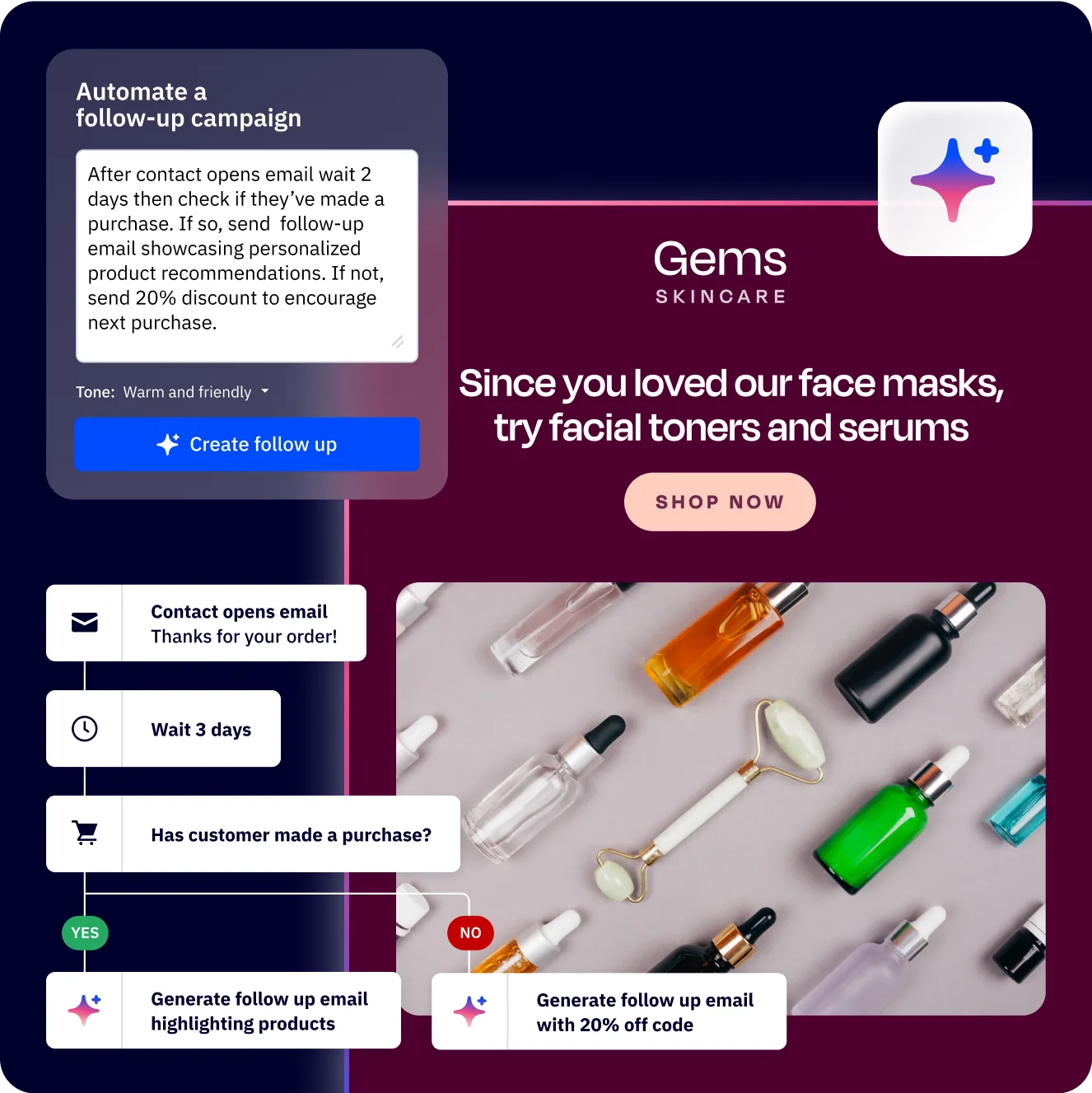
Create an automation triggered by Deal stage changes. When a deal moves to a new stage, the automation sends the appropriate follow-up email to the associated contact.
- Moved to Qualified - Send a “next steps” email outlining what happens during the proposal phase
- Moved to Proposal - Send the proposal document with a personalized introduction
- Moved to Negotiation - Send a comparison sheet addressing common objections
- Moved to Won - Send an onboarding welcome email and kick off your client onboarding automation
Workflow 2: Stalled deal alerts
Deals that sit in a stage too long are either dead or need attention. Build an automation that watches for inactivity.
- Trigger: Deal stage changes (any stage)
- Add a Wait condition: wait 7 days (adjust per stage - early stages can wait longer, late stages need faster follow-up)
- Add a condition: If deal is still in the same stage
- Action: Send notification to the deal owner with the deal title, value, and days stalled
- Add another wait of 3 days, then escalate to the sales manager if the deal still has not moved
If you want a deeper dive into the trigger options, the automation builder guide covers every CRM trigger and the conditions you can layer on top.
Workflow 3: Deal owner notifications
Keep your sales team informed without them needing to check the CRM constantly.
- New deal assigned - Immediate email notification with deal details and contact information. For teams using dedicated sales engagement platforms, these notifications can route through your existing outreach tooling instead
- Deal note added - Notify the owner when a colleague adds a note (useful for team selling)
- Deal task due - Reminder notification the morning a task is due, with a direct link to the deal record
Workflow 4: Automated deal stage progression
Some stage changes can happen automatically based on contact behavior.
- Contact opens the proposal email and clicks the pricing link - move deal from Proposal to Negotiation
- Contact signs the contract via your e-signature tool (DocuSign or PandaDoc) - move deal to Won via a webhook trigger
- Contact does not open any emails for 30 days while in Negotiation - move deal to Lost and tag with “went-dark”
Building these automations:
All deal automations use the CRM triggers in the marketing automation builder. Navigate to Automations > Create an Automation and select triggers from the CRM category: “Deal stage changes,” “Deal is created,” “Deal owner changes,” or “Deal task is due.” Combine these with wait steps, conditions, and actions to build workflows that match your sales process.
How Does Win Probability and AI Scoring Work in ActiveCampaign?
Win probability is a Professional plan feature that uses machine learning to predict the likelihood of each deal closing. Instead of relying on gut feeling or manually assigned percentages, ActiveCampaign analyzes patterns from your historical deal data to score active deals automatically.
How win probability works:
ActiveCampaign examines factors across your closed deals to identify patterns that correlate with winning or losing. The model considers:
- Time in each stage - Deals that close tend to move through stages at a certain pace. Deals lingering too long in one stage get lower scores
- Deal value relative to stage - High-value deals in early stages may score differently than small deals in the same position
- Contact engagement - Email opens, link clicks, site visits, and form submissions from the associated contact influence the probability
- Historical conversion rates - If 60% of deals that reach your Proposal stage eventually close, new deals in that stage start with a baseline near 60%
Using win probability effectively:
- Sort your pipeline by probability. Focus your team’s energy on deals with the highest chance of closing rather than spreading attention evenly - the AI features guide walks through every AI-powered scoring option
- Set threshold alerts. Create an automation that notifies a manager when a deal’s probability drops below 30%, signaling it needs intervention or should be moved to Lost
- Forecast revenue. Multiply each deal’s value by its win probability to get a weighted pipeline value. This gives a more realistic revenue forecast than counting total pipeline value
AI-powered next best actions:
On the Professional plan, ActiveCampaign AI also suggests next best actions for each deal. These recommendations appear as cards on the deal record and suggest things like “Send a follow-up email - this deal has been idle for 5 days” or “Schedule a call - this contact engaged with your pricing page yesterday.” The suggestions are based on patterns from deals that successfully closed in your account.
Getting accurate probability scores:
Win probability improves with data. You need at least 20-30 closed deals (both won and lost) before the model produces reliable scores. If you are just getting started, focus on building your pipeline and closing deals first. The AI scoring becomes useful once you have a few months of deal history.
When Should You Use Multiple Pipelines in ActiveCampaign?
A single pipeline works when your business has one sales motion. The moment you have distinct processes - different products, different customer segments, different team responsibilities - you need multiple pipelines to keep things clean.
Common multi-pipeline configurations:
- New business vs. expansion - New customer acquisition follows a different process than upselling existing accounts. The stages, timelines, and automation triggers are different enough to warrant separate pipelines
- Direct sales vs. partnerships - Partner-sourced deals often skip early qualification stages and need different follow-up sequences. A dedicated partner pipeline lets you track partner deal flow separately
- Product-specific pipelines - If you sell multiple products with fundamentally different sales cycles (a self-serve SaaS product vs. an enterprise implementation), separate pipelines keep each process clear
- Regional pipelines - Teams covering different territories can each have their own pipeline with region-specific stages and owners
If you also run support and customer success on top of these pipelines, our conditional content guide shows how to vary the messaging contacts see based on which pipeline they sit in.
Pipeline management best practices:
- Do not create pipelines for status tracking. If you are tempted to create a “Churned Customers” pipeline, use tags instead. Pipelines should represent active sales processes, not archives
- Name pipelines descriptively. “Enterprise SaaS - North America” tells a sales rep exactly what belongs there. “Pipeline 2” does not
- Review pipeline structure quarterly. As your sales process evolves, stages that made sense six months ago may need renaming, merging, or removing. Prune regularly
- Use pipeline-specific automations. Each pipeline can have its own automation triggers, so a deal moving to “Proposal” in your Enterprise pipeline can trigger a different email sequence than the same stage in your SMB pipeline
Pipeline Reporting and Analytics
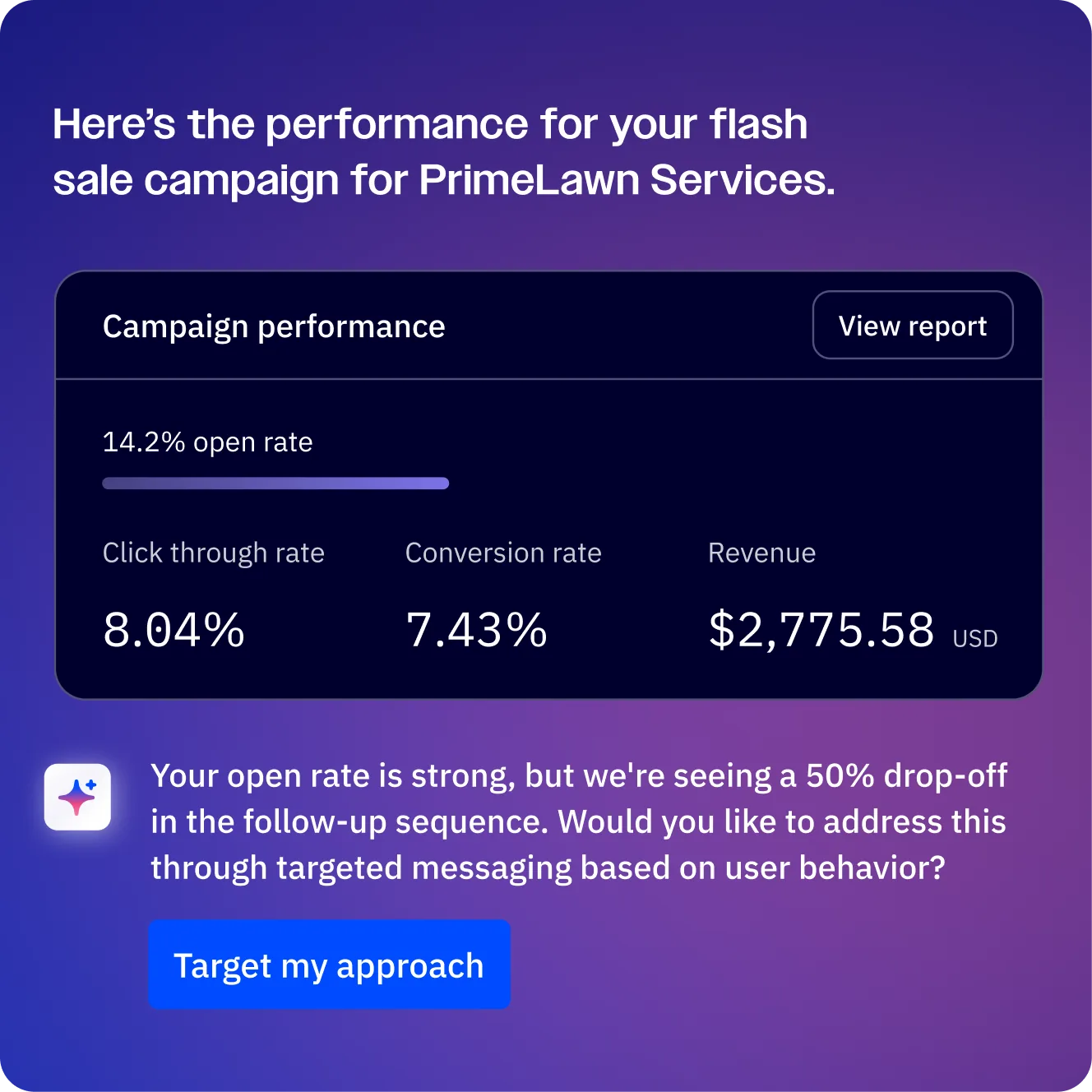
Setting up a pipeline without tracking performance is like running ads without checking the results. ActiveCampaign provides deal reports that show you where your pipeline is healthy and where it is leaking revenue.
Key reports to monitor:
- Pipeline value - Total dollar value of all active deals, broken down by stage. This is your top-line indicator of sales health. A healthy pipeline has deals distributed across stages, not clustered in one
- Conversion rates by stage - What percentage of deals advance from each stage to the next? If 80% of Qualified deals make it to Proposal but only 20% of Proposals reach Negotiation, your proposal process needs work
- Average time in stage - How long deals spend in each stage before moving forward. Spikes in stage time indicate bottlenecks that need process changes or additional resources
- Win/loss ratio - Track overall and by deal owner, lead source, and product line. This tells you not just how many deals you close, but which types of deals and which reps perform best
- Revenue forecasting - Combine deal values with stage-based conversion rates or win probability scores to forecast revenue for the month, quarter, or year
For a benchmark on healthy pipeline velocity, Salesforce’s sales pipeline guide provides industry numbers you can compare your own conversion rates against.
Custom reporting with the Professional plan:
The Professional and Enterprise plans unlock deal attribution reports that show which marketing campaigns, email sequences, and content pieces contributed to closed deals. This closes the loop between marketing spend and revenue, letting you double down on what works and cut what does not.
Setting up a reporting routine:
- Daily - Check pipeline view for stalled deals and new deals requiring action
- Weekly - Review stage conversion rates and deals by owner to spot coaching opportunities
- Monthly - Analyze win/loss trends, average deal size, and pipeline velocity to inform strategy
Pro Tips
Common mistakes to avoid:
-
Too many stages. If your pipeline has more than seven stages, you probably have task steps disguised as stages. Move those to deal tasks or automation actions instead
-
No “Lost” stage. Every pipeline needs a Lost stage with a mandatory lost reason field. Without it, your analytics are incomplete and you cannot identify patterns in why deals fail
-
Ignoring deal rot. Deals sitting untouched for weeks pollute your pipeline value and make forecasting unreliable. Set up stalled deal automations from day one
-
Manual everything. If your reps are spending 20 minutes per day updating deal records, your automation is not doing enough. Automate stage progression, follow-ups, and notifications - McKinsey’s research on sales automation shows top performers automate 30%+ of routine deal updates
For data hygiene rules at the contact level (which feed deal quality), see our segmentation strategies guide.
Best practices from high-performing pipelines:
- Standardize deal naming. Use a convention like “Company - Product - Value” across all reps. This makes searching and reporting consistent
- Require deal values. Even estimated values improve forecasting dramatically. Make it a required field on deal creation
- Use deal tasks, not memory. Every next action for a deal should be captured as a task with a due date. Sales reps who track next steps in their heads lose deals
- Run pipeline reviews. Weekly 15-minute team meetings where each rep walks through their top 5 deals by value or probability. This surfaces stuck deals and coaching moments faster than any report
The Bottom Line
A well-structured deals pipeline turns ActiveCampaign from an email tool into a full revenue platform. Combine it with e-signature workflows from DocuSign or PandaDoc and most B2B teams can retire their separate CRM. Start with the Plus plan if you only need pipelines, or upgrade to Professional when you want win probability scoring and attribution reporting.
Frequently Asked Questions
How many pipelines can I create in ActiveCampaign?
There is no hard limit on the number of pipelines you can create on the Plus plan or above. However, more pipelines means more to manage. Most businesses operate well with two to four pipelines. Create a new pipeline only when the sales process is genuinely different - not just because the product or rep is different. If you find yourself making a pipeline per rep or per product variation, tags or custom fields will usually serve you better.
What is the difference between a deal and a contact?
A contact is a person in your database with an email address, tags, and custom fields. A deal is a revenue opportunity tied to that contact. One contact can have multiple deals - for example, a client you sold a website project to (Deal 1, Won) and are now pitching an SEO retainer (Deal 2, in Proposal). Contacts live in your contact list permanently and accumulate engagement history over years. Deals live in pipelines and move through stages until they are won or lost, then sit in your historical pipeline data for reporting.
Can I automate deal creation from form submissions?
Yes. Create an automation with the trigger “Submits a form” and select your form. Add the CRM action “Add a deal” and configure the deal title, pipeline, stage, value, and owner. You can use personalization tags to populate the deal title dynamically with the contact’s name or company. This is the most common method for connecting inbound marketing to the sales pipeline, and pairs naturally with our forms setup guide for capturing the lead in the first place.
How does win probability scoring work?
Win probability is a Professional plan feature that uses machine learning to predict the likelihood of a deal closing. The model analyzes your historical deal data - time in stages, deal values, contact engagement, and conversion rates - to assign a percentage score to each active deal. You need at least 20-30 closed deals (both won and lost) before the scoring becomes reliable. The score updates automatically as deals progress and contact behavior changes, and you can sort the entire pipeline view by probability to focus rep attention on the deals most likely to close.
What are the best pipeline stages for B2B sales?
A proven B2B pipeline structure is: Lead, Qualified, Proposal, Negotiation, Won, Lost. Six stages cover the critical milestones without creating unnecessary friction. Adjust the names to match your terminology - “Discovery” instead of “Qualified” or “Contract Review” instead of “Negotiation” - but keep the progression logical and under seven total stages. Each stage should represent a meaningful change in the deal’s status, not an internal task. Internal tasks belong in deal tasks or automations, not as their own stages.
Want to learn more about ActiveCampaign?
Related Guides
- ActiveCampaign CRM Setup Guide
- ActiveCampaign Automation Builder Guide
- ActiveCampaign Lead Scoring Guide
- ActiveCampaign AI Features Guide
- ActiveCampaign Email Automation Workflows
Related Reading
External Resources
- ActiveCampaign Sales CRM Help Center - Official documentation for pipelines, deals, and win probability
- ActiveCampaign Sales CRM Overview - Product page covering pipelines and CRM features
- ActiveCampaign Deals API Reference - REST API for programmatic deal creation and updates
Related Guides
- Activecampaign AI Content Generation: Complete 2026 Guide
- ActiveCampaign AI Features: Active Intelligence Guide
- Activecampaign Automation Builder: Complete 2026 Guide
- Activecampaign Brand Kit: 2026 Walkthrough for Teams
- ActiveCampaign Conditional Content: Personalization Guide
- ActiveCampaign CRM Setup: How to Set Up ActiveCampaign CRM
- ActiveCampaign Deliverability: Best Practices Guide
- ActiveCampaign Email Automation: 10 Workflows That Work
- ActiveCampaign Email Campaign Setup: Step-by-Step Guide
- ActiveCampaign Forms: Types, Setup, and Conversion Tips