




Murf AI voiceover is a browser-based production workflow that converts written scripts into studio-quality audio using a library of 200+ AI voices across 20+ languages. Features like voice cloning, emotion control, and a timeline-based studio editor make it practical for educators, content creators, and marketing teams - replacing traditional studio recording with a faster, scalable alternative.
Murf AI has fundamentally changed how many creators approach audio content. What used to require booking a voice actor, scheduling studio time, and waiting days for deliverables now takes minutes with a script and an internet connection. The platform offers 200+ AI voices across 20+ languages, and with features like voice cloning and an emotion control system, the output sounds far more polished than you would expect from a text-to-speech tool. For broader context on this category, our best AI voice generators 2026 roundup compares Murf against the leading competitors.
This murf ai voiceover guide walks through everything from your first voiceover to advanced workflows, with pricing breakdowns and practical strategies for educators, content creators, and marketing teams.
Why Murf AI Stands Out for Voiceover Production
The AI voiceover space is crowded, but Murf AI differentiates itself in three areas that matter for professional use. First, the voice library is genuinely massive - 200+ voices that span accents, age ranges, and speaking styles across 20+ languages. Second, the studio editor gives you timeline-based control over pacing, emphasis, and pronunciation without leaving the browser. Third, the collaboration features on the Business tier make it practical for teams producing voiceovers at scale.
Murf AI currently holds across major review platforms, with particularly strong marks for voice quality and ease of use. The platform has attracted over 500,000 users since launching in 2020, and the recent addition of the Falcon TTS API with 55ms latency positions it as a serious option for both pre-recorded and real-time voice applications.
Getting Started: Your First Murf AI Voiceover
Creating your first voiceover takes less than five minutes. Here is the recommended workflow for beginners.
Account Setup
Head to murf.ai and sign up for the free tier. You get 10 minutes of voice generation and 2 projects, which is enough to produce a couple of short voiceovers and decide whether the platform fits your needs. No credit card required.
Choosing Your Voice
This is the step most people rush through, and it costs them time later. Murf AI organizes voices by language, accent, age range, and use case. Before picking randomly, consider:
- Your audience - A corporate training narration calls for a different voice than a YouTube tutorial. The platform labels voices by tone (conversational, formal, narrative) to help you match
- Consistency needs - If you are producing a course with 20 lessons, pick one voice and stick with it. The Voice Consistency Engine maintains tone and pacing across sessions
- Language requirements - MultiNative technology lets you switch languages mid-sentence while keeping the same voice character, which is valuable for multilingual content
The tutorial above walks through the voice selection process in detail. Once you have identified your voice, the next step is converting your script into audio.
Creating Your Voiceover
- Paste or type your script into the Murf Studio editor
- Select your chosen voice from the library
- Click Generate to produce the initial audio
- Use the timeline to adjust pacing, add pauses, or emphasize specific words
- Preview the full audio and make adjustments
- Export in your preferred format (MP3, WAV, or FLAC)
The AI Script Assistant catches common issues before generation - things like run-on sentences that produce awkward pauses, misspelled words that throw off pronunciation, and overly long paragraphs that need breathing room. Spending two minutes on script cleanup before hitting Generate saves five minutes of post-production editing.
Key Features That Matter for Professional Use
Voice Cloning 2.0
Voice cloning is the feature that elevates Murf AI from a utility to a brand asset. With just 2 minutes of clean audio, the platform creates a custom AI voice that captures your tone, accent, and speech patterns. Processing takes 24-48 hours, and the result is available across 20 languages.
When voice cloning makes sense:
- Building a consistent brand voice across all audio content
- Educators who want their own voice narrating lessons without recording every one
- Podcasters creating consistent intros and ad reads
- Companies standardizing training narration across departments
The quality depends heavily on your input audio. Record in a quiet environment with a consistent pace, and the cloned voice will be noticeably more accurate than if you submit audio with background noise or varying volume.
Emotion Control System
The emotion sliders let you shift voice delivery between Happy, Sad, Excited, and Serious. For most voiceover work - tutorials, training, marketing - the adjustments are subtle but effective. An enthusiastic product demo sounds noticeably different from a calm tutorial walkthrough.
Where the system falls short is nuanced character work. If you need a voice that conveys complex emotions for audiobook narration or dramatic content, the slider approach feels limiting. For that use case, ElevenLabs offers more granular control - their ElevenLabs pricing starts lower than Murf for the Starter tier.
Studio Editor and Timeline
The studio editor is where Murf AI feels most like a professional tool rather than a text-to-speech widget. You get:
- Timeline-based editing - Drag to adjust timing, add pauses between sentences, and sync voiceover with video
- Background music library - Add royalty-free tracks that automatically duck under the voiceover
- Video sync - Import video files and align your voiceover directly in the editor
- Pronunciation controls - Override the AI’s pronunciation of technical terms, brand names, and acronyms
- Auto-trim silence - Remove dead air from generated audio with one click
For projects under 20 minutes, the editor is responsive and intuitive. Longer projects can experience some sluggishness, and Splitting 45-minute course narrations into 10-15 minute segments keeps the editor performant.
API Access and Automation
The Falcon TTS API delivers voiceovers with 55ms latency - fast enough for real-time voice agents and interactive applications. At $0.01 per minute, the pricing is competitive for programmatic use. The API is Enterprise-tier only, but for teams building voice-enabled products, it opens possibilities that the studio editor cannot match.
For developers integrating voice into applications, the API supports all 200+ voices and includes features like SSML markup for fine-grained control over speech output.
Murf AI Voiceover Workflows by Role
For Educators Creating Narrated Lessons
This is the use case where Murf AI delivers the strongest ROI. A typical 20-lesson course requires 10-15 hours of voiceover recording using traditional methods. With Murf AI, the same course takes 2-3 hours including script preparation and review.
Educator workflow:
- Write your lesson scripts in your preferred writing tool
- Import each script into a separate Murf project
- Select a voice and configure emotion settings (Conversational + slightly Enthusiastic works well for educational content)
- Generate all lessons, then batch-review for consistency
- Use the Voice Consistency Engine to ensure uniform tone across the entire course
- Export audio and sync with your slides or video in your LMS
Pro tip for teachers and course creators: The MultiNative feature is underrated for education. If you teach students across language backgrounds, you can produce the same lesson in multiple languages using the same voice character, maintaining familiarity for students who access content in different languages.
For Content Creators and YouTubers
If you publish 2-5 videos weekly, recording voiceovers for each one adds hours to your production schedule. Murf AI compresses that to minutes.
Content creator workflow:
- Draft your video script as you normally would
- Paste into Murf Studio and generate the voiceover
- Import the audio into your video editor alongside footage
- Use the background music feature if your video editor lacks a good music library
The 2-hour monthly limit on the Creator plan ($29/month) handles a typical YouTube production schedule. If you produce daily content, the Business plan’s expanded limits and collaboration features are worth reviewing.
For Marketing Teams
Marketing teams producing multilingual campaigns benefit most from the combination of voice variety and language coverage. Instead of hiring regional voice talent for each market, you can produce ads in 20+ languages from the same platform.
Marketing workflow:
- Write your ad script in the primary language
- Use translation services to localize the script
- Select a voice that works across your target markets using MultiNative
- Generate versions in each language
- Review with native speakers for cultural fit (AI handles pronunciation, but cultural nuance needs human eyes)
The Business plan at $99/month adds team collaboration with 3 editors and 5 viewers, making it practical for marketing teams and agencies with multiple stakeholders reviewing audio content.
Pricing: Which Murf AI Plan Do You Need?
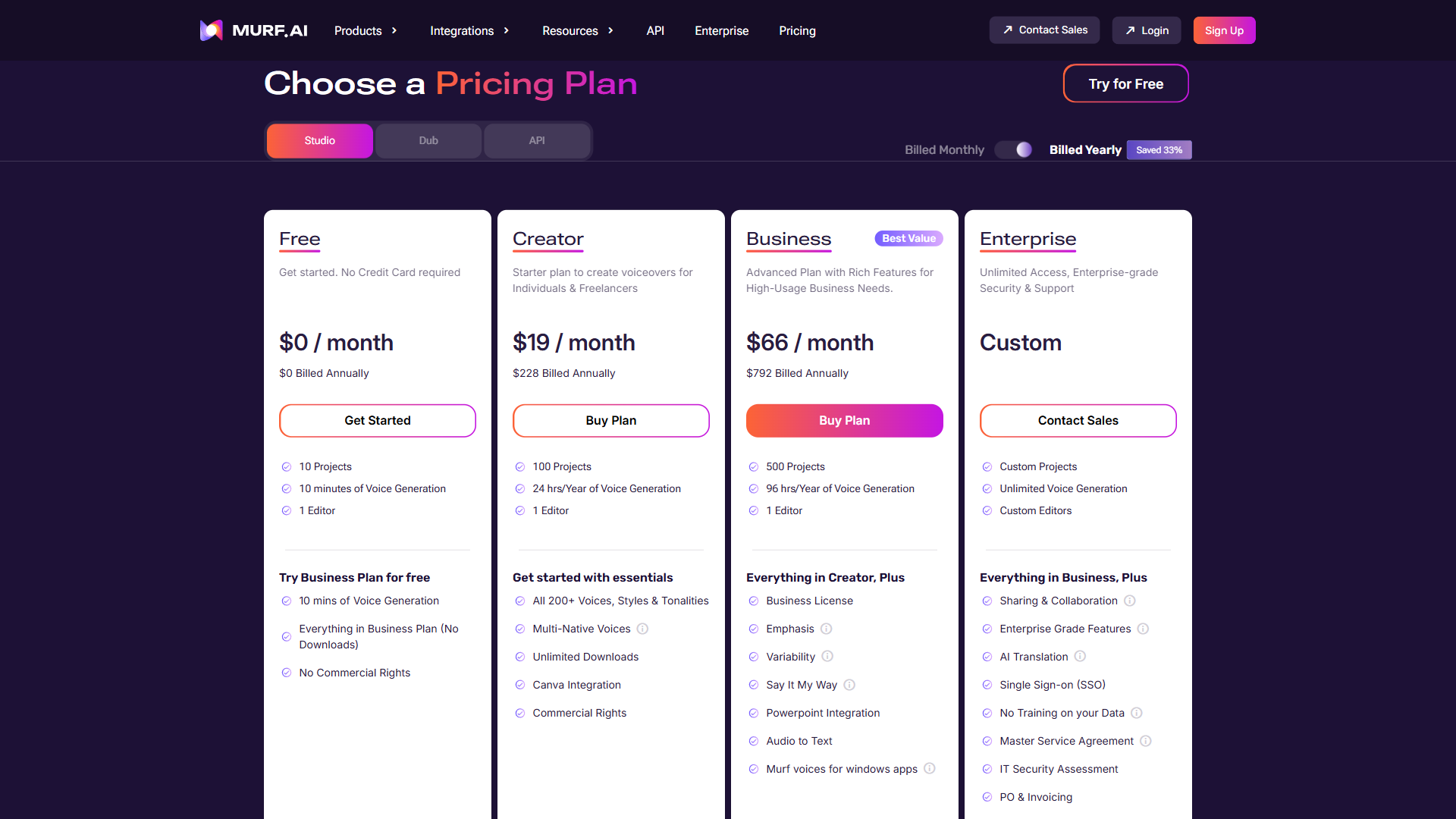
Murf AI offers five pricing tiers, and the right choice depends on your production volume and feature needs.
| Plan | Key Limits | Best For |
|---|---|---|
| Free | 10 min generation, 2 projects | Testing the platform |
| Creator | 2 hrs/month, 200+ voices | Individual creators |
| Business | Team collaboration, priority rendering | Teams and agencies |
| Enterprise | Falcon API, SSO, data residency | Organizations at scale |
Recommendation: Most individual creators should start with the Creator plan at $29/month. The 2 hours of monthly voice generation covers 20-40 typical voiceovers, and commercial usage rights are included.
For teams, the Business plan’s collaboration features justify the upgrade to $99/month. The ability to share projects with editors and viewers eliminates the back-and-forth of exporting files and collecting feedback externally.
Annual billing saves up to 35% on paid plans. If you commit to using Murf AI for at least six months, the annual plan is the better value. Check the current Murf AI pricing for the latest rates, and explore the underlying text-to-speech engine if you want to understand the model that powers each voice.
Tips for Getting the Best Results
Script Preparation
The quality of your voiceover starts with the script, not the voice selection. Follow these guidelines:
- Keep sentences under 25 words - Longer sentences produce awkward pacing and unnatural breath points
- Write for the ear, not the eye - Read your script aloud before pasting it into Murf. If a sentence feels clunky when spoken, it will sound clunky in the AI output
- Use the AI Script Assistant - It catches pronunciation issues, suggests tone adjustments, and auto-trims silence
- Mark emphasis explicitly - If a word needs stress, use the pronunciation controls rather than hoping the AI catches your intent
Voice Selection Strategy
- Test 3-5 voices before committing - Generate the same paragraph with different voices and compare. The differences are significant
- Match voice age to audience - A voice that sounds 25 resonates differently than one that sounds 45. Both can be professional, but the audience connection varies
- Save voice presets - Once you find a voice and emotion setting that works, save it as a preset for future projects
Production Efficiency
- Batch process scripts - Generate all voiceovers for a project in one session rather than one at a time
- Use background music sparingly - The built-in music library is convenient, but voiceover-first content should let the voice carry the experience
- Export at the highest quality - WAV files are larger but preserve audio quality for post-production. Export MP3 only for final delivery
How Murf AI Compares to Alternatives
If you are evaluating AI voiceover platforms, here is how Murf AI stacks up against the closest competitors.
| Feature | Murf AI | ElevenLabs | LOVO | WellSaid Labs |
|---|---|---|---|---|
| Voice Count | 200+ | 120+ | 500+ | 50+ |
| Languages | 20+ | 29 | 100+ | English-focused |
| Voice Cloning | Yes (2 min sample) | Yes (1 min sample) | Yes | Enterprise only |
| Starting Price | See current pricing | See current pricing | See current pricing | See current pricing |
| Free Tier | Yes (10 min) | Yes (10 min) | Yes (limited) | No |
| Collaboration | Business tier | None | Enterprise | Team tier |
Murf AI wins on the combination of voice quality, collaboration features, and the studio editor. ElevenLabs has better emotional range and lower entry pricing, making it stronger for individual creators focused on character work. LOVO offers the largest voice library but at the cost of per-voice quality consistency. WellSaid Labs produces excellent English voices but lacks multilingual depth.
Common Issues and How to Fix Them
Pronunciation errors on technical terms: Add custom pronunciations in the studio editor before generating. The platform remembers these across projects, so you only need to correct each term once.
Voice sounds robotic on long passages: Break your script into shorter paragraphs with natural pause points. The AI generates more natural-sounding audio when it processes shorter segments with clear sentence boundaries.
Editor lag on long projects: Split projects longer than 20 minutes into multiple files. Generate each segment separately and combine them in your video editor or audio workstation.
Voice cloning quality is inconsistent: Re-record your input audio in a quieter environment with a consistent speaking pace. The 2-minute sample needs to be clean and representative of your natural speech pattern.
Background music is too loud: Use the audio mixer in the studio editor to reduce music volume to 15-20% of the voiceover level. The auto-duck feature works well but occasionally needs manual adjustment for dramatic pauses.
The Bottom Line
Murf AI delivers on its promise of studio-quality voiceovers without recording equipment. For educators producing narrated courses, content creators publishing regularly, and marketing teams running multilingual campaigns, the platform replaces what used to be a multi-day production process with a workflow that takes minutes.
The pricing is reasonable for professional use. The Creator plan at $29/month is a fraction of hiring voice talent for even a single project. The free tier’s 10 minutes of generation is genuinely useful for evaluation, not just a teaser.
Where Murf AI falls short is emotional depth for audiobook-style narration and editor performance on very long projects. For those specific needs, consider ElevenLabs. For everything else, Murf AI is one of the most complete platforms in the AI voiceover space.
Frequently Asked Questions
Is Murf AI voice free?
Yes - Murf AI offers a free tier that includes 10 minutes of voice generation and 2 projects, with no credit card required. This is enough to produce a couple of short voiceovers and evaluate whether the platform suits your needs. Paid plans start at $29/month for the Creator plan, with a discount for annual billing.
How many voices and languages does Murf AI support?
Murf AI offers 200+ voices spanning accents, age ranges, and speaking styles across 20+ languages. The library covers use cases ranging from marketing and tutorials to multilingual course narration, making it one of the more comprehensive voice libraries among AI voiceover platforms.
How does Murf AI compare to ElevenLabs?
Murf AI offers stronger collaboration features (Business tier with editors and viewers), a timeline-based studio editor, and the Falcon TTS API for real-time use cases. ElevenLabs wins on emotional range, lower entry pricing, and finer-grained control for character work and audiobook narration. Choose Murf for production workflows; choose ElevenLabs for nuanced creative work.
Can Murf AI clone my voice?
Yes - Murf AI’s Voice Cloning 2.0 creates a custom AI voice from just 2 minutes of clean audio. Processing takes 24-48 hours, and the cloned voice works across all 20+ supported languages. The quality depends heavily on your input audio - record in a quiet environment with consistent volume for the best results.
Does Murf AI offer commercial usage rights?
Yes - all paid plans (Creator, Business, Enterprise) include commercial usage rights. The free tier does not include commercial rights, so you cannot use the voiceovers in client work or monetized content without upgrading. The Creator plan at $29/month is the practical entry point for any commercial use.
Related Guides
- AI Voiceover Tips for Professional Audio Content - Production techniques that apply across AI voice platforms
- AI Voiceover for Corporate Training - Workflow specifically for L&D and training content
- Murf E-Learning Course Narration - Step-by-step guide to building a narrated course in Murf
- ElevenLabs Voice Cloning Tutorial - Compare voice cloning workflows across platforms
Want to learn more about Murf AI?
Related Reading
- Murf AI Tool Page - Full review with pricing, features, and ratings
- ElevenLabs Review - Compare against the leading alternative for character work
- LOVO AI Review - Largest voice library at slightly lower quality
- WellSaid Labs Review - English-focused premium alternative
- AI Tools for Course Creators - Voiceover fits into a broader content stack
External Resources
- Murf AI Text-to-Speech - Official product page covering voice selection, script optimization, and export options
- Murf AI Pricing - Current pricing tiers with annual billing discounts
- Murf AI Help Center - Official documentation for studio editor, voice cloning, and API integration
- Murf AI Blog - Feature releases, voice updates, and customer case studies
Related Guides
- AI Video Creation Tips: 2026 Walkthrough for Teams
- AI Voice Cloning Ethics Best Practices: Complete 2026 Guide
- AI Voiceover Corporate Training With WellSaid Labs
- AI Voiceover for YouTube Videos: Murf Workflow Guide 2026
- AI Voiceover Tips: Making Synthetic Voices Sound Human
- ElevenLabs API Setup: Developer Quick Start Guide (2026)
- ElevenLabs Audio Native Embed Audio on Any Website
- ElevenLabs Audio Quality Settings: Pro Tips and Settings
- ElevenLabs Audiobook Creation: Long-Form Audiobook
- ElevenLabs Conversational AI Agents: Build Voice Agents