




Notion pricing in 2026 has four tiers: Free ($0), Plus ($12 per month or $10 billed annually), Business ($18 per month or $15 annually), and Enterprise (custom pricing). Notion pricing for personal use starts at $0 with no free trial required - the Free plan stays fully functional indefinitely. The biggest change this year is the Notion AI add-on - formerly a separate $8/member/month charge on any plan - is now bundled exclusively into Business and Enterprise tiers, so Free and Plus users who did not already have the add-on can no longer purchase it.
That restructuring changes the calculus for teams: a solo user on Plus who wanted AI now faces a jump to Business pricing. This Notion pricing comparison guide breaks down every plan, the AI pricing shift, annual versus monthly costs, and the hidden expenses the official pricing page glosses over. Our analysis draws on Notion’s current vendor documentation and independent research rather than sponsored placement, and AI Productivity may earn a commission from links on this page while keeping rankings editorially independent. For a category overview, see our apps like Notion roundup and best Notion alternatives breakdown.
Pricing Overview
Notion costs $0 on Free, $10 to $12 per member monthly on Plus, $15 to $18 per member monthly on Business, and a custom quote on Enterprise. Here is every Notion plan side by side, updated 2026:
| Feature | Free | Plus | Business | Enterprise |
|---|---|---|---|---|
| Monthly Price | $0 | $12/member/mo | $18/member/mo | Custom |
| Annual Price | $0 | $10/member/mo | $15/member/mo | Custom |
| Pages & Blocks | Unlimited (individual) | Unlimited (teams) | Unlimited | Unlimited |
| Guests | 10 | 100 | 250 | Custom |
| Page History | 7 days | 30 days | 90 days | Unlimited |
| File Uploads | 5MB per file | Unlimited | Unlimited | Unlimited |
| Notion AI | No | No (legacy only) | Full multi-model AI + Agents | Full + advanced controls |
| SSO (SAML) | No | No | Yes | Yes |
| Advanced Permissions | No | No | Private teamspaces | Granular controls |
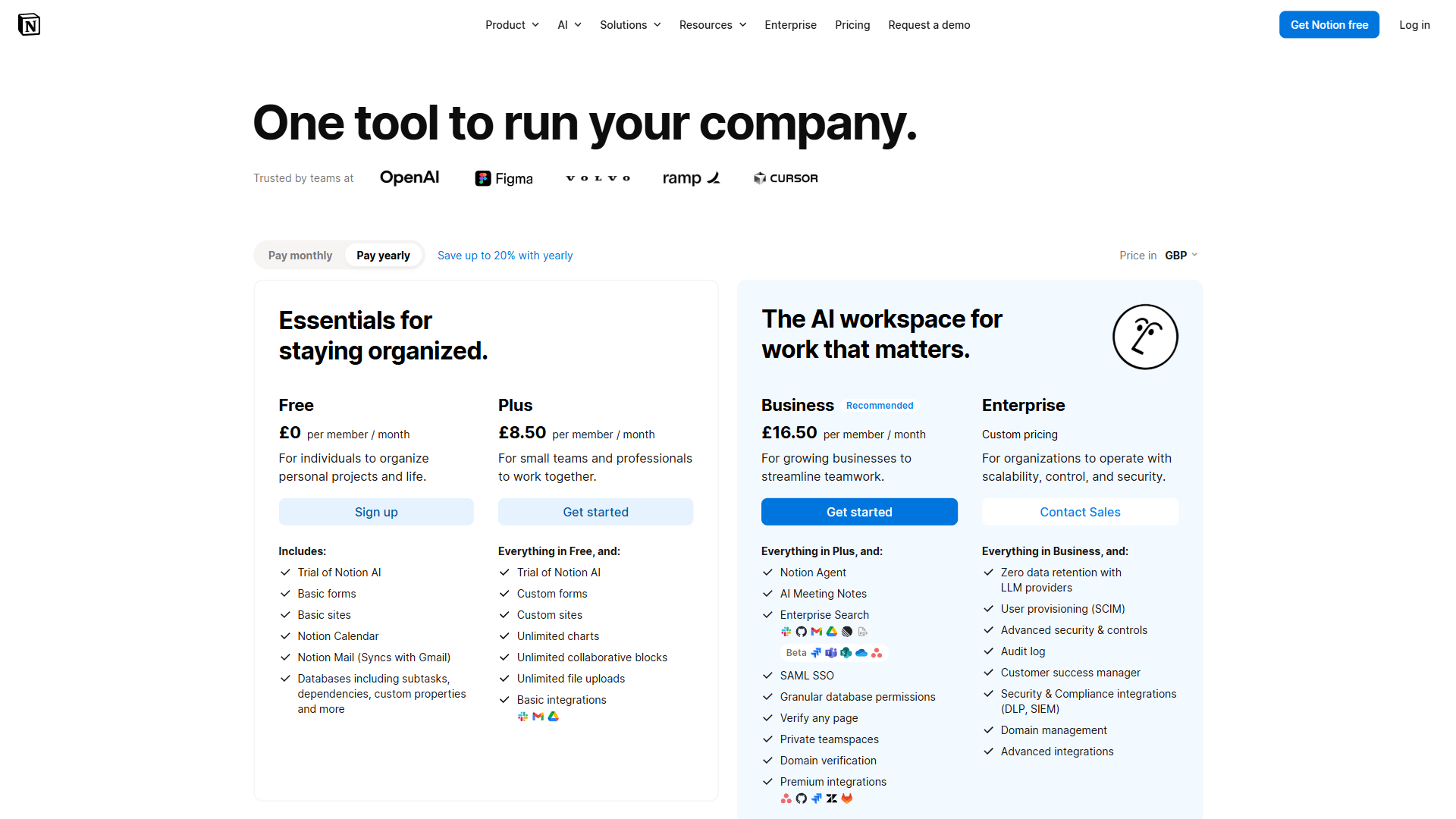
The annual billing discount is 17% across both paid tiers - Plus drops $24 per member per year and Business $36. For teams weighing the Notion premium price against value delivered, annual billing is consistently the more cost-effective path. Notion’s scale gives that pricing weight: the company surpassed 100 million users in 2025, so these tiers reflect a mature, widely adopted product.
Notion Free Plan: What You Actually Get
The Notion Free plan costs $0 indefinitely and gives individual users unlimited pages and blocks, but caps team blocks to push collaborative use toward paid plans.
What is included: Unlimited pages and blocks for solo use, a capped block limit once collaborators join, basic page analytics, cross-platform sync (web, desktop, mobile), 10 guest invitations, 7-day page history, and a 5MB per-file upload limit.
Key limitations: The free plan does not include Notion AI, synced databases, or advanced team features. The 7-day page history means deletions older than a week are unrecoverable, and the 5MB file limit turns Notion into a text-first tool where rich media requires workarounds.
Who it is for: Students, personal note-takers, and individuals evaluating Notion before committing. Notion also offers free Plus plans for students and educators, worth checking before paying.
Notion Plus Plan: The Team Starter
The Notion Plus plan costs $12 per member each month, or $10 per member billed annually, and is the entry point for small teams. The jump from Free to Plus removes the collaboration restrictions that make the free tier impractical beyond individual use.
What Plus adds over Free: Unlimited blocks for teams, 100 guest invitations (10x the Free cap), 30-day page history, unlimited file uploads, synced databases that turn Notion into an operational system, and custom if-then automations.
What Plus does NOT include: The critical absence is Notion AI. In early 2026, Notion began bundling AI into Business and Enterprise tiers rather than offering it as a standalone add-on, so new Free and Plus users cannot purchase the AI add-on separately. Plus also lacks private teamspaces, SAML SSO, advanced page analytics, and bulk PDF export. For teams comparing AI options, the Notion AI vs ChatGPT comparison breaks down where each model performs best.
The cost calculation for small teams:
| Team Size | Monthly Billing | Annual Billing | Annual Total |
|---|---|---|---|
| 3 members | $36/mo | $30/mo | $360/yr |
| 5 members | $60/mo | $50/mo | $600/yr |
| 10 members | $120/mo | $100/mo | $1,200/yr |
Who it is for: Small teams (2-10 members) that need shared workspaces, unlimited content, and database sync but do not require AI or enterprise security controls.
Limitations of the Plus plan: AI is no longer purchasable on Plus for new subscribers, so any team that decides AI matters later faces an immediate jump to Business. Other gaps include no SAML SSO, no private teamspaces, no audit logs, and only 30-day page history.
Notion Business Plan: Where AI Lives
The Notion Business plan costs $18 per member monthly ($15 billed annually) and is the only standard tier that bundles the full Notion AI suite, including autonomous agents and multi-model access. This is where Notion’s value proposition shifts from organized workspace to AI-powered operational hub.
What Business adds over Plus:
- Unlimited Notion AI with multi-model access - GPT-5, Claude Opus 4.1, and o3 models power AI features, with each task routed to the optimal model.
- Autonomous AI Agents - Notion 3.0 introduced agents that execute multi-step workflows using full workspace context.
- AI meeting notes - Automatic meeting summaries with action item extraction.
- Advanced page analytics, private teamspaces, SAML SSO, and bulk PDF export - Single sign-on plus siloed areas for HR or financial documentation.
- 250 guest invitations and 90-day page history - 2.5x the Plus guest cap and three months of version tracking.
The AI value proposition: Before the change, Notion AI cost $8/member/month as a separate add-on. A team on Plus ($10/member) plus AI ($8/member) paid $18/member/month - the same as Business now. For teams already paying for the add-on, upgrading from Plus+AI to Business is effectively $0 with private teamspaces, SSO, and longer history included.
Who it is for: Teams of any size that need AI, and mid-size organizations (10-50 members) that require workspace segmentation and SSO.
Limitations of the Business plan: The $5/member/month premium over Plus is essentially a forced AI fee for teams that do not use AI heavily, and there is no SCIM provisioning or audit logs.
Notion Enterprise Plan: Custom Pricing for Large Organizations
Notion Enterprise pricing is custom and unpublished - large organizations must request a quote from Notion sales, and rates typically start above the Business per-member rate with discounts for larger seat counts and multi-year commitments. Teams reach out to sales to get a tailored quote.
What Enterprise adds over Business: Organization-wide workspace analytics, SCIM provisioning synced with your identity provider (Okta, Azure AD, OneLogin), granular permissions and content locking, full audit logs for compliance, unlimited page history, a dedicated customer success manager, custom contracts and SLAs, and negotiable guest limits beyond the 250 Business cap.
Who it is for: Organizations with 50+ members, companies in regulated industries that require audit logs and SCIM, and enterprises where IT security mandates SSO with provisioning.
Limitations of the Enterprise plan: Pricing is opaque - you cannot self-serve, sales cycles often run weeks, per-seat costs typically land well above Business, and implementation requires real procurement and IT involvement.
Notion AI Pricing: The Full Story
Notion AI is no longer sold as a standalone add-on - since early 2026 it is bundled exclusively into the Business and Enterprise tiers, so the cheapest path to Notion AI for new users is the Business plan at $15/member/month annually.
Timeline of changes: Notion AI launched in early 2024 as a $10/member/month add-on ($8 annually) on every plan including Free. The price held through 2025 as features expanded to workspace Q&A and connected search. In early 2026 Notion bundled AI into Business and Enterprise tiers, ending standalone add-on sales for new Free and Plus users while existing subscribers kept access. New individual users who want AI must now pay Business pricing.
Is the AI worth the price jump? The productivity data suggests yes for teams that use Notion as a primary knowledge base. “Notion AI saves our team 13.5 minutes per user per day,” according to a Notion customer case study on the Remote.com deployment with 1,400 employees - roughly 2.25 hours of reclaimed time daily for a team of 10, well above the $5/member/month premium over Plus.
Limitations of Notion AI pricing: New Plus subscribers can no longer add AI as an $8 per month standalone, forcing an upgrade to Business if AI matters. Notion’s multi-model routing is also opaque - you cannot pin a specific model for a specific task the way you can in dedicated AI tools.
Annual vs Monthly: The Real Savings
Annual Notion billing saves 17% over monthly on every paid tier - $24 per member each year on Plus and $36 per member each year on Business.
| Plan | Monthly Billing | Annual Billing | Annual Savings per Member | Savings % |
|---|---|---|---|---|
| Plus | $12/mo ($144/yr) | $10/mo ($120/yr) | $24/yr | 17% |
| Business | $18/mo ($216/yr) | $15/mo ($180/yr) | $36/yr | 17% |
For teams, the annual savings compound:
| Team Size | Plus Annual Savings | Business Annual Savings |
|---|---|---|
| 5 members | $120/yr | $180/yr |
| 10 members | $240/yr | $360/yr |
| 25 members | $600/yr | $900/yr |
| 50 members | $1,200/yr | $1,800/yr |
Recommendation: Annual billing makes sense for any team that has used Notion for more than three months and committed to it. The caveat is that Notion does not pro-rate refunds mid-year, so skip annual billing if your team size fluctuates.
Hidden Costs and Gotchas in Notion Pricing
Notion pricing is cleaner than many SaaS tools, but several costs are easy to overlook:
Guest access limits: Free allows 10 guests, Plus 100, and Business 250. Guests are free, but hitting the cap means upgrading plans or removing inactive guests - the 100-guest Plus limit constrains agencies quickly.
API usage: Notion’s API is free with no per-call charges, but rate limits of 3 requests per second per integration affect teams building heavy automations.
Storage and file sizes: The Free plan caps uploads at 5MB per file; Plus and above allow unlimited file uploads, and Notion publishes no total workspace storage limit for paid plans.
Member vs guest billing: Only members count toward per-seat pricing. Adding a contractor as a member costs $10-$15 per month; adding them as a guest costs $0 but limits access to shared pages.
Migration costs: Notion supports Markdown and CSV export, but database relations, rollups, and formulas do not survive export cleanly. For teams considering a switch, the Notion vs Obsidian breakdown and Joplin vs Notion comparison cover common alternatives.
Education and nonprofit discounts: Students and educators get free Plus plans through Notion for Education. Nonprofits and startups may qualify for discounted or free access through Notion for Startups (up to $6,000 in credit). There is no recurring Notion pricing black friday discount - the education and startup programs are the reliable ways to cut cost.
Tier-by-Tier: Which Plan Fits
The right Notion plan depends on team size and AI need: Free suits solo users, Plus suits small teams without AI, Business suits any team that needs AI, and Enterprise suits 50+ member organizations with compliance requirements.
- Choose Free for solo work on personal notes or task management, for evaluating Notion before committing a team, for students and educators (check the education program first), and when content volume is low enough that 7-day page history is acceptable.
- Choose Plus ($10/member/month annually) for a small team (2-10 members) that needs shared workspaces for documentation, wikis, and lightweight project tracking, where AI is not a priority.
- Choose Business ($15/member/month annually) when AI-powered search, writing, and agents would save meaningful time, when the workspace has enough content depth that AI Q&A delivers real value, when private teamspaces or SSO are required, or when the team was previously on Plus + AI add-on.
- Choose Enterprise (custom pricing) for organizations with 50+ members, when SCIM provisioning or audit logs are mandatory for compliance, when a dedicated customer success manager and SLA are expected, or when custom contracts and security reviews are part of procurement.
Total Cost: Notion vs Competitors
Notion sits in the mid-range of workspace pricing: its $10/month Plus plan matches Coda but costs more than ClickUp ($7) and Obsidian ($4), while Confluence undercuts everyone for large teams at $5.75/month.
| Tool | Free Tier | Entry Paid Plan | AI Included | Key Differentiator |
|---|---|---|---|---|
| Notion | Yes (individual) | $10/mo (Plus, annual) | Business+ only | All-in-one workspace with AI Agents |
| Coda | Yes (limited) | $10/mo (Pro) | Add-on | Stronger formulas and automations |
| ClickUp | Yes (limited) | $7/mo (Unlimited) | All paid plans | More robust native project management |
| Obsidian | Yes (personal) | $4/mo (Sync) | Via plugins | Local-first, Markdown, graph view |
| Confluence | Yes (10 users) | $5.75/mo (Standard) | Atlassian Intelligence | Deep Jira integration, enterprise wiki |
Key takeaways: ClickUp undercuts Notion on per-user pricing and includes AI on all paid plans (see the ClickUp vs Notion comparison). Obsidian costs far less for personal knowledge management at $4 per month for Sync (see the Obsidian vs Notion comparison). Confluence is the cheapest option for larger teams and the natural choice for Jira users (see the Confluence vs Notion comparison). Notion’s AI pricing is the key differentiator - Business at $15 per month with multi-model AI Agents is competitive, but only if the team will actually use AI regularly.
The Bottom Line
Notion pricing in 2026 comes down to one question - does the team need AI? If yes, Business at $15/member/month (annual) is the clear choice; if not, Plus at $10/member/month provides a capable workspace for documentation and collaboration without the AI premium. Business bundles multi-model AI, autonomous agents, private teamspaces, and SSO at the price the old Plus + AI add-on cost with fewer features.
The most common pricing mistake is starting multiple team members on individual Free accounts instead of consolidating into a paid workspace. For teams of three or more, starting on Plus and evaluating whether AI justifies the Business upgrade after 30 days is the most efficient path. For individuals, the Free plan is genuinely capable, and students and educators get Plus for free. For more detail, see the full Notion review and tool overview.
FAQ
Q: How expensive is Notion?
Notion has four pricing tiers: Free ($0), Plus ($12 per month or $10 billed annually), Business ($18 per month or $15 annually), and Enterprise with custom pricing. The annual billing discount is 17% across both paid tiers. Teams that need AI features must be on Business or Enterprise.
Q: Is Notion overkill for personal use?
For individuals, the Free plan is genuinely capable for Notion pricing personal use. Check the education program before paying - students and educators get Plus for free, which makes Notion one of the strongest value propositions in productivity tools for academic use.
Q: Is there a Notion free trial?
There is no separate Notion free trial because the Free plan stays fully functional indefinitely at $0 - it acts as an open-ended trial of the core product. Paid tiers can be tested by upgrading and downgrading within a billing period, and annual plans are not pro-rated on cancellation.
Q: Is Notion free for 2 members?
The free tier is generous for individual users but deliberately restrictive for teams. Once a second collaborator joins, the team block limit applies, creating a hard ceiling that pushes most two-person teams toward the Plus plan.
Q: Can you get Notion AI without upgrading to Business?
No. In early 2026, Notion bundled AI exclusively into Business and Enterprise tiers. New Free and Plus users cannot purchase the AI add-on separately. Existing Plus subscribers who purchased the AI add-on before the change retain access, but anyone signing up today must pay the Business rate ($15/member/month annually).
Q: Does Notion offer discounts for students or nonprofits?
Yes. Students and educators can get free Plus plans through Notion for Education - the core of Notion pricing student offers. Nonprofits and startups may qualify for discounted or free access through Notion for Startups, which offers up to $6,000 in credit. Eligible users should check these programs before paying any subscription fee.
Related Reading
These related guides extend this Notion pricing comparison into head-to-head matchups and alternative-platform breakdowns.
- Apps Like Notion: Top Alternatives - Comprehensive alternatives breakdown if Notion pricing does not fit the budget
- ClickUp vs Notion - Head-to-head comparison focused on project management capabilities and value
- Obsidian vs Notion - Local-first versus cloud-first knowledge management approaches compared
- Notion AI vs Coda AI - Direct comparison of AI features between the two leading workspace platforms
- Confluence vs Notion - Enterprise wiki showdown for teams evaluating both platforms
- Notion Review
- Confluence Review
- Obsidian Review
- ClickUp Review
- Coda Review
External Resources
These primary sources from Notion confirm the pricing, AI, and discount details cited above.
- Notion Official Pricing - Current pricing and plan details direct from Notion
- Notion AI Features - Full breakdown of Notion AI capabilities and availability
- Notion for Education - Free Plus plan details for students and educators