


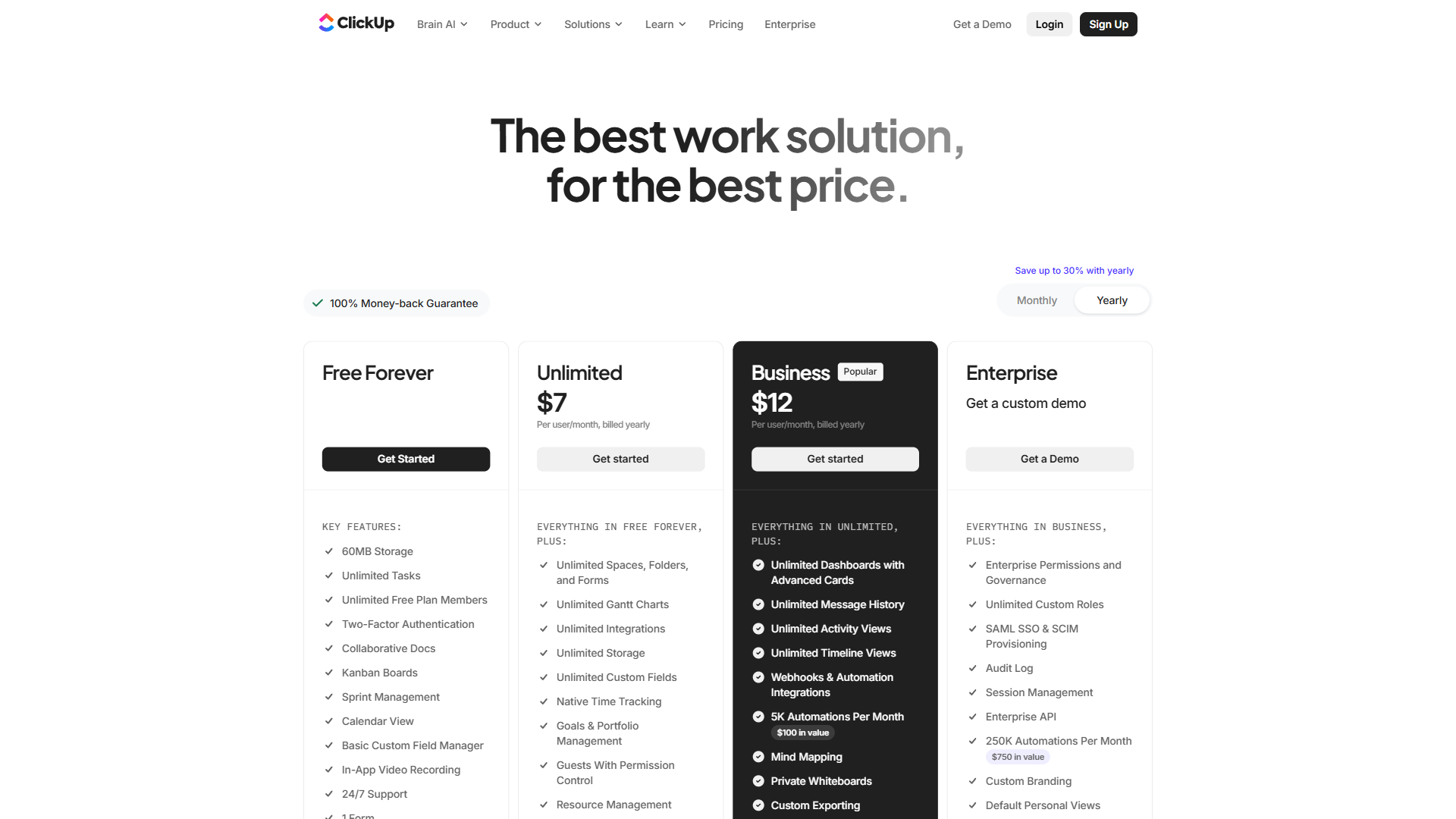
ClickUp pricing in 2026 has four core tiers: Free Forever ($0), Unlimited ($7 per month billed annually), Business ($12 per month billed annually), and Enterprise (custom pricing). For most teams, the Unlimited plan at $7 per month per user offers the strongest value - delivering unlimited storage, integrations, dashboards, and Gantt charts at a price that undercuts every major competitor.
But ClickUp pricing has a catch that the main pricing page buries: ClickUp Brain AI is a paid add-on starting at $9 per user/month. That means a team wanting AI features on the Unlimited plan actually pays $16 per user/month - not $7. This guide breaks down every tier, analyzes the real cost of ClickUp Brain, identifies hidden expenses, and compares pricing against Asana, Monday.com, and Notion to determine which plan delivers the best value for each team size. Project leaders weighing seat costs against ROI can cross-reference Asana’s Anatomy of Work Index and McKinsey research on knowledge-worker productivity to gauge whether the upgrade pays back. According to the Anatomy of Work Index, a study by Asana, “Knowledge workers spend 58% of their day on work about work rather than the skilled job they were hired to do, costing organizations significant productivity each week.” Our analysis draws on current ClickUp vendor documentation, published pricing pages, and independent project-management research rather than sponsored placement, and AI Productivity may earn a commission from links on this page - our rankings remain editorially independent.
Quick Verdict: ClickUp Pricing Overview
ClickUp Pricing in 2026 spans multiple tiers starting at $0. Key price points include $0, $7 per month, $12 per month. The right plan depends on your team size, feature requirements, and how heavily you use premium capabilities. This breakdown covers every tier with real-world guidance on which one delivers the best value.
Here is every ClickUp plan side by side as of March 2026:
| Feature | Free Forever | Unlimited | Business | Enterprise |
|---|---|---|---|---|
| Monthly Price | $0 | $10/user/mo | $19/user/mo | Custom |
| Annual Price | $0 | $7/user/mo | $12/user/mo | Custom |
| Storage | 100MB | Unlimited | Unlimited | Unlimited |
| Tasks | Unlimited | Unlimited | Unlimited | Unlimited |
| Members | Unlimited | Unlimited | Unlimited | Unlimited |
| Views | List, Board, Calendar | + Gantt, Mind Maps | + Timeline, Workload | All views |
| Integrations | Limited | Unlimited | Unlimited | Unlimited |
| Dashboards | Basic | Unlimited | Advanced | Advanced |
| Automations | None | Basic | 250+/month | Unlimited |
| Time Tracking | No | Yes (native) | Yes (native) | Yes (native) |
| Goals | No | Yes | Yes | Yes |
| SSO | No | No | Google SSO | SAML, Okta, Microsoft |
| Support | 24/7 | 24/7 | 24/7 | Dedicated CSM |
ClickUp Free Forever Plan: Genuinely Useful or Just a Demo?
The Free Forever tier is more generous than most project management tools offer at $0. Where Asana caps free plans at 10 users and Monday.com limits free to 2 users, ClickUp allows unlimited members on the free plan - a significant differentiator for budget-constrained teams. For broader options, see our ClickUp alternatives roundup.
What the free plan includes:
- Unlimited tasks and members - No cap on how many people can join or how many tasks get created. This alone makes ClickUp viable for larger teams that cannot afford per-user pricing.
- Collaborative docs - Built-in document editor with real-time collaboration, though it lacks the polish of Notion or Google Docs.
- Whiteboard collaboration - Visual brainstorming boards for planning sessions and ideation.
- Real-time chat - In-app messaging tied to workspaces and tasks, reducing Slack dependency.
- Kanban boards and sprint management - Agile teams can run basic sprints without upgrading.
- Calendar view - Visual task scheduling, though Timeline and Gantt views require a paid plan.
- In-app video recording - Record and share screen captures directly within ClickUp.
- ClickUp Brain trial access - Limited AI features to test before committing to the add-on. See ClickUp’s AI documentation and the ClickUp Brain help center article for full capability details.
Key limitations:
The 100MB storage cap is the most restrictive element. Teams sharing documents, images, or files will hit this ceiling within weeks. There are no Gantt charts, no time tracking, no goals, no custom fields, and no automations. Guest permissions and advanced sharing are also locked behind paid tiers.
Who should use Free Forever: Solo users evaluating ClickUp, student teams, and small groups that need basic task management without file-heavy workflows. The unlimited member count makes it viable for volunteer organizations and community groups where per-user costs are a dealbreaker.
ClickUp Unlimited Plan: The Value Leader
ClickUp Unlimited costs $7 per user per month billed annually ($10 monthly) and unlocks unlimited storage, integrations, dashboards, Gantt charts, and native time tracking. The jump from Free to Unlimited is substantial - the biggest value step across all four tiers.
What Unlimited adds over Free:
- Unlimited storage - The single biggest upgrade. No more worrying about the 100MB cap. Teams can store documents, designs, and attachments without constraints.
- Unlimited integrations - Connect ClickUp to Slack, GitHub, Google Drive, Figma, and hundreds of other tools through the ClickUp integrations directory. Free tier restricts integration options.
- Unlimited dashboards - Build custom reporting views pulling data from across workspaces, projects, and tasks.
- Gantt charts - Visual project timelines with dependency tracking. Essential for teams managing projects with sequential milestones.
- Native time tracking - Track time spent on tasks directly within ClickUp using the native time tracking documentation, eliminating the need for standalone tools like Toggl or Harvest.
- Goals - Set measurable targets at the team, department, or company level with progress tracking tied to tasks.
- Custom fields - Add dropdown menus, numbers, dates, checkboxes, and other field types to tasks for structured data tracking.
- Form views - Create intake forms that automatically generate tasks - useful for client requests, bug reports, and internal submissions.
- Guest permissions - Invite external collaborators (clients, contractors) with controlled access levels.
- Advanced public sharing - Share views and documents with external stakeholders without giving them full workspace access.
The cost calculation for teams:
| Team Size | Monthly Billing | Annual Billing | Annual Total | Annual Savings |
|---|---|---|---|---|
| 5 users | $50/mo | $35/mo | $420/yr | $180/yr |
| 10 users | $100/mo | $70/mo | $840/yr | $360/yr |
| 25 users | $250/mo | $175/mo | $2,100/yr | $900/yr |
| 50 users | $500/mo | $350/mo | $4,200/yr | $1,800/yr |
At $7 per user/month annually, a 10-person team pays just $840 per year - less than most competitors charge for their entry-level paid tiers.
Who should pick Unlimited: Small to mid-sized teams (5-25 people) that need real project management features but do not require advanced automations, workload management, or enterprise security. This is the sweet spot for startups, agencies, and growing businesses.
Limitations and who it’s not for: Unlimited has real drawbacks - automations are basic (no 250+/month workflow rules), there is no Workload view for capacity planning, and Google SSO is locked to Business. Skip Unlimited if your team is over 20 people, if you rely on heavy automation chains, or if you need ClickUp Brain at the lower per-user cost (Brain still adds $9-$28 per user on top).
ClickUp Business Plan: Power Features for Scaling Teams
ClickUp Business costs $12 per user per month billed annually ($19 monthly) and adds 250+ monthly automations, Workload and Timeline views, Google SSO, and unlimited teams. The plan targets teams that have outgrown basic project tracking and need automation, resource management, and access controls.
What Business adds over Unlimited:
- Unlimited teams - Organize workspaces into separate team structures with independent permissions, useful for departments that need isolation.
- Advanced automations (250+ per month) - Create if/then workflows using natural language via the ClickUp Automations guide. Automate status changes, task assignments, notifications, and integrations. The Unlimited plan includes only basic automation capabilities.
- Timeline view - A more detailed project scheduling view than Gantt charts, showing task durations and overlaps across team members.
- Workload view - Visual capacity planning that shows each team member’s task load. Critical for preventing burnout and balancing assignments.
- Mind maps - Visual brainstorming and task relationship mapping (limited to 100 on the free plan, fully unlocked on Business).
- Google SSO - Single sign-on through Google accounts, reducing password management overhead for Google Workspace organizations.
- Automation auditing - Track which automations ran, what they changed, and whether they succeeded. Important for debugging complex workflows.
- Conditional logic in forms - Build dynamic intake forms that show different fields based on previous answers, creating smarter submission workflows.
- Advanced dashboard features - More widget types, data visualization options, and cross-workspace reporting capabilities.
Business vs Unlimited - is the upgrade justified?
The decision hinges on two features: automations and workload management. If a team runs repetitive processes (weekly status updates, task routing based on type, automatic deadline reminders), the 250+ monthly automations will save hours. If a project manager needs to see who is overloaded and who has capacity at a glance, the Workload view alone justifies the $5 per user/month difference.
For teams under 10 people with straightforward workflows, the Unlimited plan typically provides everything needed. Business becomes essential when team size exceeds 15-20 people or when workflow complexity demands automation.
Limitations and who it’s not for: Business still has downsides - the 250/month automation cap can throttle complex teams, SAML SSO and SCIM are Enterprise-only, and there is no data residency control. Skip Business if you are under 10 people (Unlimited is fine), if your IT mandates SAML rather than Google SSO, or if you need unlimited automations - you would have to either upgrade again or layer on AI Autopilot.
ClickUp Enterprise Plan: Custom Pricing for Large Organizations
ClickUp Enterprise pricing is custom and quote-only, typically landing in the $20-25 per user per month range for organizations with 100+ seats, with volume discounts available for larger deployments. Teams must reach out to sales for an exact quote, since ClickUp does not publish Enterprise rates on its website.
What Enterprise adds over Business:
- White labeling - Customize the ClickUp interface with company branding, useful for agencies presenting the platform to clients.
- Advanced permissions and unlimited custom roles - Granular access controls beyond the standard admin/member/guest tiers. Define exactly what each role can view, edit, and manage.
- SAML SSO (Okta, Microsoft, custom) - Enterprise-grade single sign-on integration beyond the Google SSO available on Business. See the ClickUp SSO setup guide for configuration.
- SCIM provisioning - Automated user provisioning and deprovisioning synced with identity providers. When an employee leaves, their ClickUp access is revoked automatically.
- Dedicated success manager - A named contact at ClickUp for onboarding support, optimization guidance, and escalation paths.
- MSI installer - Managed desktop deployment for IT teams that control software installation across company devices.
- Advanced security controls - Session management, IP restrictions, and enhanced data protection policies.
- US/EU/APAC data residency - Choose where workspace data is stored to meet regional compliance requirements (GDPR, data sovereignty laws).
- Tableau web connector - Direct integration with Tableau for business intelligence reporting.
- API access - Full programmatic access for building custom integrations and automations beyond the built-in options.
Who needs Enterprise: Organizations with 50+ users, companies in regulated industries requiring audit logs and data residency, IT departments that mandate SAML SSO and SCIM, and agencies that want white-labeled client-facing workspaces.
Limitations and who it’s not for: Enterprise has the usual drawbacks of opaque enterprise pricing - you have to talk to sales, contracts are typically annual, and the per-seat rate jumps to roughly $20-$25 per user/month. Skip Enterprise if you have under 50 seats, if you cannot commit to an annual deal, or if your compliance needs are already met by Business plus a separate identity provider.
ClickUp Brain AI Pricing: The Add-On That Changes the Math
ClickUp Brain is not included in any base plan. It is a separate add-on with two tiers that fundamentally change the total cost of ownership.
AI Standard - $9 per user/month (billed annually):
- Unlimited AI essentials (task summaries, writing assistance, knowledge search)
- Brain MAX desktop app for system-wide AI access beyond the browser
- Premium AI models including GPT-5, Claude Opus 4.1, and o3
- AI-powered writing, summarization, and content generation within Docs
AI Autopilot - $28 per user/month (billed annually):
- Everything in AI Standard
- Unlimited automations (bypasses the 250/month Business tier cap)
- Custom AI agents (Autopilot Agents) for automated standups, reporting, and workflows
- Enterprise search across 100+ connected apps (Google Drive, Teams, Figma, Slack)
- Unlimited AI Notetaker for meeting transcription and automatic task creation
The real cost with AI:
| Plan + AI Tier | Annual Price/User/Month | Without AI |
|---|---|---|
| Unlimited + AI Standard | $16/user/mo | $7/user/mo |
| Unlimited + AI Autopilot | $35/user/mo | $7/user/mo |
| Business + AI Standard | $21/user/mo | $12/user/mo |
| Business + AI Autopilot | $40/user/mo | $12/user/mo |
This is the critical detail that ClickUp pricing discussions often miss. A Business plan with AI Autopilot costs $40 per user/month - more than double the base plan price and more expensive than most competitors’ top tiers. Teams budgeting for ClickUp need to decide upfront whether AI is a requirement, because it shifts the value calculation significantly.
Is ClickUp Brain worth the add-on cost? For teams that actively use AI for meeting notes, task summarization, and cross-app search, the $9 per user/month Standard tier provides genuine productivity gains. The Autopilot tier at $28 per user/month is harder to justify unless a team heavily relies on automated agents and enterprise search. Most teams should start with Standard and evaluate Autopilot after 2-3 months of usage data. For a deeper view of ClickUp Brain’s place in the AI project management landscape, see our ClickUp vs Asana comparison.
Limitations and who it’s not for: ClickUp Brain has real drawbacks - it is bolted on top of the base plan (so total cost can hit $35-$40 per user/month), Autopilot is hard to justify without enterprise search workloads, and Notion Business bundles AI for less. Skip Brain if your team rarely writes long-form Docs in ClickUp, if you already have an AI tool stack (Claude, ChatGPT) doing the same job, or if your AI use is intermittent enough that the per-seat charge is hard to defend.
Annual vs Monthly: How Much Do You Actually Save?
ClickUp offers some of the largest annual billing discounts in the project management category. Here is the full breakdown:
| Plan | Monthly Billing | Annual Billing | Annual Savings | Savings % |
|---|---|---|---|---|
| Unlimited | $10/user/mo ($120/yr) | $7/user/mo ($84/yr) | $36/user/yr | 30% |
| Business | $19/user/mo ($228/yr) | $12/user/mo ($144/yr) | $84/user/yr | 37% |
| AI Standard | approximately $11/user/mo | $9/user/mo | approximately $24/user/yr | ~18% |
| AI Autopilot | approximately $34/user/mo | $28/user/mo | approximately $72/user/yr | ~18% |
For a 10-person team on the Business plan, annual billing saves $840 per year compared to monthly billing. Add AI Standard for the whole team and the annual savings jump to $1,080/year total.
Recommendation: Unless the commitment is for a project lasting fewer than 4 months, annual billing is the obvious choice. The 30-37% savings on base plans more than compensate for the upfront commitment. ClickUp also offers a 14-day free trial on paid plans, which provides enough time to evaluate before committing annually.
Tradeoffs to weigh: Annual billing has clear downsides if your seat count is volatile - you pay upfront for the year, downgrades only kick in at renewal, and refunds for unused seats are limited. Skip annual if your headcount fluctuates seasonally, if you might switch tools within 6 months, or if cash flow makes a 12-month commitment painful.
Hidden Costs and Gotchas
ClickUp’s base pricing is competitive, but several costs are not immediately visible on the pricing page:
1. ClickUp Brain is not included. This is the biggest hidden cost. Every AI feature - writing assistance, task summaries, meeting transcription, enterprise search - requires the $9-$28 per user/month add-on. Competitors like Notion (Business plan) and include AI in their base tier pricing, and lighter alternatives like bundle AI agents into their lower tiers as well.
2. Guest access is limited on lower tiers. The Free plan has no guest permissions. Unlimited allows guests but with restricted access levels. Agencies and consultancies that collaborate extensively with external clients may need the Business plan specifically for advanced guest controls.
3. Automation caps on the Business plan. The Business tier includes 250+ automations per month. Teams with complex, automation-heavy workflows may hit this ceiling and either need to optimize their automations or upgrade to Enterprise (unlimited automations) or add AI Autopilot (which includes unlimited automations).
4. Learning curve has a real cost. ClickUp’s feature density means onboarding takes 2-3 weeks for most teams. That is not a direct expense, but the productivity dip during adoption is a cost that simpler tools like Asana or Trello avoid. Budget training time accordingly, and lean on the ClickUp Getting Started hub to compress the ramp.
5. Migration costs. Moving from another project management tool into ClickUp requires data migration, workflow redesign, and team retraining. ClickUp provides import tools for Asana, Trello, Monday.com, and others, but the migration process still demands significant time investment.
6. Storage on Free is practically unusable for teams. The 100MB cap on the Free plan accommodates almost no file attachments. Even small teams sharing documents will exhaust this quickly, making the free tier viable only for task tracking without file management.
Which Tool Fits: ClickUp Plan for Your Team
The right ClickUp plan depends on team size and feature needs: Free Forever fits solos and volunteer groups, Unlimited fits 5-25 person teams at $7 per user per month, Business fits 15+ person teams needing automation at $12, and Enterprise fits 50+ user organizations with SSO and compliance requirements. Match the team situation to the right tier below:
Choose Free Forever if:
- Working solo or in a small group that primarily needs task lists
- No file storage requirements beyond text-based tasks
- Evaluating ClickUp before committing to a paid plan
- Running a volunteer organization or student project with no budget
Choose Unlimited ($7 per user/month annually) if:
- Running a team of 5-25 people with standard project management needs
- Gantt charts, time tracking, and goals are core requirements
- Integration with Slack, GitHub, Google Drive, or similar tools is necessary
- Budget is a primary constraint and AI features are not essential
Choose Business ($12 per user/month annually) if:
- Managing 15+ team members who need workload visibility
- Workflow automations would eliminate repetitive manual processes
- Form-based intake workflows (client requests, bug reports) are part of daily operations
- Google SSO is an IT requirement
Choose Enterprise (custom pricing) if:
- The organization has 50+ users
- SAML SSO, SCIM provisioning, and audit logs are IT requirements
- Data residency (US, EU, APAC) is a compliance necessity
- White labeling is needed for client-facing workspaces
Add ClickUp Brain Standard ($9 per user/month) if:
- Teams frequently write long-form content in ClickUp Docs
- Meeting transcription and task creation from meetings would save meaningful time
- AI-assisted task summaries and knowledge search across workspaces are valuable
Add ClickUp Brain Autopilot ($28 per user/month) if:
- The team needs enterprise search across Google Drive, Slack, Teams, and other connected apps
- Custom AI agents for automated reporting and standups are a priority
- Unlimited automations are required (bypasses the 250/month Business cap)
Pricing Comparison: ClickUp vs Competitors
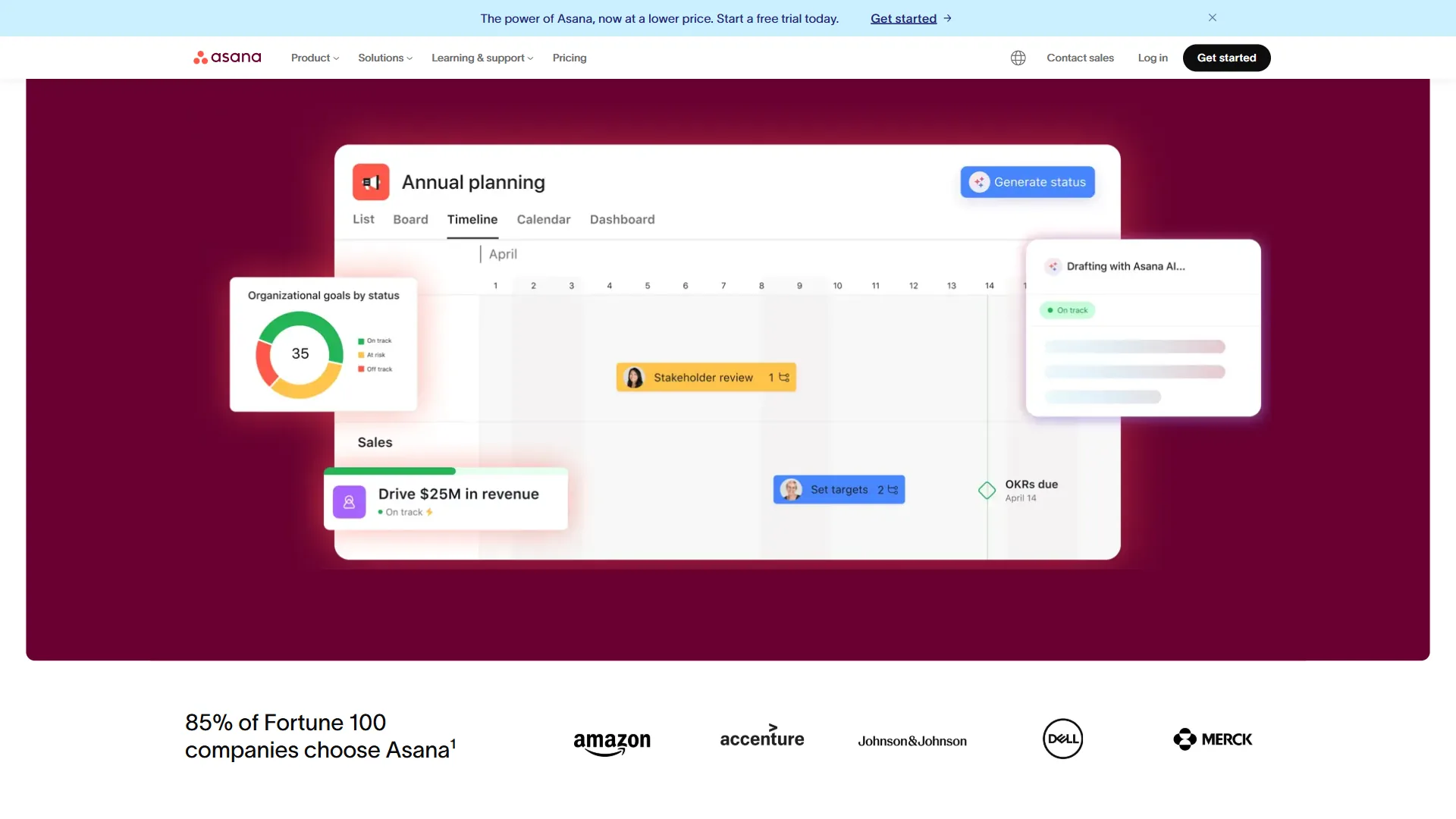
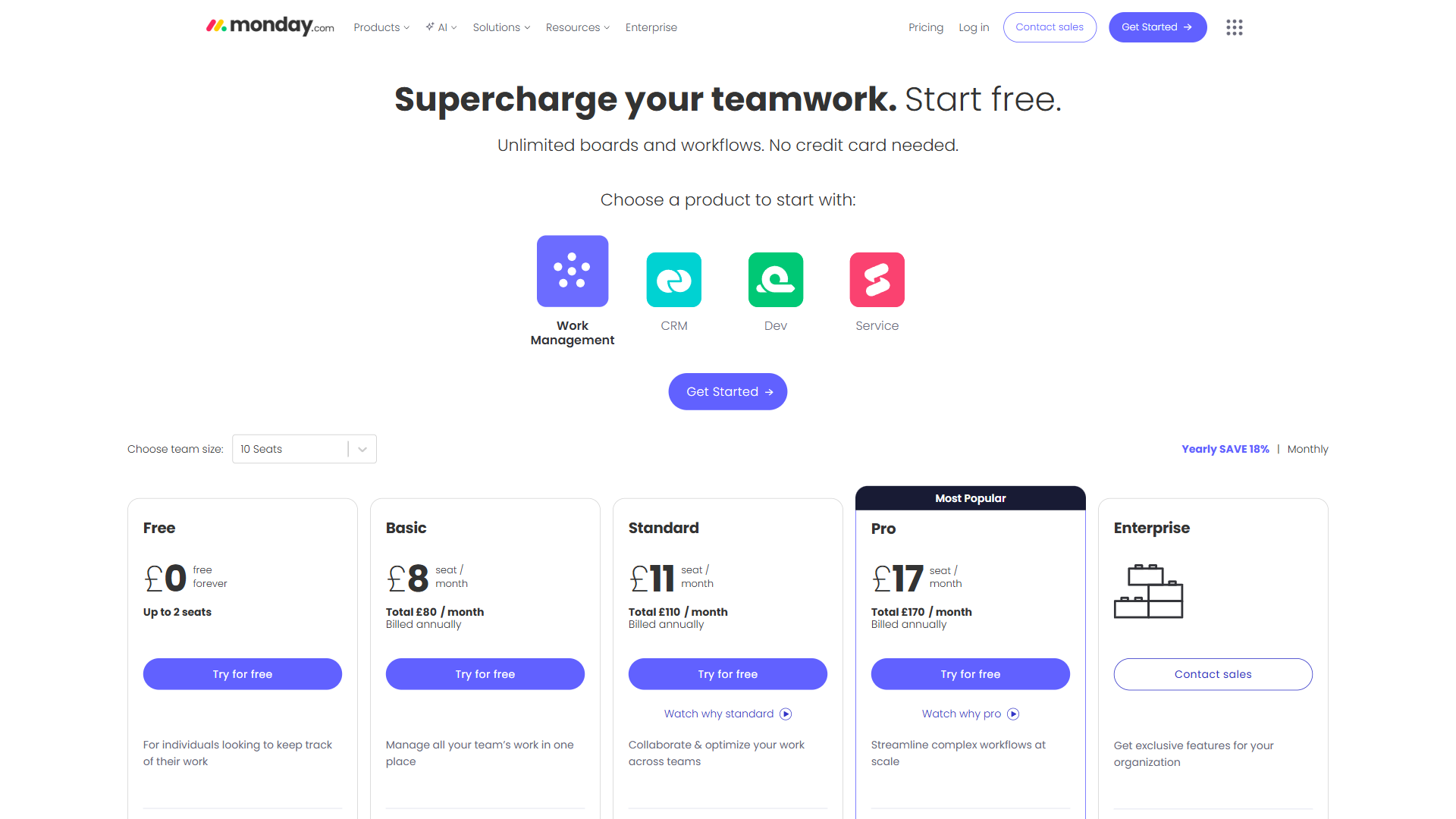
ClickUp is the cheapest full-featured project management option at $7 per user per month annually, undercutting Asana Starter ($10.99), Monday.com Basic ($9 with 3-seat minimum), and Notion Plus ($10). Here is how the major alternatives stack up:
| Tool | Free Tier | Entry Paid (Annual) | Mid Tier (Annual) | AI Included? | Key Differentiator |
|---|---|---|---|---|---|
| ClickUp | Yes (unlimited tasks/users) | $7/user/mo (Unlimited) | $12/user/mo (Business) | No ($9-$28 add-on) | Most features at lowest base price |
| Asana | Yes (10 users, basic) | $10.99/user/mo (Starter) | $24.99/user/mo (Advanced) | Basic in Starter | Cleaner UX, faster onboarding |
| Monday.com | Yes (2 users) | $9/seat/mo (Basic) | $12/seat/mo (Standard) | 500 credits in Basic | Visual boards, minimum 3 seats |
| Notion | Yes (individual use) | $10/user/mo (Plus) | $15/user/mo (Business) | Full AI in Business | Best for docs and knowledge bases |
| Trello | Yes (unlimited boards) | $5/user/mo (Standard) | $10/user/mo (Premium) | Basic AI (Atlassian) | Simplest Kanban, lowest paid entry |
Key takeaways from the comparison:
-
ClickUp is the cheapest full-featured option. At $7 per user/month (Unlimited, annual), no competitor matches the breadth of features - time tracking, Gantt charts, goals, unlimited storage, and unlimited dashboards. Asana’s comparable Starter tier costs $10.99 per user/month and lacks native time tracking.
-
AI changes the equation. When ClickUp Brain is factored in, the price advantage narrows or disappears. ClickUp Unlimited + AI Standard ($16 per user/month) costs more than Notion Business ($15 per user/month), which includes full AI with multi-model access. Teams that prioritize AI should compare total costs, not just base plan prices.
-
Monday.com’s 3-seat minimum adds friction. Monday.com requires a minimum of 3 seats on paid plans, meaning a 2-person team pays for 3. ClickUp has no seat minimums on any tier.
-
Trello wins on simplicity and price. At $5 per user/month (Standard), Trello is the cheapest paid option for teams wanting basic Kanban boards. But it lacks Gantt charts, time tracking, goals, and the depth of customization ClickUp provides.
-
Asana wins on user experience. Teams that value clean design and fast onboarding over feature density will find Asana’s Starter plan ($10.99 per user/month) a better fit, despite the higher price and smaller feature set.

ClickUp Nonprofit and Education Pricing
ClickUp offers discounted pricing for qualifying organizations:
-
Nonprofits receive a discount on paid plans, typically 25-35% off standard pricing. Organizations must apply through ClickUp’s nonprofit program and provide proof of 501(c)(3) status (or equivalent outside the US).
-
Education pricing is available for accredited educational institutions. Students and educators can access paid features at reduced rates.
Both programs require application and verification. Discounts are not automatically applied - teams should contact ClickUp’s partnerships team with documentation before selecting a plan.
Limitations and who it’s not for: The discount programs have real tradeoffs - approval can take weeks, the percentage off is not guaranteed (it varies by org type), and AI add-ons may not always be discounted. Skip the program path if you need to deploy quickly, if you are a for-profit org without 501(c)(3) status, or if the standard Unlimited plan at $7 per user/month is already affordable enough to skip the verification overhead.
The Bottom Line
ClickUp pricing in 2026 delivers the most features per dollar of any project management platform at the base plan level. The Unlimited plan at $7 per user/month (annual) packs time tracking, Gantt charts, unlimited storage, and unlimited integrations into a package that competitors charge $11-$25 per user/month to match.
The caveat is ClickUp Brain. AI features are a paid add-on ($9-$28 per user/month), which erodes the pricing advantage for teams that consider AI essential. A Business plan with AI Standard costs $21 per user/month - competitive, but no longer the clear budget winner. Teams should decide whether AI is a core need before comparing plans, because the answer changes the entire pricing picture.
For most teams of 5-25 people who want robust project management without AI bells and whistles, the Unlimited plan at $7 per user/month is the strongest value in the market. For teams that need AI, compare ClickUp Business + AI Standard ($21 per user/month) against Notion Business ($15 per user/month) and Asana Advanced ($24.99 per user/month) to find the right balance of features and cost. For an AI-first head-to-head, see our ClickUp AI vs Monday AI breakdown.
Ready to evaluate ClickUp for your team? Check out the full ClickUp review and tool overview for a deeper look at features, ratings, and use cases beyond pricing.
FAQ
Q: How much does ClickUp cost?
ClickUp pricing in 2026 has four core tiers: Free Forever at $0, Unlimited at $7 per month billed annually, Business at $12 per month billed annually, and Enterprise at custom pricing. For most teams, the Unlimited plan at $7 per month per user offers the strongest value, delivering unlimited storage, integrations, dashboards, and Gantt charts.
Q: What is the difference between free and paid ClickUp?
The Free Forever plan costs $0, while paid tiers include Unlimited at $7 per month, Business at $12 per month billed annually, and Enterprise at custom pricing. Upgrading to Unlimited delivers unlimited storage, integrations, dashboards, and Gantt charts at a price that undercuts every major competitor, making it the strongest value for most teams.
Q: Is ClickUp really free forever?
Choose Free Forever if: - Working solo or in a small group that primarily needs task lists - No file storage requirements beyond text-based tasks - Evaluating ClickUp before committing to a paid plan - Running a volunteer organization or student project with no budget
Related Reading
Related reading on ClickUp pricing covers the full tool review, head-to-head comparisons with Asana, Monday.com, and Notion, and a broader project-management roundup. Start with these guides:
- ClickUp Review: Full Tool Overview - In-depth look at ClickUp’s features, ratings, and use cases beyond pricing
- Asana Review - Structured team workflows and AI Studio comparison
- Monday.com Review - Visual workflow building as a ClickUp alternative
- Notion Review - Docs-first workspace with AI Agents
- ClickUp vs Asana: Complete Comparison 2026 - Head-to-head feature and pricing comparison between the two leading platforms
- ClickUp vs Notion 2026: Which Productivity Tool Wins? - How ClickUp’s project management strengths compare to Notion’s documentation focus
- ClickUp Alternatives 2026 - Best project management tools when ClickUp is not the right fit
- Best Project Management Tools 2026 - Roundup comparing Monday, Asana, ClickUp, and more
External Resources
External resources include ClickUp’s primary vendor documentation for current plan details, AI add-on specifics, and partner program information. Verify the latest pricing directly with these sources:
- ClickUp Official Pricing Page - Current plan details and free trial signup
- ClickUp Brain AI Features - AI add-on details and pricing
- ClickUp Partner Program - Affiliate and partnership information