


Warp vs iTerm2 is a comparison of two macOS terminals built on fundamentally different philosophies. Warp is an AI-native, Rust-based environment with built-in AI commands, blocks-based output, and team collaboration via Warp Drive, ranging from free up to $50 per month. iTerm2 is a free, open-source workhorse offering deep customization with no account required.
The Warp vs iTerm2 debate keeps coming up in developer forums, Slack channels, and Reddit threads. Broader roundups that pit Warp vs iTerm2 vs Ghostty - or weigh iTerm2 vs kitty - tend to land on the same split. The short answer: Warp wins if you want AI-powered command generation and team collaboration. iTerm2 wins if you need deep customization, zero cost, and no account requirements.
Our analysis draws on vendor documentation and independent industry research, including the Stack Overflow 2024 Developer Survey on developer tooling adoption. Some links on this page are affiliate links; our analysis remains independent.
How Do Warp and iTerm2 Compare?
Warp and iTerm2 compare as opposites on a single axis: Warp is a closed-source, AI-native terminal priced from free to $50 per month with cross-platform support, while iTerm2 is a free, open-source, macOS-only terminal with deep customization but no AI features. Many developers reach this page while hunting for a Warp terminal alternative or weighing iTerm2 against it directly. The right choice depends on your workflow, budget, and team size.
| Feature | Warp | iTerm2 |
|---|---|---|
| Rating | N/A | |
| Price | Free / $20/mo (Build) / $50/mo (Business) | Free (open source) |
| AI Features | Built-in AI commands, agents, error debugging | None |
| Performance Engine | Rust-based, GPU-accelerated | Objective-C, CPU-rendered |
| Collaboration | Warp Drive for team sharing | None |
| Customization | Themes, growing settings | Extensive profiles, triggers, key mappings |
| Account Required | Yes | No |
| Platform | macOS, Linux, Windows | macOS only |
| Open Source | No | Yes (GPL v2) |
| Best For | AI-powered productivity | Deep customization and scripting |
Quick verdict: Choose Warp if you want AI command generation, blocks-based output, and team features that save time daily. Choose iTerm2 if you need a free, highly customizable terminal with no strings attached.
What Makes Warp an AI-Native Terminal?
Warp is an AI-native terminal because it bakes natural language command generation, autonomous Agents 3.0, error debugging, and multi-model AI access from OpenAI, Anthropic, and Google directly into the command prompt rather than treating them as add-ons. This distinguishes Warp from every Warp terminal alternative still wrapping a traditional REPL with optional plugins.
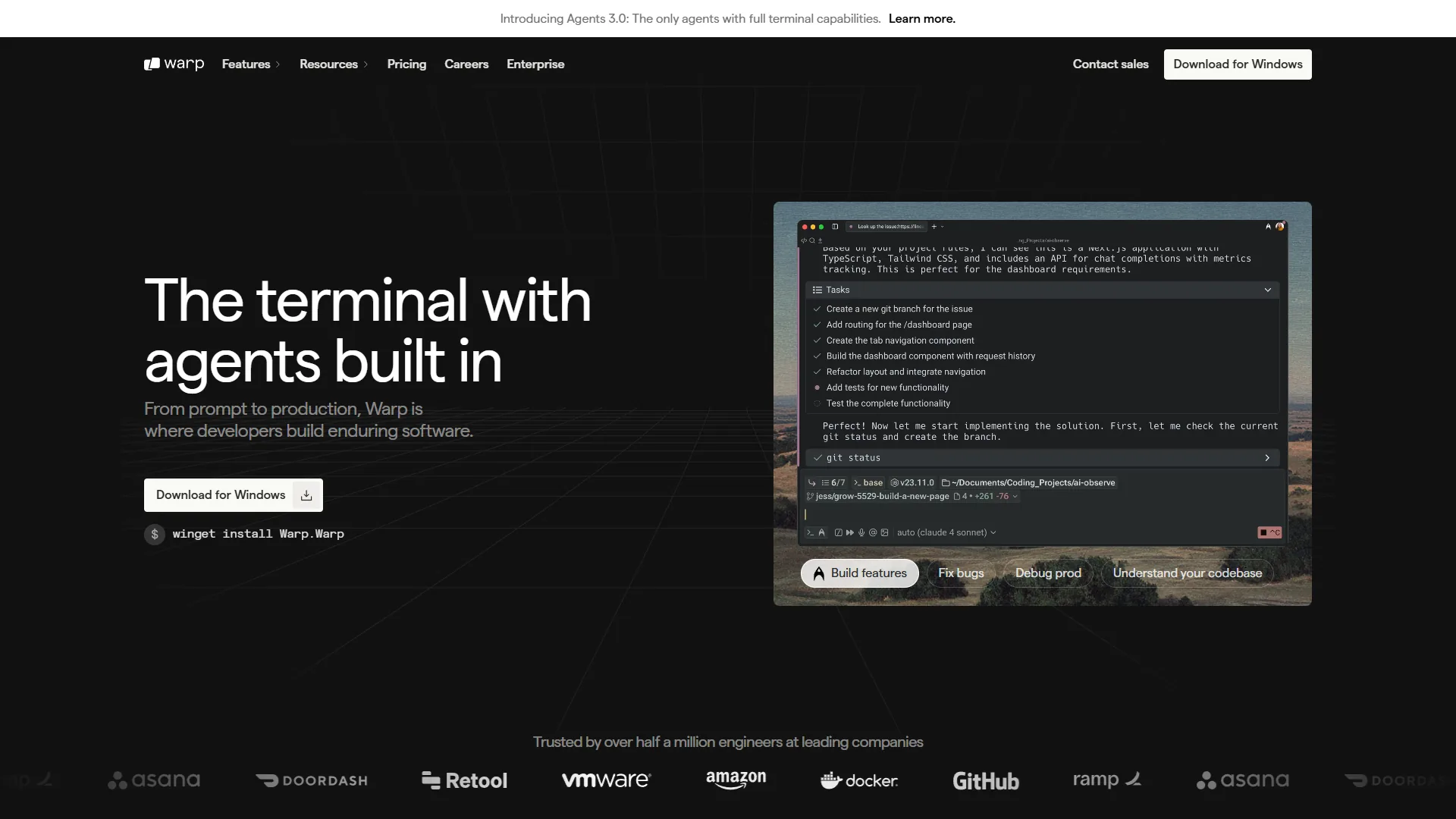
Warp is a Rust-based terminal that treats the command line as a modern application. The headline feature is its blocks-based interface - every command and its output becomes a discrete, navigable block you can click, copy, or share with teammates without scrolling through raw text.
What Are Warp’s AI Capabilities?
Warp’s AI capabilities include four integrated pillars: natural-language-to-command translation, autonomous Agents 3.0 for multi-step tasks, AI error debugging from pasted stack traces, and multi-model support across OpenAI, Anthropic, and Google with BYOK on paid tiers.
- Natural language to commands - Similar to how AI coding assistants generate code from descriptions, Warp turns plain English into the correct terminal command without touching Stack Overflow.
- Agents 3.0 - Autonomous AI agents that execute multi-step tasks, edit files, and dispatch sub-agents for parallel work. Ask an agent to scaffold a new Next.js project with TypeScript and Tailwind and it handles the entire sequence.
- Error debugging - Paste a stack trace and Warp explains what went wrong with suggested fixes. Our AI pair programming guide covers how AI debugging compresses the error-fix loop.
- Multi-model support - Access models from OpenAI, Anthropic, and Google. Paid tiers support Bring Your Own Key (BYOK).
Warp Pricing
Warp operates on a freemium model:
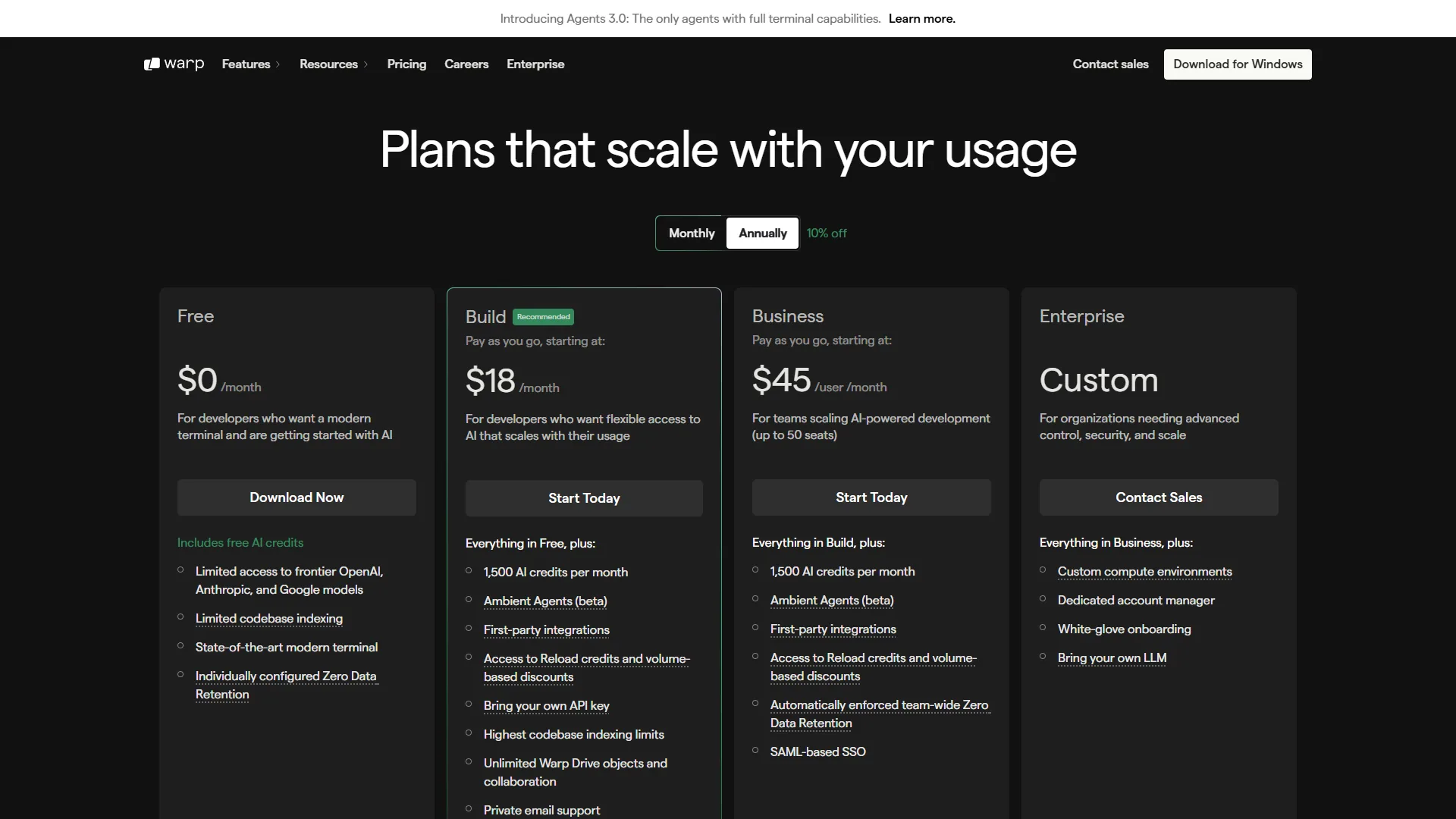
- Free - Full terminal features, 75 AI credits/month, multi-model AI access, basic Warp Drive
- Build ($20 per month) - 1,500 AI credits, BYOK support, Agents 3.0 with full capabilities, unlimited Warp Drive objects
- Business ($50 per month) - Everything in Build plus SSO, enforced Zero Data Retention, SOC 2 compliance
- Enterprise - Custom pricing with SAML SSO, SCIM provisioning, dedicated support
The free tier is useful for evaluation. Developers who lean on AI features will find 75 monthly credits limiting and should consider the Build tier.
Limitations: Warp requires an account and routes AI queries through cloud services - skip it for classified or regulated environments. Customization depth lags iTerm2, the 200-400 MB RAM footprint is heavy on older hardware, and the closed-source codebase rules it out for open-source-only teams.
Why Is iTerm2 the Customization Powerhouse for macOS?
iTerm2 is the customization powerhouse for macOS because every aspect of the terminal - from profiles and triggers to key mappings and a full Python scripting API - is configurable in ways no AI-first terminal currently matches. According to George Nachman, founder and lead maintainer at the iTerm2 project, “iTerm2 is a replacement for Terminal and the successor to iTerm. It works on Macs with macOS 10.14 or newer.” iTerm2 has served as the default terminal replacement for serious Mac developers since 2010 and is maintained as an open-source project under GPL v2.
Where Warp bets on AI and modern UI, iTerm2 bets on depth of configuration. For developers who have spent years fine-tuning their terminal setup, iTerm2 is a precision instrument.
iTerm2’s Core Strengths
- Profiles system - Distinct configurations per project or environment, covering colors, fonts, working directory, shell, key bindings, and trigger rules. The official iTerm2 profiles documentation walks through every setting.
- Split panes - Horizontal and vertical panes with independent sessions, plus broadcast input across multiple panes for running the same command on several servers.
- Triggers - Pattern-matching rules that fire when specific text appears in output. The iTerm2 triggers reference documents every match action.
- Shell integration - Deep hooks into bash, zsh, and fish for per-directory command history, automatic profile switching, and inline images.
- Scripting API - A full Python scripting API automates sessions, windows, tabs, and panes.
- Instant Replay - Rewind terminal output like a video instead of scrolling.
iTerm2 Pricing
iTerm2 is completely free with no tiers, credits, or account. The project accepts donations but places no restrictions on usage.
Limitations: No built-in AI features (command generation, error debugging, or agents). macOS-only, no cross-platform plans. No collaboration features - shared command libraries and cloud sync simply do not exist. Newer developers can lose hours tuning profiles and triggers before the terminal feels productive.
Feature-by-Feature Comparison
In a feature-by-feature comparison of Warp and iTerm2, Warp wins on AI, collaboration, and cross-platform support, while iTerm2 wins on customization depth, resource usage, and open-source licensing. The breakdown below covers the six categories where these two terminals diverge most.
AI Features
Winner: Warp (by a wide margin)
Warp’s entire identity revolves around AI integration - natural language commands, autonomous agents, error debugging, and multi-model support. iTerm2 has no built-in AI features. You can pipe output to external AI tools, but these are workarounds, not native integrations.
That said, some developers view the absence of AI as a feature, not a bug. iTerm2 will never send your terminal data to a cloud service, hallucinate a dangerous command, or require credits to function. For privacy-first developers working with sensitive infrastructure, that predictability matters.
| AI Feature | Warp | iTerm2 |
|---|---|---|
| Natural language commands | Yes (built-in) | No |
| Error debugging | Yes (AI-powered) | No |
| Autonomous agents | Yes (Agents 3.0) | No |
| BYOK support | Yes (paid tiers) | N/A |
| Privacy from cloud AI | Requires account + sends queries | Fully local, no cloud dependency |
Performance
Winner: Warp (rendering) / iTerm2 (resource usage)
Warp’s Rust-based engine with GPU acceleration delivers noticeably faster rendering on large output volumes. iTerm2 uses significantly less memory at idle - Warp’s runtime consumes 200-400 MB of RAM compared to iTerm2’s 80-150 MB footprint. On a modern MacBook with 16+ GB this is negligible, but on older hardware iTerm2’s lighter footprint matters - our Mac productivity tools roundup tracks how this fits the broader stack. iTerm2 also opens near-instantly versus Warp’s 1-2 second launch.
User Interface
Winner: Warp (modern workflows) / iTerm2 (traditional workflows)
Warp’s blocks-based interface is a real productivity win for developers who frequently reference previous output - each command and its results form a clickable, copyable, shareable unit, and the input area supports multi-line editing with syntax highlighting.
iTerm2 follows the traditional model: a scrolling text buffer enhanced with split panes, tabs, and profiles. Developers under 5 years of terminal experience tend to prefer Warp’s modern UI; developers with 10+ years often prefer iTerm2’s conventional interface because they have already optimized their workflow around it.
Collaboration
Winner: Warp
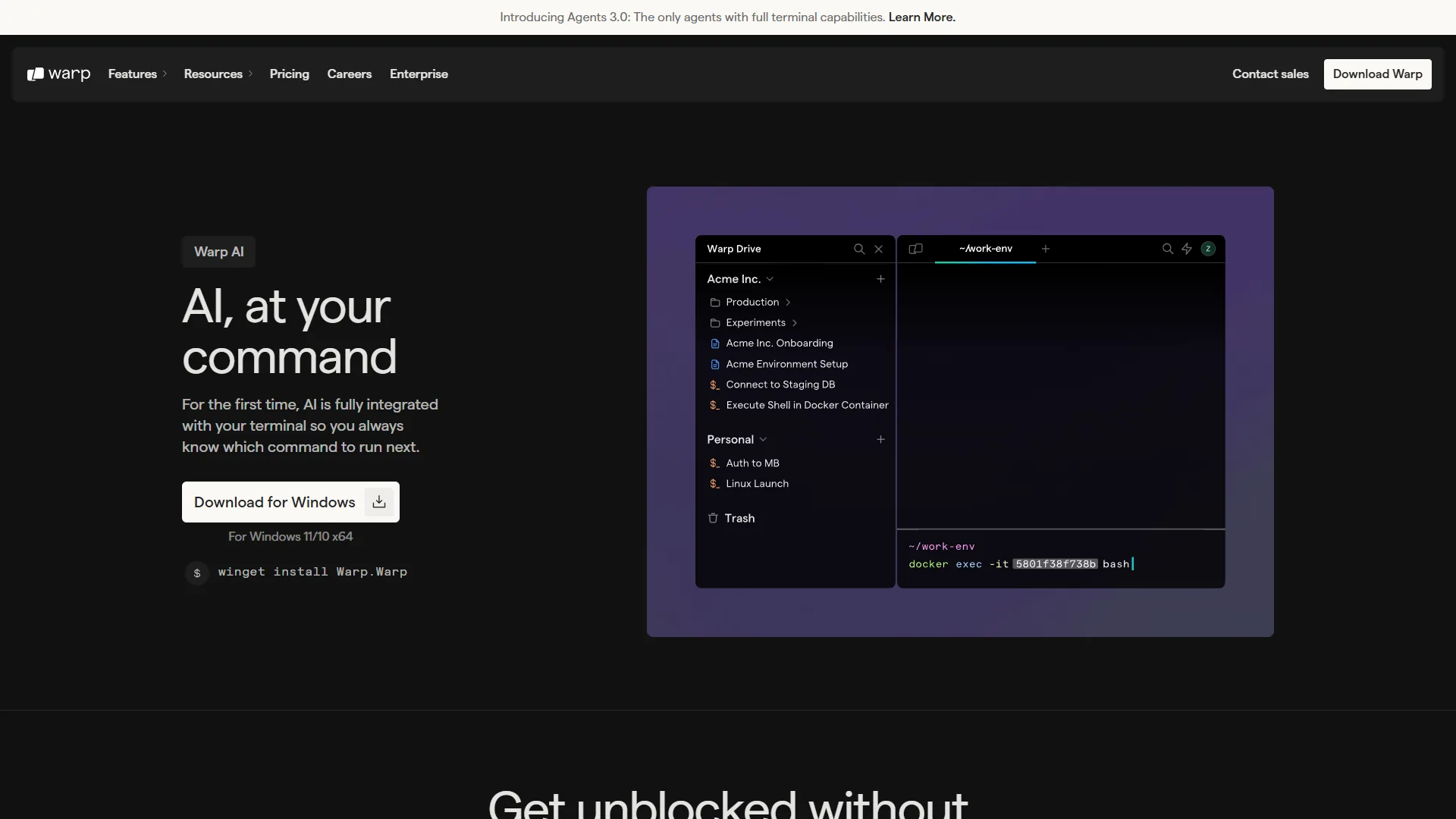
Warp Drive lets teams share commands, workflows, and notebooks through a centralized cloud repository. Instead of pasting commands into Slack or maintaining a team wiki, you store them in Warp Drive where teammates can discover and execute them with the right parameters.
iTerm2 has no collaboration features - no shared command library, no team features, no cloud sync. For solo developers this category is irrelevant; for teams of 5+, Warp’s collaboration features justify evaluation on their own. Our best AI coding assistants 2026 roundup covers how Warp pairs with the broader AI dev stack.
Customization
Winner: iTerm2
iTerm2’s depth of customization is its strongest advantage: unlimited named profiles, remappable key bindings, regex-based triggers, a full Python scripting API, hundreds of community color schemes, and configurable mouse reporting. Warp offers themes, font selection, and basic keybinding configuration - growing, but nowhere near iTerm2’s level today.
Cross-Platform Support
Winner: Warp
Warp runs on macOS, Linux, and Windows with full feature parity, including ARM64 for Apple Silicon and ARM Linux. iTerm2 is macOS-only and will stay that way - it is built with Cocoa frameworks specific to Apple’s platform. Our Warp vs Cursor comparison covers how Warp pairs with AI-native code editors.
Choose Warp if you
Choose Warp if you need AI command generation, team workflow sharing through Warp Drive, or one terminal that runs on macOS, Linux, and Windows with full feature parity.
- You want AI in the terminal. Natural language commands, error debugging, and autonomous agents pay for themselves if you spend time searching for syntax.
- You work on a team. Warp Drive’s shared commands and workflows reduce the “how do I run that deploy script again?” friction.
- You value a modern UI. Blocks-based output and inline editing pair well with modern AI code editors for an AI-powered dev workflow.
- You use multiple operating systems - one terminal on Mac, Linux, and Windows.
- You’re newer to the command line. AI suggestions flatten the learning curve.
Choose iTerm2 if you
Choose iTerm2 if you want a permanently free, deeply customizable, open-source macOS terminal that keeps every byte of your shell session fully local with no cloud account.
- Budget is zero, permanently. No upsells, credit limits, or account requirements.
- You need deep customization. Profiles, triggers, key mappings, and the Python scripting API tailor the terminal to your workflow.
- Privacy is non-negotiable. No cloud services, no account, no data leaves your machine - a hard requirement for classified or regulated systems.
- You prefer traditional terminal workflows. Enhances conventional patterns without reinventing them.
- Open source matters. GPL v2 license; Warp is closed-source.
Which Terminal Is Best for Your Use Case?
The best terminal for your use case is Warp if AI assistance, team collaboration, or cross-platform support are top priorities, and iTerm2 if customization depth, full local privacy, or open-source licensing matter more. Use this matrix to find your best match based on what matters most.
| Priority | Choose Warp | Choose iTerm2 |
|---|---|---|
| AI productivity | Strong built-in AI | No AI (add-your-own via CLI tools) |
| Price sensitivity | Free tier available, $20/mo for full AI | Always free |
| Team collaboration | Warp Drive sharing | External tools needed |
| Customization depth | Growing but limited | Industry-leading |
| Privacy/security | Cloud account required | Fully local |
| Cross-platform | macOS, Linux, Windows | macOS only |
| Open source | No | Yes (GPL v2) |
| Performance (rendering) | GPU-accelerated Rust | CPU-rendered, lighter footprint |
| Learning curve | Gentle (modern UI + AI help) | Moderate (powerful but conventional) |
For first-time evaluators: install both, use Warp for a week, then iTerm2 for a week. The terminal you reach for on week three is your answer. If your shortlist also includes a Warp vs Ghostty or Ghostty vs iTerm2 cross-check, the same week-on, week-off cadence works - and the open-source Warp terminal GitHub repository ships only the desktop client, with the AI backend staying closed.
Can You Use Warp and iTerm2 Together?
Yes, you can run Warp and iTerm2 side by side on the same Mac, and many developers do exactly that. A practical setup is to use Warp as your primary terminal for daily development where AI suggestions and blocks help, and keep iTerm2 configured for specific workflows - SSH sessions with custom profiles, long-running processes where you want triggers and notifications, or environments where you need fully local operation.
Since both terminals use your existing shell configuration (zsh, bash, fish), aliases, functions, and environment variables work identically in either, per Warp’s official migration documentation and iTerm2’s shell integration reference. Switching between them carries no friction.
The Bottom Line
The warp vs iterm2 decision comes down to picking AI productivity and team collaboration (Warp) over customization depth and zero cost (iTerm2) - both are excellent terminals for macOS developers, and there is no wrong answer.
Warp wins on AI features, modern UI, collaboration, and cross-platform support. AI command generation and Agents 3.0 deliver real gains for developers who frequently look up syntax, debug errors, or onboard new teammates. The free tier is enough for evaluation; the $20/month Build tier is reasonable when your time is worth more than the subscription.
iTerm2 wins on customization, price, privacy, and open-source principles. It is a mature, rock-solid terminal that does everything a power user needs without an account or internet connection.
Recommendation: if you are setting up a new 2026 dev environment with no strong preference, start with Warp. If you already have a polished iTerm2 setup, switching for the sake of switching is not worth the disruption.
FAQ
Q: Is there anything better than iTerm2?
iTerm2 has no collaboration features. You can export and import profiles, but there is no shared command library, no team features, and no cloud sync.
Q: What is the difference between Mac terminal and Warp?
However, iTerm2 uses significantly less memory and CPU at idle. Warp’s feature-rich runtime consumes roughly 200-400 MB of RAM compared to iTerm2’s 80-150 MB footprint.
Q: What’s better than Warp?
Warp launched with a bold premise: the terminal hasn’t changed meaningfully in 40 years, and developers deserve something better.
Q: Is warp terminal better?
Warp launched with a bold premise: the terminal hasn’t changed meaningfully in 40 years, and developers deserve something better.
Related Reading
Related reading covers Warp’s full tool review, complementary AI dev tools, and adjacent terminal comparisons that round out the picture.
- Warp - Full tool review with pricing, ratings, and feature breakdown
- Slack - Team communication platform where terminal workflows are frequently shared
- Warp Terminal AI Productivity Guide - Deep dive into Warp’s features, setup, and advanced workflows
- Best AI Code Editors 2026 - How AI-native editors compare for developer productivity
- Best Version Control Tools - Git clients and platforms that pair well with your terminal
- AI Pair Programming Guide - How AI coding assistants complement terminal workflows
External Resources
External resources below link to the official vendor sites and documentation for both terminals so you can verify pricing, features, and platform support directly at the source.