


Airtable vs Coda is a comparison of two flexible database platforms that approach structured data differently. Airtable starts from the database and adds document features, excelling at linked records and multiple views. Coda starts from the document and adds database capabilities, excelling at formula-driven docs where tables, text, and automations coexist.
The airtable vs coda comparison comes up whenever a team outgrows basic spreadsheets and needs something more flexible. Both tools occupy the same general category - structured data management with document-like flexibility - but they approach the problem from opposite directions.
Airtable starts from the database and adds document features. Coda starts from the document and adds database features. This distinction sounds subtle but produces meaningfully different tools with different strengths, pricing models, and ideal use cases.
Here is an honest comparison of airtable vs coda across every dimension that matters in 2026.
According to Gartner’s research on no-code platforms, the market for collaborative work management tools is growing as teams move beyond traditional spreadsheets. Both Airtable and Coda are cited in Forrester’s collaborative work management wave as leading flexible database platforms. Airtable has published detailed customer case studies documenting enterprise ROI across organizations including Red Bull and eBay. Readers asking about Airtable vs Coda pros and cons, Airtables’ main competitors, and the disadvantages of Airtable will find a direct breakdown below.
According to Howie Liu, co-founder and CEO at Airtable, “Airtable is built so that anyone can create their own software for their own unique workflow without writing a single line of code.” This positioning frames the airtable vs coda question: Airtable optimizes for non-technical app-builders working with relational data, while Coda optimizes for teams that want a single document to combine narrative, tables, and automation.
Editorial disclosure: AI Productivity may earn a commission from links on this page; our rankings stay editorially independent. Methodology: this comparison draws on each vendor’s current pricing pages, official feature documentation, and independent research - not sponsored placement or hands-on benchmarking.
Methodology
Our airtable vs coda methodology compares both tools across pricing, database depth, document flexibility, automations, integrations, and views using each vendor’s current public documentation. Airtable and Coda take different approaches to solving similar problems, and the right choice depends on your workflow, budget, and team size. This guide compares both tools across the features that matter for daily work.
Airtable is a relational database platform that happens to look like a spreadsheet. Its strength is in structured data - linked records, rollup formulas, multiple views of the same data (grid, Kanban, calendar, gallery, Gantt). It excels when your data has relationships: projects connected to clients connected to invoices connected to team members. The Interface Designer lets you build app-like dashboards on top of your data.
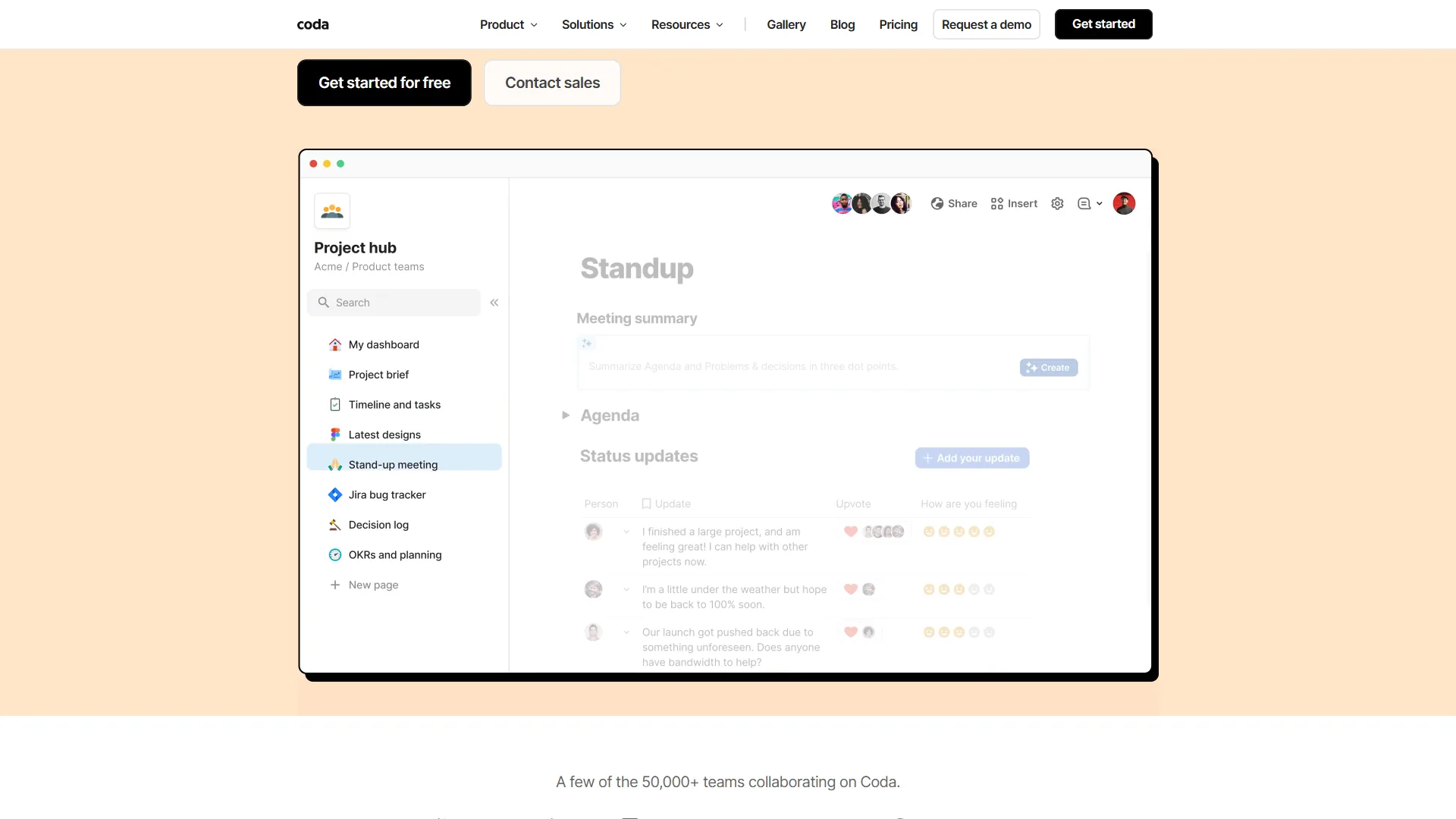
Coda is a document platform that happens to have powerful database capabilities. Its strength is in flexible, formula-driven docs where tables, text, buttons, and automations coexist on the same page. It excels when you need documents that do things - a project tracker that also contains the project brief, meeting notes, and automated status updates.
This philosophical difference shapes everything from the interface to the pricing model.
Comparison Table
The airtable vs coda comparison table below shows side-by-side pricing, record limits, view types, automation quotas, and integration counts pulled from each vendor’s current pricing and documentation pages.
| Feature | Airtable | Coda |
|---|---|---|
| Rating | ||
| Starting Price | Free (1K records/base) | Free (unlimited docs, size limits) |
| Paid Price | $24/seat/month (Team) | $12/maker/month (Pro) |
| Annual Price | $20/seat/month | $10/maker/month |
| Free Editors | No (all editors pay) | Yes (Maker billing) |
| Records Limit | Up to 500K/base (Enterprise) | No record limits |
| Field Types | 25+ structured types | Flexible, formula-driven |
| Views | Grid, Kanban, Calendar, Gallery, Gantt | Tables, Kanban, Charts |
| Automations (free) | 100 runs/month | 35 time-based/month |
| Automations (paid) | Up to 500K runs/month | Unlimited (Team) |
| Integrations | Extensions marketplace | 600+ Packs |
| API Access | All paid plans | Team+ plan |
| AI Features | AI field types | Coda AI (writing, analysis) |
Quick verdict: For structured data management, relational workflows, and teams where everyone needs full database access, Airtable wins. For teams with many stakeholders who mainly view data, and for building complex docs that combine content with live data, Coda wins.
Airtable: Database Power for Non-Technical Teams
Airtable has been the leading flexible database platform since its launch in 2012. Used by over 500,000 organizations including Red Bull and eBay, it delivers genuine relational database capabilities in a package that non-technical teams can use effectively.
Airtable Pricing

Airtable charges per seat - every person who edits data pays:
- Free: Unlimited bases, 1,000 records/base, 5 editors, 100 automation runs/month
- Team ($24/seat, $20 annual): 50,000 records/base, 25,000 automation runs, Gantt and timeline views
- Business ($54/seat, $45 annual): 125,000 records/base, 100,000 runs, SAML SSO, two-way sync
- Enterprise Scale (custom): 500,000 records/base, 500,000 runs, SCIM, unlimited workspaces
Annual billing saves around 17%. A 10-person Team plan costs $200 per month or $2,400 annual.
Airtable’s Key Strengths
Relational Database Power Without SQL: Airtable’s linked records system lets you create proper relational databases visually. A project base can link to a client base, which links to an invoice base, which links to a contacts base. Rollup fields pull calculated values across these relationships. Lookup fields display related data inline. This is real database thinking without writing a single line of SQL.
25+ Field Types: Airtable supports rich types including attachments, multi-select, currency, duration, formula, rollup, lookup, barcode, and button fields - data capture that spreadsheets approximate poorly.
Multiple Views of the Same Data: Every base can be viewed as grid, Kanban, calendar, gallery, Gantt chart, or timeline. Views update in real time and filter independently, so marketing sees a calendar while project managers see a Gantt.
Interface Designer: Build no-code dashboards and apps on top of bases - client portals, status dashboards, data entry forms - without writing code.
Proven Enterprise ROI: Red Bull achieved 70-80% time savings in media planning. eBay reduced issue resolution from 9 months to days. Code and Theory saved over 10,000 hours annually through Airtable automation.
Automation Builder: Visual builder connecting triggers with conditions and actions. Business plan allows 100,000 runs/month - enough to replace Zapier for many internal flows.
Airtable’s Limitations
Per-Seat Pricing Adds Up: At $24/seat/month for Team, a 20-person organization pays $480 per month. Coda’s Maker billing is dramatically cheaper for teams where most members view rather than create.
Record Limits Per Base: Enterprise at 500,000 records/base eventually constrains data-intensive use cases. Splitting datasets across bases adds sync complexity.
Learning Curve for Relational Concepts: Linked records and rollup formulas take time to master. Teams migrating from spreadsheets often under-use Airtable’s relational power.
AI Features Are Supplementary: Airtable’s AI field types are useful additions but lag behind Coda AI’s deeper integration.
Coda: Documents That Do Things
Coda was acquired by Grammarly in 2025 and serves over 50,000 teams worldwide. Its philosophy - “a doc as powerful as an app” - captures why it appeals to teams that want documents and databases integrated rather than separate.
Coda Pricing
Coda’s Maker billing model is its most distinctive feature: only Doc Makers (document creators) pay. Editors and viewers are completely free.
- Free: Unlimited docs with size limits, connected tables, Kanban, 35 time-based + 100 row automations/month
- Pro ($12/maker, $10 annual): Unlimited doc size, 30-day version history, custom domains, 100 time + 500 row automations
- Team ($36/maker, $30 annual): Unlimited automations and version history, doc locking, private folders, all Packs
- Enterprise (custom): SSO/SAML, audit events, CSM, Enterprise Packs
For 2 Doc Makers plus 20 viewers, you pay 2 Coda seats vs 22 Airtable seats - a decisive gap for organizations where most stakeholders consume rather than create data.
Coda’s Key Strengths
Maker Billing Saves Money at Scale: A leadership team where 3 makers create docs while 30 members view them pays $90 per month on Coda Team versus $720 per month on Airtable Team. Same functionality, 8x cheaper.
Documents and Databases on the Same Page: Coda combines narrative text, live tables, action buttons, and embedded charts in one document. A PRD can hold the feature backlog, Kanban board, meeting notes, and approval button on a single page.
Building Blocks for No-Code Apps: Coda’s formula system and button controls let you build approval workflows, inventory systems, and onboarding portals without writing code.
600+ Packs (Integrations): Coda’s Packs connect to Slack, Google Workspace, Jira, Figma, Salesforce, GitHub, and hundreds more, plus a Pack SDK for proprietary systems.
Unlimited Record Storage: Coda imposes no record limits per document, though performance can degrade on extremely large tables.
Coda AI: Coda AI handles writing, summarization, data analysis, formula generation, and automation scripting - more deeply integrated than Airtable’s AI field types.
Coda’s Limitations
Steeper Learning Curve: Coda’s formula language is more complex than Airtable’s, and building blocks require more investment to use effectively.
Performance on Large Documents: Complex docs with many tables, automations, and embedded views load slowly. Very large Coda docs become noticeably sluggish.
Weaker Relational Features: Coda’s table relationships exist but are less sophisticated than Airtable’s linked records and rollup system.
Missing Code Syntax Highlighting: Engineering teams find Coda’s code blocks lack proper syntax highlighting.
Mobile Experience Limitations: Coda’s mobile app works but lacks the full desktop capability that Airtable’s mobile app offers.
Feature-by-Feature: Airtable vs Coda
How Do Airtable and Coda Compare on Database Capabilities?
Winner: Airtable. Linked records, rollup formulas, bidirectional relationships, and 25+ field types give Airtable mature relational depth. Coda’s tables are capable but the relational layer is thinner. Teams modeling clients linked to projects linked to invoices linked to time entries should pick Airtable.
Document and Content Features
Winner: Coda. Mixing narrative text with live tables, embedding charts, adding workflow buttons, and creating wiki-style docs feels native in Coda. Our Notion AI vs Coda AI breakdown goes deeper on Coda’s AI writing features. In Airtable, documentation lives separately in Interface Designer or external tools.
Pricing for Large Teams
Winner: Coda (usually). Maker billing gives Coda a decisive advantage where most members view rather than create. If 60-70%+ of your team actively edits docs, Airtable’s per-seat model is competitive; if the majority are viewers, Coda is dramatically cheaper.
Automations
Winner: Airtable for volume, Coda for flexibility. Airtable handles up to 100,000 runs/month on Business and integrates natively with views. Coda’s Team plan offers unlimited automations but needs more formula knowledge. Tie - choose by complexity needed.
Integrations
Winner: Coda (breadth), Airtable (depth). Coda’s 600+ Packs cover more third-party services and ship with a Pack SDK for proprietary systems. Airtable’s Extensions cover major tools more deeply.
Views and Visualization
Winner: Airtable. Grid, Kanban, calendar, gallery, Gantt, and timeline views give Airtable broader visualization than Coda’s tables and Kanban.
Which Tool Fits Your Team
Airtable fits teams that need relational database power with multiple views and where every member actively edits data, while Coda fits teams that combine documents with databases and have many viewers per maker. The fit depends on team structure, data complexity, and whether you need pure database power or document-database hybrid functionality.
Choose Airtable If You:
- Need strong relational database features with linked records and rollup formulas
- Want multiple views of the same data (Gantt, timeline, gallery, calendar)
- Have a team where most members actively edit and manage data
- Need robust API access on mid-tier plans
- Build workflows where precise record limits and data structure matter
- Want an established platform with documented enterprise case studies
- Need strong mobile app support for field data entry
Choose Coda If You:
- Have many stakeholders who primarily view data rather than create it (Maker billing advantage)
- Want documents and databases integrated in the same workspace
- Need to build internal tools and interactive docs with buttons and formulas
- Want unlimited record storage without per-base caps
- Require 600+ Pack integrations or need to build custom integrations
- Need deep AI integration for writing, analysis, and formula generation
- Consolidating multiple tools (docs, spreadsheets, project tracker) into one platform
Team Scenarios
Content team (10 people, 2 editors, 8 approvers): Coda wins. 2 Maker seats at $30 = $60 per month vs 10 Airtable Team seats at $20 = $200 per month.
Operations team with complex supplier data (20 people, all active): Airtable wins, an outcome reflected in our Airtable vs Notion databases comparison. Relational power, views, and Interface Designer justify per-seat pricing.
Engineering team building an internal incident tracker: Coda wins (see our best workflow automation tools coverage). Tracker table, post-mortem docs, and runbooks live in one document.
Marketing team running multi-channel campaigns: Either works (see our best AI project management tools coverage). Airtable’s Gantt suits timeline management; Coda suits briefs alongside tracking. Our best Kanban tools roundup covers lighter alternatives.
The Bottom Line
Airtable wins for relational database power and multiple views; Coda wins for document-database hybrids and teams with many viewers per maker. The airtable vs coda decision depends more on your team structure and workflow needs than on feature quality, and both platforms are strong in their respective strengths.
Airtable wins when you need a relational database with multiple visualization options, strong API access, and proven enterprise credentials. Per-seat pricing is the cost of genuine database power without a developer.
Coda wins when you want documents and databases integrated, when most of your team are viewers (Maker billing is transformative), and when you need interactive internal tools combining content and data. The learning curve is steeper but the ceiling is higher.
Many teams use both: Airtable for structured data operations, Coda for wikis with embedded live data. Teams comparing broader project management may also want ClickUp vs Notion. Free tiers make it practical to try both.
FAQ
Q: What is better than Airtable?
Coda is better than Airtable for teams that need documents and databases combined on the same page, and for teams with many viewers per maker thanks to Maker billing. Notion is a stronger choice for wiki-style knowledge bases, and Smartsheet wins for traditional project plans.
Q: What are the disadvantages of Airtable?
The disadvantages of Airtable include per-seat pricing that scales expensively for large teams, record caps per base (500K even on Enterprise), a learning curve for relational concepts, and AI field types that lag behind Coda AI’s deeper integration.
Q: Does Netflix use Airtable?
Public Airtable customer stories cite Red Bull, eBay, Time, BuzzFeed, and Shopify; Netflix has not been confirmed as an Airtable customer in vendor-published case studies. Teams researching airtable vs coda pros and cons should focus on documented case studies from each vendor rather than rumored deployments.
Q: Who are Airtables’ main competitors?
Airtables’ main competitors include Coda, Notion, Smartsheet, Monday.com, ClickUp, and Baserow. Among database-first tools, Coda and Notion are the closest comparisons; among project-management-first tools, Monday.com and ClickUp overlap on multiple views and automations.
Q: What is the main difference between Airtable and Coda?
Airtable is a relational database platform that happens to look like a spreadsheet, with strengths in structured data, linked records, rollup formulas, and multiple views like grid, Kanban, calendar, gallery, and Gantt. Coda is a document platform with powerful database capabilities, where tables, text, buttons, and automations coexist on the same page.
Q: When should you choose Airtable over Coda?
Choose Airtable when your data has relationships - projects connected to clients connected to invoices connected to team members. Airtable excels at structured data management and includes the Interface Designer, which lets you build app-like dashboards on top of your data. Its multiple view types suit teams that need to slice the same records different ways.
Q: When should you choose Coda over Airtable?
Choose Coda when you need flexible, formula-driven documents where tables, text, buttons, and automations live together on the same page. Coda excels for documents that do things - a project tracker that also contains the project brief, meeting notes, and automated status updates, rather than a pure database with separate views.
Related Reading
Related reading on airtable vs coda includes dedicated tool reviews, adjacent comparisons, and roundups of best workflow and project management platforms.
- Airtable Review
- Coda Review
- Best AI Project Management Tools in 2026
- Best Workflow Automation Tools in 2026
- Airtable vs Notion Databases
External Resources
External resources for airtable vs coda include the primary pricing pages and official template galleries published by each vendor.