


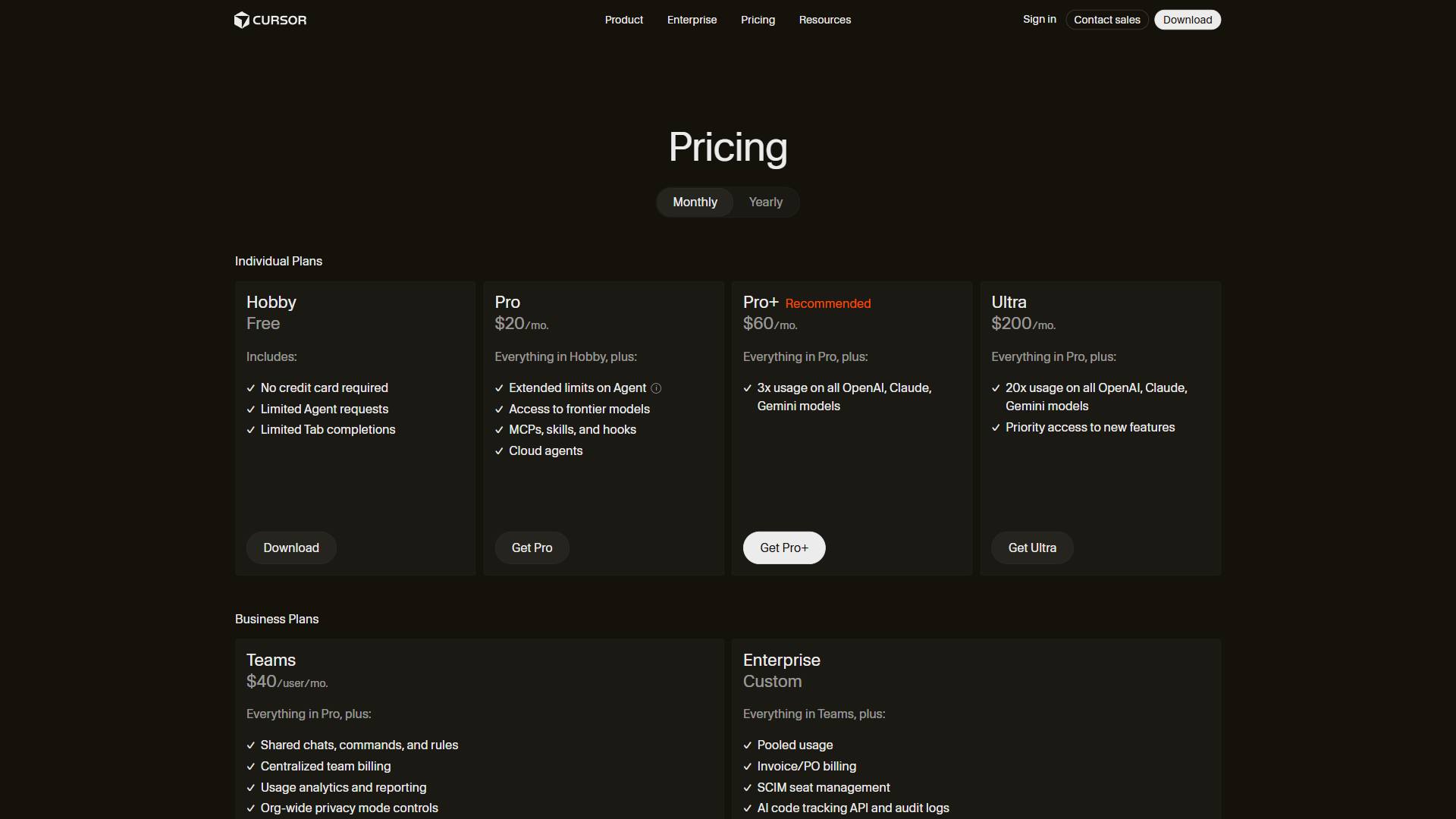
Cursor pricing costs $0 to $200 per month across five individual and team tiers: Hobby at $0, Pro at $20 per month, Pro+ at $60 per month, Ultra at $200 per month, and Teams at $40 per user/month, per the official Cursor pricing page. For most professional developers, the Pro plan at $20 per month hits the right balance - providing unlimited Tab completions, $20 of API agent usage, and Background Agents that handle the bulk of daily coding work without hitting limits.
But cursor pricing is not just about the monthly fee - the real cost depends on how heavily you lean on premium AI models and how many agent requests you fire off. This comparison breaks down every plan, explains the request system that drives actual costs, and identifies which tier fits real usage. For a side-by-side feature view, see our Cursor vs GitHub Copilot comparison and Cursor vs Windsurf breakdown.
Our analysis draws on Cursor’s current vendor documentation and independent research rather than sponsored placement. AI Productivity may earn a commission from links on this page; our plan recommendations are editorially independent.
TL;DR: Cursor Pricing Quick Overview
Cursor pricing runs from $0 on Hobby to $200 per month on Ultra, with the right plan depending on team size and how heavily you use premium AI models. Here is every Cursor plan side by side as of March 2026:
| Feature | Hobby | Pro | Pro+ | Ultra |
|---|---|---|---|---|
| Monthly Price | $0 | $20 | $60 | $200 |
| Tab Completions | Limited | Unlimited | Unlimited | Unlimited |
| API Agent Usage | Limited | $20/mo included | $70/mo included (3x Pro) | $400/mo included (20x Pro) |
| Auto Model Selection | Limited | Unlimited | Unlimited | Unlimited |
| Background Agents | No | Yes | Yes | Yes |
| MAX Mode | No | No | Yes | Yes |
| Premium Models | Trial only | Standard access | GPT-5, Claude 4 Opus/Sonnet, Gemini 2.5 Pro | All models + priority access |
| Context Windows | Standard | Maximum | Maximum | Maximum |
Is the Cursor Hobby Plan Actually Free?
The Cursor Hobby plan is a genuine free tier, not a 7-day trial - new users get a one-week Pro trial, then Hobby continues with real functionality. The Cursor plans and usage documentation breaks down how usage is metered across each tier.
What is included: limited Tab completions (powered by Cursor’s proprietary Fusion model), limited agent requests for code generation and refactoring, a one-week full Pro trial, full VS Code marketplace extension compatibility, and codebase indexing.
Key limitations: The Hobby plan caps the two features that define Cursor - Tab completions and agent requests - so active developers exhaust them within a few days, and there is no Background Agents, MAX mode, or premium model selection. It suits developers evaluating Cursor, students on coursework, and anyone coding fewer than 2-3 hours per day. For broader options, see our best Cursor alternatives roundup and AI tools for developers overview.
Is the Cursor Pro Plan Worth It for Most Developers?
Cursor Pro at $20 per month is worth it for most professional developers, removing completion limits and adding $20 of agent credits that cover typical daily coding without restrictions.
What Pro adds over Hobby: unlimited Fusion-model Tab completions, $20 of API agent usage per month (roughly 500 fast premium requests, per the Cursor plans and usage docs), unlimited Auto model selection, Background Agents in sandboxed environments, and maximum context windows.
Understanding the $20 API usage credit: Every agent request consumes part of this credit based on model and prompt complexity, and Auto mode optimizes the spend automatically. For typical usage the $20 credit comfortably covers a full month of 8-hour workdays; heavy agent users may find it limiting in the final week. Skip Pro if you run multiple Background Agents in parallel, want manual model selection, or need centralized billing and SSO, which require Teams.
Cursor Pro+ Plan: For Heavy Agent Users
The Cursor Pro+ plan costs $60 per month, suits heavy agent users, and triples the API usage budget while unlocking MAX mode - Cursor’s highest-performance tier for complex reasoning tasks.
What Pro+ adds over Pro: $70 of API agent usage (three times Pro, roughly 1,500 fast premium requests per month), direct manually selectable access to GPT-5, Claude 4 Opus/Sonnet, and Gemini 2.5 Pro, and MAX mode for complex problems like architectural refactors and race conditions. All Pro features carry forward.
When the $70 credit matters: The jump from $20 to $70 matters most for developers who use the agent as a primary workflow tool. Track your Pro usage for a month via the billing settings page: if you consistently hit the $20 limit before the cycle resets, Pro+ is worth the upgrade. Skip Pro+ if Pro’s credit covers your month - the $40 delta is hard to justify otherwise. Compare workflow philosophy in our Claude Code vs Cursor comparison.
Cursor Ultra Plan: Unlimited Everything
The Cursor Ultra plan costs $200 per month and removes all practical limits on agent usage and model access, with $400 of included API credits and full access to every model Cursor supports.
What Ultra adds over Pro+: $400 of API agent usage (twenty times Pro, functionally unlimited for most individuals), priority access to experimental features before lower tiers, and full unrestricted access to every model Cursor supports. All Pro+ features carry forward.
Is Ultra worth $200 per month? For individual developers, Ultra is hard to justify financially - few use even half the Pro+ allocation - but the math changes for developers billing $150+/hour who want zero friction. Research from Opsera shows developers report 20-25% time savings on debugging and refactoring tasks with Cursor.
“Engineers who actively use Cursor merge roughly 20% more pull requests per week while maintaining code quality,” according to research published by developer-analytics firm DX.
At a $150/hour billing rate, saving even 2 hours per week pays for Ultra many times over. Skip Ultra if you do not consistently saturate Pro+ or your employer does not cover the cost - most developers will never use half the $400 credit pool, and there is no team or admin layer.
Teams and Enterprise Plans
Cursor offers two organization-focused plans: Teams at $40 per user/month and Enterprise on custom pricing.
Teams - $40 per user/month: The Teams plan wraps Pro-level features in organizational tooling - centralized billing, usage analytics, org-wide privacy controls, role-based access control, and SAML/OIDC SSO. At $40 per user/month it is double individual Pro - the premium buys administrative control and usage visibility, not a volume discount.
Enterprise - custom pricing: Enterprise adds the compliance layer large organizations require - pooled agent credits, invoice/PO billing, SCIM seat management, an AI code tracking API with audit logs, and priority support. Rates are not listed publicly - reach out to Cursor’s sales team for a quote; expect roughly $50-80/user/month with volume commitments.
Who it is not for: Skip Teams if you have under 5 developers and skip Enterprise if you do not need SCIM or audit logs.
Understanding Cursor’s Request System
Cursor’s request system meters every agent action as a dollar-denominated API usage credit rather than a fixed request count, so the plan you need depends on credit consumption, not a request quota. As the Cursor pricing documentation states, “you are charged based on the actual compute used by the models you select,” which is why two developers on the same plan can see very different effective costs.
How API usage credits work: Each plan includes a dollar amount of API usage ($20 for Pro, $70 for Pro+, $400 for Ultra), and every agent request consumes credits based on the model, context length, and output length. Lightweight models cost fractions of a cent, while heavy models like GPT-5 and Claude 4 Opus cost significantly more.
Auto mode vs manual selection: Auto mode is the default on all paid plans, picking the cheapest model that handles each task and stretching credits further than manual selection. Pro+ and Ultra users can override it to force a specific model, such as Claude 4 Opus for a nuanced refactor.
MAX mode (Pro+ and Ultra only): MAX mode is a computation multiplier, not a separate model - it applies maximum reasoning effort at roughly 3-5x the credits of a standard request. Use it for multi-file refactoring, debugging race conditions, and architectural planning; avoid it for simple completions and boilerplate.
Background Agents (Pro and above): Background Agents run independently in sandboxed environments, so you can launch one to write tests, keep working elsewhere, then review the results, per the Background Agents documentation. Each running agent consumes credits, and running several in parallel multiplies consumption.
Tradeoffs of the credit model: The usage-credit system has real downsides versus flat per-request quotas - costs are unpredictable until you have months of data, and frequent task-switching can burn credits unnoticed.
How Much Does Cursor Actually Cost in Real-World Use?
Cursor costs $0 to $200 per month for individuals and $40 per user for teams; here is what each developer profile typically pays:
| Developer Profile | Likely Plan | Monthly Cost | Annual Cost |
|---|---|---|---|
| Student / hobby coder | Hobby | $0 | $0 |
| Part-time freelancer | Pro | $20 | $240 |
| Full-time developer | Pro | $20 | $240 |
| Heavy agent user | Pro+ | $60 | $720 |
| Senior dev / tech lead | Pro+ | $60 | $720 |
| High-rate consultant | Ultra | $200 | $2,400 |
| 5-person team (Teams) | Teams | $200 | $2,400 |
| 20-person team (Teams) | Teams | $800 | $9,600 |
The ROI calculation: A team of five developers on Pro ($100 per month total) saving 4 hours per month at a $50/hour rate generates $1,000 in value - a 10x ROI. Enterprise teams report 30-50% reductions in development cycles on complex full-stack projects, per DX engineering research. At the individual level, if Cursor saves one hour per week at any professional billing rate, every plan through Ultra pays for itself.
Tradeoffs in the ROI math: These estimates assume steady daily use, ignore onboarding ramp time (typically 1-2 weeks), and do not factor in the productivity dip when teammates use different editors. Skip the headline numbers if your team codes intermittently or works in proprietary frameworks Cursor’s models have not seen.
How Does Cursor Pricing Compare to GitHub Copilot and Windsurf?
The three leading AI code editors take distinct pricing approaches - Copilot starts cheapest at $10 per month, Windsurf at $15, and Cursor at $20:
| Feature | Cursor | GitHub Copilot | Windsurf |
|---|---|---|---|
| Free Tier | Hobby (limited completions + agents) | Free (2,000 completions, 50 premium requests) | Free (unlimited base model, 25 premium credits) |
| Entry Paid | Pro - $20/mo | Pro - $10/mo | Pro - $15/mo |
| Mid Tier | Pro+ - $60/mo | Pro+ - $39/mo | N/A |
| Top Individual | Ultra - $200/mo | N/A | N/A |
| Team Plan | Teams - $40/user/mo | Business - $19/user/mo | Teams - $30/user/mo |
| Enterprise | Custom | $39/user/mo | Custom |
| Completions | Unlimited (Pro+) | Unlimited (Pro+) | Unlimited base model (Free) |
| Premium Requests | Usage-based credits | 300-1,500/mo by tier | 500 credits/mo (Pro) |
| IDE | Standalone (VS Code fork) | Extension (VS Code, JetBrains, etc.) | Standalone (VS Code fork) |
Key differences: GitHub Copilot is the cheapest entry point at $10 per month and works as an extension inside existing editors, with less powerful agentic capabilities than Cursor. Windsurf undercuts Cursor at $15 per month with the most generous free tier. Cursor commands a premium ($20 per month Pro) justified by its Tab completion model, Background Agents, and a more mature parallel-agent workflow - the $500M ARR and adoption by over half of Fortune 500 companies suggest the premium is holding. For terminal-first alternatives, see our aider vs Cursor comparison.
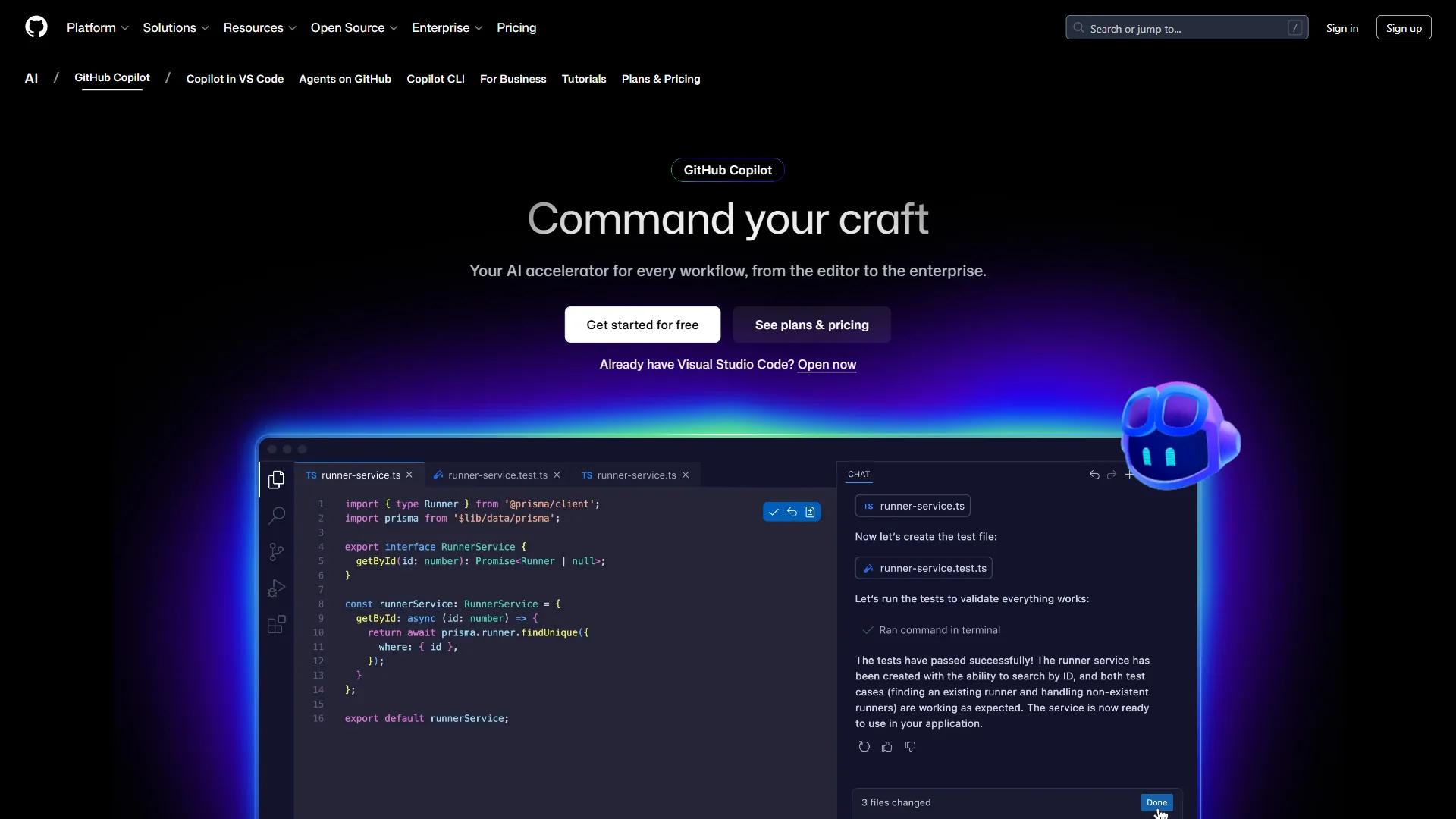
The switching consideration: All three editors support VS Code extensions and similar keybindings, so switching is low-friction. The real lock-in comes from workflow habits - developers who build around Cursor’s Background Agents or MAX mode will find those capabilities missing elsewhere.
Which Tool Fits: Cursor Plan for Your Workflow
The right Cursor plan for your workflow is Hobby for under 10 coding hours a week, Pro for most full-time developers, Pro+ for those who exhaust Pro’s credits, Ultra for high-rate developers who want zero friction, and Teams when an organization needs centralized billing.
- Hobby ($0) - evaluating Cursor, fewer than 10 hours per week, or student coursework.
- Pro ($20 per month) - your primary editor, 20+ hours per week, and you rarely hit the $20 credit limit (where most developers fall).
- Pro+ ($60 per month) - you consistently exhaust Pro’s credit, use MAX mode on complex codebases, or want manual model selection.
- Ultra ($200 per month) - your billing rate makes $200 irrelevant, or you run multiple Background Agents in parallel all day.
- Teams ($40 per user/month) - your organization requires centralized billing, SSO, and code privacy controls.
The Bottom Line
Cursor pricing is straightforward once you understand the API usage credit system: Hobby is a genuine free tier for light use, Pro at $20 per month is the right choice for most professional developers, Pro+ at $60 makes sense only when you consistently burn through Pro’s credits, and Ultra at $200 is a luxury tier for high-rate developers who want zero friction.
The most common mistake is starting on Ultra “just in case.” Start on Pro; upgrade to Pro+ if you ration agent requests late in the month; move to Ultra only if Pro+ still feels limiting after a full billing cycle. For teams, Teams at $40 per user is the only option with administrative controls - otherwise individual Pro plans are half the cost. See the full Cursor review and tool overview for a deeper look at features and ratings.
FAQ
The most common Cursor pricing questions cover total cost, the free tier, student discounts, usage limits, and the token-based credit system - answered directly below.
Q: How much does Cursor actually cost?
Cursor pricing in 2026 spans five tiers: Hobby at $0, Pro at $20 per month, Pro+ at $60 per month, Ultra at $200 per month, and Teams at $40 per user per month. For most professional developers, the Pro plan at $20 per month hits the right balance with unlimited Tab completions, $20 of API agent usage, and Background Agents for daily coding work.
Q: Is Cursor free of cost?
Cursor is free of cost on the Hobby plan, a genuine free tier that includes limited Tab completions, limited agent requests, and a one-week Pro trial for new users. Paid plans start at Pro for $20 per month, and a separate Cursor student discount gives verified students free Pro access through the dedicated students program.
Q: What are the Cursor pricing limits on each plan?
The Cursor pricing limits are set by included API credits rather than hard request caps: Pro includes $20 of usage, Pro+ includes $70, and Ultra includes $400 per month. Recent Cursor pricing changes replaced fixed request counts with these dollar-denominated credits, so heavy MAX-mode or multi-agent use can exhaust a plan faster than the headline figure suggests.
Q: How do Cursor pricing tokens work?
Cursor pricing tokens work by metering each agent request against your plan’s API credit balance based on the model, context length, and output length. Lightweight models cost fractions of a cent per request while premium models like GPT-5 and Claude 4 Opus consume far more, so two developers on the same plan can see very different effective costs.
Q: Is Cursor worth it in 2026?
Cursor is worth it in 2026 for any developer who codes 20 or more hours per week, with Pro at $20 per month paying for itself if it saves even one hour of billable time. The shift from fixed request counts to API usage credits is the most important change to understand before choosing a plan.
Q: Which Cursor plan should I choose?
Choose Hobby ($0) if you are evaluating Cursor or code fewer than 10 hours per week, and Pro ($20 per month) once Cursor becomes your primary editor. Step up to Pro+ or Ultra only when you consistently exhaust the lower tier’s credits. For organizations, Cursor pricing Enterprise adds pooled credits, SCIM provisioning, and audit logs on top of the Teams feature set.
Related Reading
These guides extend this Cursor pricing breakdown with full feature reviews and head-to-head comparisons.
- Cursor Review: Full Tool Overview - Features, ratings, and use cases beyond pricing
- GitHub Copilot Review - How the extension-based Copilot compares
- GitHub Copilot vs Cursor 2026 - Head-to-head comparison of features and models
- Claude Code vs Cursor 2026 - Terminal-based Claude Code versus Cursor’s IDE
- Windsurf vs Cursor 2026: AI IDE Comparison - Direct comparison with Cursor’s closest competitor
External Resources
These primary sources from Cursor confirm the plan pricing and usage metering cited in this guide.
- Cursor Official Pricing Page - Current plan details and signup
- Cursor Documentation - Usage guides, model details, and agent configuration
- Cursor Referral Program - $20 credit for referrer and new subscriber