


Marketing teams burn hours sourcing stock photos, waiting on designers, and still end up with visuals that look like everyone else’s. Leonardo AI changes that equation entirely. Across social campaigns, blog headers, product mockups, and ad creatives, the platform demonstrably delivers professional-quality images fast enough to keep up with modern content calendars.
This leonardo ai marketing images guide covers everything you need to produce marketing-ready visuals, from choosing the right model for your use case to building brand-consistent asset libraries with custom model training and brand kits.
Why Leonardo AI Works for Marketing Teams
Most AI image generators produce impressive one-off images but fall short when you need consistent, on-brand visuals at scale. Leonardo AI solves this with three capabilities that matter specifically for marketing work:
-
Real-time generation lets you see images forming as you type, enabling rapid iteration on concepts without waiting 30-60 seconds per generation. Users report creating 40+ ad creative variations in under 30 minutes during a single campaign sprint.
-
Custom model training captures your brand aesthetic from 10-20 reference images and applies it consistently across every future generation. Once trained, your model produces on-brand visuals without lengthy prompt engineering every time.
-
Brand kits store your colors, typography preferences, and style guidelines so every generated image aligns with your visual identity from the start.
Leonardo AI currently holds across review platforms, reflecting strong adoption among creative professionals and marketing teams.
Getting Started: Your First Marketing Image
Choosing the Right Model
Leonardo AI offers several foundational models, and picking the right one for your marketing use case makes a significant difference in output quality.
According to Leonardo’s official model release notes, Phoenix 1.0 is the go-to for most marketing work. It excels at prompt adherence, meaning it generates exactly what you describe rather than taking artistic liberties. Phoenix also handles text in images better than any other model available, which matters for social graphics and banner ads that include headlines or taglines.
Lucid Origin produces the highest visual fidelity at Full HD resolution. Use it when you need hero images, landing page backgrounds, or any asset where raw image quality takes priority over speed. The aesthetic output rivals dedicated art platforms.
Flux models (Schnell and Dev) are your rapid prototyping tools. Flux Schnell generates in 2-3 seconds, making it ideal for brainstorming sessions where you want to explore dozens of directions before committing to a final concept. Flux Dev delivers more polished results with slightly longer generation times.
For leonardo ai marketing images specifically, a practical approach is to start with Phoenix 1.0 for 80% of your work, switch to Lucid Origin for premium hero assets, and use Flux Schnell when you need fast concept exploration.
Writing Prompts That Produce Marketing-Ready Results
Generic prompts produce generic images. Marketing visuals need to be specific about composition, mood, and context. Here is the prompt structure that consistently delivers professional results:
[Subject] + [Setting/Context] + [Style/Mood] + [Technical Details]
Example for a SaaS landing page hero:
“Professional woman using laptop in a modern minimalist office, natural window lighting, warm corporate atmosphere, shallow depth of field, clean composition with copy space on the right third, photorealistic”
Key prompt principles for marketing:
- Include copy space by specifying “with negative space on [left/right/top]” so designers can overlay text without obscuring the subject
- Specify lighting mood that matches your brand tone. “Warm golden hour” reads differently than “clean studio lighting” or “dramatic side lighting”
- Reference real photography styles like “editorial photography,” “product photography on white background,” or “lifestyle brand photography” to anchor the AI’s output in professional conventions
- Add technical parameters like “shot on Canon EOS R5, 85mm f/1.4, shallow depth of field” to push the AI toward photorealistic marketing-quality output
Core Features for Marketing Workflows
Image Generation at Scale
The core generation engine is where most marketing teams will spend their time. Leonardo AI supports batch generation, letting you produce multiple variations from a single prompt. This is critical for A/B testing ad creatives or generating options for stakeholder review.
Practical workflow for ad creatives:
- Write your base prompt describing the visual concept
- Generate 4 variations at once
- Select the strongest direction
- Modify the prompt slightly (change lighting, angle, or background) and generate 4 more
- Repeat until you have 3-5 polished options for the campaign
This iterative approach takes 15-20 minutes and produces a library of options that would take a designer hours to create manually.
Fine-Tuned Models for Brand Consistency
Custom model training is the feature that separates Leonardo AI from tools like DALL-E 3 or basic Midjourney workflows for serious marketing use. You upload 10-20 images that represent your desired style, and Leonardo AI trains a model that captures that aesthetic.
What to train custom models on:
- Product photography style - Upload your best product shots so the AI generates new product images matching your existing visual language
- Brand illustration style - If your brand uses a specific illustration aesthetic (flat design, isometric, watercolor), train a model on your existing assets
- Campaign visual direction - For a specific campaign, train a model on the mood board images to ensure every generated asset feels cohesive
- Character consistency - If your marketing uses a mascot or recurring human character, custom model training maintains visual consistency across every touchpoint
For example, training a model on 15 product lifestyle images and generating 60+ new product shots in various settings is a common workflow. Users report the consistency is strong enough that generated images blend seamlessly with original photography.
Real-Time Canvas for Editing and Refinement
The Canvas editor is where you refine generated images without switching to Photoshop or Figma. For marketing teams, this means faster iteration cycles and fewer handoffs.
Canvas tools that matter for marketing:
- Inpainting - Select a region and regenerate just that area. Perfect for swapping backgrounds, changing product colors, or removing unwanted elements
- Outpainting - Extend an image beyond its original borders. Use this to add copy space to an image that was generated without enough breathing room for text overlays
- Masking - Isolate specific elements for selective editing. Change the background behind a product while keeping the product untouched
- AI Upscaler - Scale images to higher resolutions for print materials, large-format displays, or retina-quality web assets without losing detail
Background Removal and Texture Generation
Two features that save significant time in marketing workflows:
Background removal isolates subjects cleanly, which is essential for product photography, team headshots, and any asset that needs to work across multiple background contexts. The quality is comparable to dedicated tools like remove.bg, but it is built directly into the generation workflow.
Texture generation creates seamless patterns and surface textures. Marketing applications include custom backgrounds for social graphics, packaging mockup textures, and website section backgrounds that feel unique rather than stock.
3D Texture and Motion Generation
For teams producing more advanced marketing assets:
3D texturing lets you upload OBJ files and generate AI-powered textures with contextual intelligence. This is valuable for product mockups, packaging visualization, and any marketing material that needs a three-dimensional element. Upload a 3D model of your product packaging and generate photorealistic textures that match your brand palette.
Motion generation creates short animations (up to 4 seconds) from static images or text prompts. While 4 seconds is limited compared to dedicated AI video generators, it is enough for social media eye-catchers, animated banner ads, and loading screen visuals. Available on the Maestro Unlimited plan.
Consistent Character Generation
Marketing campaigns that use human characters across multiple touchpoints need visual consistency. Leonardo AI’s character consistency tools let you generate the same person in different poses, settings, and scenarios.
Use cases for marketing:
- A brand spokesperson character appearing across landing pages, email headers, and social posts
- Product demonstration sequences showing the same person using your product in different contexts
- Campaign storytelling where a character progresses through a narrative across multiple ad placements
Brand Kits for Team-Wide Consistency
Brand kits centralize your visual guidelines within Leonardo AI. Store your brand colors, preferred styles, and reference images so every team member generates on-brand visuals without memorizing complex prompts.
This feature is especially valuable for distributed marketing teams or agencies managing multiple client brands. Switch between brand kits to instantly shift the generation context from one client’s aesthetic to another. If you also need AI-generated logos alongside marketing imagery, our best AI logo generators roundup covers dedicated tools for that use case.
Pricing for Marketing Teams
Leonardo AI offers four consumer tiers. Here is how they map to marketing use cases:
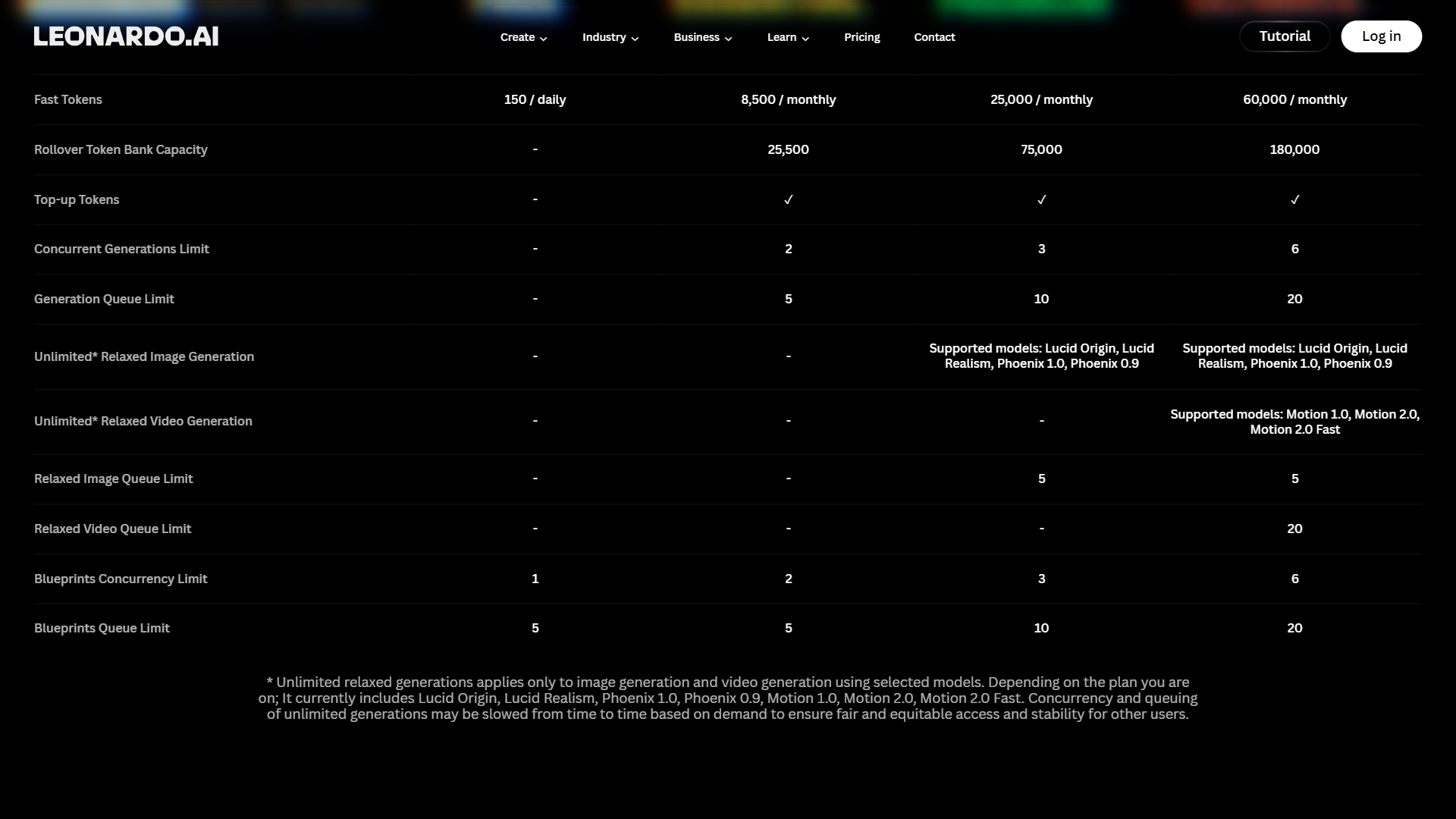
| Plan | Monthly Price | Tokens | Best For |
|---|---|---|---|
| Free | $0 | 150/day | Testing and evaluation |
| Apprentice | $12/month | 8,500/mo | Individual marketers, light usage |
| Artisan Unlimited | $30/month | 25,000 fast + unlimited relaxed | Marketing teams, heavy production |
| Maestro Unlimited | $60/month | 60,000 fast + unlimited relaxed | Agencies, video + 3D assets |
Which plan do you actually need?
The Free tier gives you 150 tokens daily (roughly 30-40 basic images). This is enough to evaluate the platform and test prompts, but not enough for production marketing work. You will hit the daily cap within one focused work session.
The Apprentice plan at $12/month works for individual marketers who generate 20-30 images per week. You get full ownership rights (important for commercial marketing use), token rollover, and access to all models including Phoenix and Lucid Origin. If your team creates a moderate volume of social graphics and blog images, this tier covers it.
The Artisan Unlimited plan at $30/month is where the value peaks for marketing professionals. Unlimited relaxed generation means you never worry about running out of tokens during a campaign sprint. Custom model training (up to 20 models) enables brand consistency across clients or campaigns. Three simultaneous generations speed up batch workflows. For anyone generating 50+ images weekly, this is the tier to choose.
The Maestro Unlimited plan at $60/month adds video generation, 3D texturing, ultra quality generations, and 50 custom models. Marketing teams producing animated social content, product visualization, or high-volume multi-brand work will use these features. For teams that only need static images, Artisan Unlimited provides better value.
According to Leonardo’s pricing page, annual billing saves approximately 17% across all paid plans. Check the current Leonardo AI pricing page for the latest rates.
Building a Marketing Image Workflow
Here is the leonardo ai marketing images workflow for producing a full week of visuals in a single session:
Step 1: Plan Your Asset Needs
Before opening Leonardo AI, list every visual asset you need for the week. Group them by type:
- Social media posts (Instagram, LinkedIn, X)
- Blog headers and in-article images
- Email campaign visuals
- Ad creatives for paid campaigns
- Website section backgrounds or hero images
Step 2: Set Up Your Generation Environment
Select the appropriate model for each asset group. Queue up Phoenix 1.0 for most marketing images, switch to Lucid Origin for hero assets, and prepare Flux Schnell for any brainstorming you need to do.
If you have trained custom models for your brand, activate the relevant one before generating.
Step 3: Batch Generate by Category
Work through each asset category in sequence. Generate 4 variations per concept, select the best direction, refine with prompt adjustments, and move on. Do not stop to perfect individual images during the batch phase.
Step 4: Refine with Canvas
After your batch session, open the Canvas editor and polish your selected images. Use inpainting to fix small issues, outpainting to add copy space, and the upscaler to prepare assets for their final dimensions.
Step 5: Export and Organize
Export finalized images at the resolution needed for each platform. Leonardo AI generates in various aspect ratios, so configure your output dimensions to match social platform requirements (1080x1080 for Instagram, 1200x628 for LinkedIn, and so on).
Tips for Better Marketing Images
Prompt like a creative director, not a search engine. Instead of “office meeting photo,” try “Collaborative team meeting in a bright modern conference room, four diverse professionals around a white table, natural daylight from floor-to-ceiling windows, editorial photography style, Canon EOS R5.”
Use negative prompts to eliminate common AI artifacts. In Leonardo AI’s advanced settings, add negative prompts like “text, watermark, distorted faces, blurry, oversaturated colors” to prevent the most frequent issues that make AI images look unprofessional.
Generate at the aspect ratio you need. Cropping AI images after generation wastes composition quality. Set the aspect ratio to match your final output (16:9 for blog headers, 1:1 for social, 9:16 for stories) before generating.
Save your best prompts. Marketing teams reuse visual styles across campaigns. Maintain a prompt library organized by asset type so you can quickly reproduce successful styles without reverse-engineering your own work.
Combine AI generation with light manual editing. Leonardo AI produces 90% of the final image. A quick pass in Figma or Canva to add text overlays, brand elements, and final adjustments turns AI output into polished, deployment-ready marketing assets.
Limitations to Know Before You Start
Leonardo AI handles most marketing image needs well, but there are areas where it falls short:
Text rendering is improving but imperfect. Phoenix 1.0 generates readable text in images more consistently than competitors, but complex typography, long phrases, or specific fonts still produce errors. Plan to add text overlays in your design tool rather than relying on AI-generated text for final assets.
Photorealistic people still need review. While quality has improved dramatically, generated humans occasionally show subtle artifacts in hands, jewelry, or fine details. Always review people-centric images at full resolution before publishing.
The learning curve is real. Leonardo AI’s interface is parameter-heavy with model selection, guidance scales, aspect ratios, and advanced settings. Expect 2-3 hours of learning before you feel comfortable, and a full week before you are generating at peak efficiency. This is more complex than DALL-E 3’s conversational interface but the control you gain is worth the investment. For a head-to-head breakdown of the two, see our Midjourney vs DALL-E comparison.
Token economics require planning. Different models and quality settings consume different token amounts. A single image might cost 3 tokens on Flux Schnell but 8 tokens on Lucid Origin at maximum quality. Monitor your usage if you are on a capped plan. The Artisan Unlimited plan eliminates most of this concern with unlimited relaxed generation.
The Bottom Line: Leonardo AI Marketing Images Workflow
Leonardo AI earns its place as a primary tool for leonardo ai marketing images at scale. The combination of real-time generation for rapid iteration, custom model training for brand consistency, and Canvas editing for refinement creates a workflow that replaces hours of stock photo searching and designer back-and-forth.
The Artisan Unlimited plan at $30/month delivers the best value for marketing professionals, offering unlimited relaxed generation and 20 custom models. Individual marketers with lighter needs will find the Apprentice plan at $12/month sufficient. And the free tier’s 150 daily tokens provide enough runway to evaluate whether the platform fits your workflow before committing.
Start with the Leonardo AI free tier, generate a week’s worth of social graphics using the workflow above, and measure the time difference against your current process. For most marketing teams, the ROI becomes obvious within the first session.
Frequently Asked Questions
Can I use Leonardo AI images for commercial use?
Yes. Paid plans (Apprentice, Artisan Unlimited, and Maestro Unlimited) grant full ownership and commercial-use rights to images you generate, which is what you need for marketing assets, ads, and client deliverables. The Free tier is limited to personal and non-commercial use, so step up to a paid plan before you ship anything paid for or public-facing.
Can I sell my Leonardo AI images?
Paid-tier images can be sold or licensed since you own the output. Marketing teams use this for stock-style libraries, product mockups, ad creatives, and merchandising visuals. As with any AI image work, avoid generating likenesses of real people without consent and review the latest Leonardo AI terms of service for current commercial-use clauses before reselling.
What models does Leonardo AI offer for marketing images?
Phoenix 1.0 handles most marketing work because it follows prompts closely and renders text in images more reliably than competing models. Lucid Origin produces higher visual fidelity for hero images and landing-page assets. Flux Schnell and Flux Dev are the rapid-prototyping options when you want to explore many concepts quickly before committing to a final direction.
How does Leonardo AI compare to other AI image generators?
Leonardo AI’s standout features for marketing teams are custom model training, brand kits, and real-time canvas editing - capabilities that DALL-E 3 and basic Midjourney workflows do not match. Raw output quality on photorealistic single images can be similar across these tools, but consistency at scale is where Leonardo separates itself, especially for teams producing dozens of on-brand assets per campaign.
Want to learn more about Leonardo AI?
Related Guides
- 10 Prompt Engineering Tips for Better AI Images
- Best AI Image Generators 2026
- Best AI Design Tools 2026
- AI Tools for Content Creators
External Resources
- Leonardo AI - Official website with free tier access and model documentation
- Leonardo AI Documentation - API reference, model guides, and platform tutorials
- Leonardo AI Blog - Latest model releases, feature updates, and creative inspiration
Related Guides
- Activecampaign AI Content Generation: Complete 2026 Guide
- AI Image Generation Tips: 2026 Walkthrough for Teams
- AI Presentation Creation Guide: Gamma, Beautiful.ai
- AI Video Creation Tips: 2026 Walkthrough for Teams
- Custom AI Models For Brand Consistency: Complete 2026 Guide
- Mailchimp AI Features Guide: 2026 Walkthrough for Teams
- Midjourney Prompt Engineering: Complete 2026 Guide
- Murf AI Pronunciation Control and Emphasis | Guide 2026
- Sider AI Browser Productivity: Complete 2026 Guide
- Stable Diffusion Tutorial 2026: Local Install to Video Gen