



Descript is an AI-powered editing tool, while Riverside is a local-recording studio for remote interviews. That single distinction settles most of the Descript vs Riverside question: Descript edits podcasts by transcript, and Riverside captures broadcast-quality audio from guests on unreliable internet. With more than 500 million podcast listeners globally, the tools you choose for production directly affect your ability to compete. Both Descript and Riverside are excellent, both have passionate users, and both approach podcast production from completely different angles.
Here’s the fundamental difference: Riverside focuses on recording high-quality remote interviews, while Descript focuses on editing with AI-powered tools. One captures pristine audio from your guests. The other makes editing that audio feel like editing a Google Doc. For broader options, see our best AI podcast editing tools roundup.
The right choice depends entirely on what problem you’re actually trying to solve.
TL;DR: Quick Verdict
Riverside wins for recording remote interviews, and Descript wins for fast AI-driven editing - so the verdict depends on whether your bottleneck is capturing audio or polishing it. Descript and Riverside take different approaches to solving similar problems, and the right choice depends on your workflow, Descript pricing, and team size. This comparison evaluates both tools across the features that actually matter for daily work.
Choose Riverside if you record remote interviews and need studio-quality audio from guests on spotty internet connections.
Choose Descript if you spend more time editing than recording and want AI to handle the tedious work.
Use both if you’re serious about podcast production - record in Riverside, edit in Descript.
| Feature | Descript | Riverside |
|---|---|---|
| Primary Focus | AI-powered editing | High-quality remote recording |
| Recording Quality | Standard (cloud-dependent) | Local recording (up to 4K video, 48kHz audio) |
| AI Transcription | Built-in, 23 languages | Built-in, 100+ languages |
| Editing Approach | Text-based (edit transcript = edit video) | Timeline-based (traditional) |
| Best For | Solo podcasters, post-production | Interview shows, remote guests |
| Starting Price | Free (60 min/mo) or $16/mo | Free (2 hrs/mo) or $19/mo |
| Rating |
Feature-by-Feature: Descript vs Riverside 2026
Recording Capabilities
Riverside was built specifically to solve the “Zoom quality” problem. When you record in Riverside, each participant’s audio and video is captured locally on their device at full quality - up to 4K video and 48kHz uncompressed audio. The files upload in the background. If someone’s internet stutters, the recording doesn’t.
Descript can record, but it’s not the main event. You get screen recording, webcam capture, and basic remote recording. The quality is fine for solo content, but it doesn’t match Riverside’s local-first architecture for interviews - a Descript vs Zencastr comparison would reveal the same recording-first gap.
Winner: Riverside (for remote recording quality)
AI Transcription
Both platforms offer AI transcription, and both are excellent in 2026.
Descript transcribes in 23 languages with speaker detection. Accuracy runs 95%+ for clear speech. The transcription powers everything else - you literally edit video by editing the transcript text.
Riverside expanded to 100+ languages in 2025 and added real-time transcription during recording. Accuracy is comparable to Descript. The difference is what you do with that transcription afterward.
Winner: Tie (both excellent, different purposes)
Video Editing
This is where the platforms diverge dramatically.
Descript’s entire editing philosophy is text-based, as documented in the Descript Getting Started guide. Delete a sentence from the transcript, and the corresponding audio and video disappear. Rearrange paragraphs, and your clips rearrange. It’s genuinely revolutionary for dialogue-heavy content. Add the Underlord AI assistant that can generate rough cuts, remove silences, and add captions from a single prompt, and you’re looking at 60%+ time savings on post-production.
Riverside offers editing tools, but they’re more traditional. You get a timeline, you make cuts, you export. It’s functional but not the reason you’d choose the platform - if pure video editing is your focus, Descript vs CapCut is a more relevant comparison than this one.
Winner: Descript (by a wide margin)
Remote Interview Features
Riverside dominates here with purpose-built interview tools:
- Producer mode lets you monitor without appearing on camera
- Separate audio tracks for each participant (essential for audio cleanup)
- Async recording for guests in different time zones
- Virtual green room so guests can check their setup before going live
- Live streaming to YouTube, LinkedIn, and other platforms simultaneously
Descript has basic remote recording but lacks the interview-specific features. You’d need to supplement with Zoom or similar.
Winner: Riverside (purpose-built for interviews)
Methodology: Recording Quality Deep Dive
Let’s get technical for a moment, because this is where Riverside’s architecture matters.
The Local Recording Advantage
When you record in Zoom, Google Meet, or most video platforms, you’re capturing a compressed stream that travels through the internet. If your guest’s connection drops for a second, that second is gone forever. The audio is compressed. The video is compressed. You’re editing whatever made it through the pipes.
Riverside records locally on each device at full quality. The files upload progressively, but if upload fails, the recording is still sitting on your guest’s computer. You can have them send it manually. This follows Audio Engineering Society standards for broadcast-quality recording.
For podcasters who’ve lost interviews to internet hiccups, this is worth the price of admission alone.
Audio Specifications
| Metric | Descript | Riverside |
|---|---|---|
| Audio Quality | Up to 48kHz (recording dependent) | 48kHz WAV uncompressed |
| Video Quality | Up to 4K (plan dependent) | Up to 4K local recording |
| Separate Tracks | Limited | Yes, per participant |
| Backup Recording | No | Yes, local + cloud |
Descript Strengths: The Editing Powerhouse
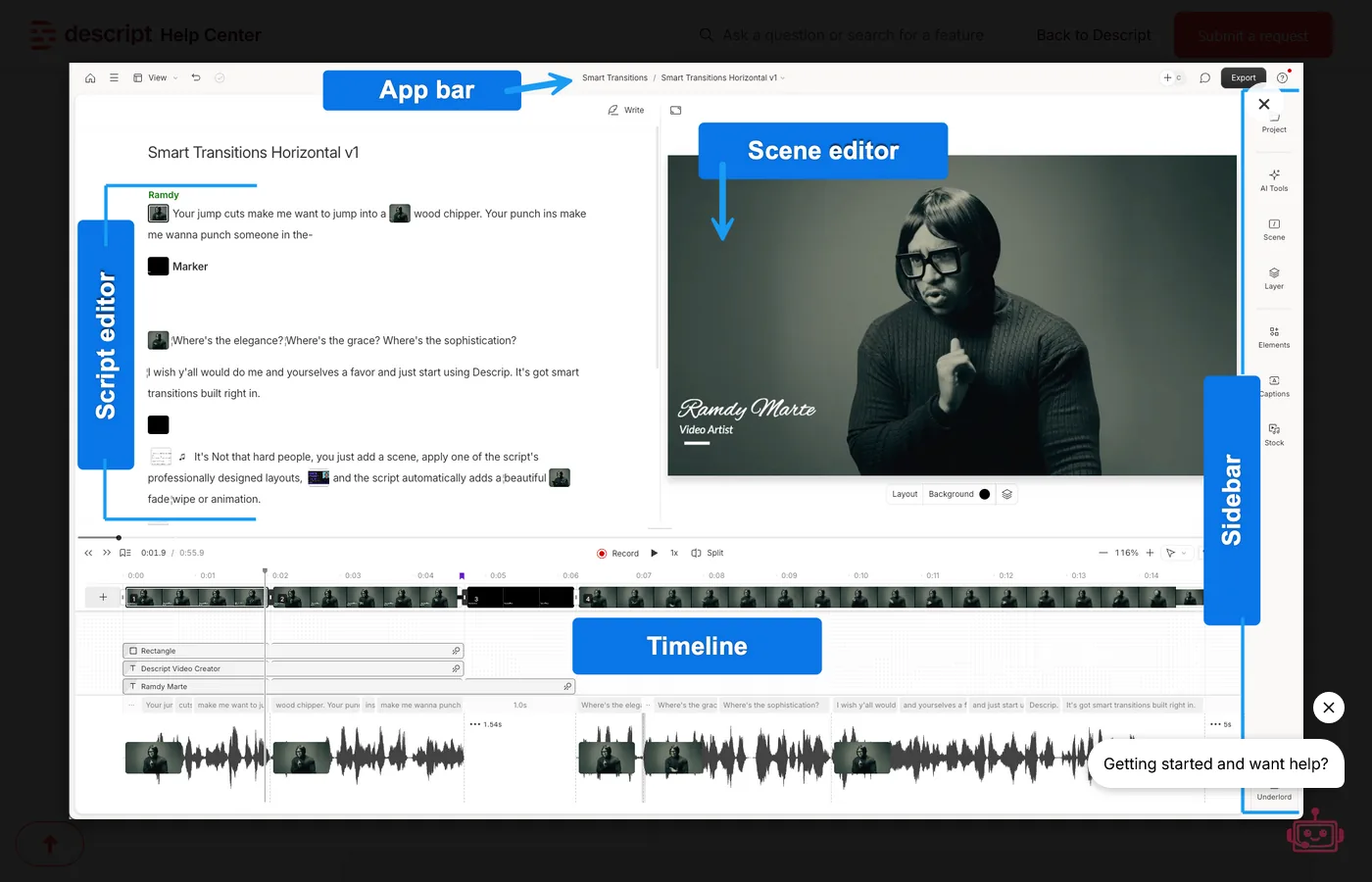
Descript’s strength is editing: it turns podcast post-production into a document-editing task and layers AI tools on top to remove the tedious work. Descript’s founders frame the product around that goal directly.
“We want to make editing audio and video as easy as editing a doc,” said Andrew Mason, CEO and co-founder of Descript, describing the product’s text-based approach in the company’s About page.
Text-Based Editing Changes Everything
Traditional DAW editing meant 15 years of scrubbing through waveforms, zooming in to find the exact millisecond to cut, constantly re-listening to check work. Descript made all of that irrelevant.
You read the transcript. You highlight and delete the parts you don’t want. The audio and video disappear. It’s that simple.
For a 45-minute podcast episode, editing time drops from 3-4 hours to under an hour. The time savings compound when producing weekly content.
Underlord AI Assistant
Descript’s Underlord AI (introduced late 2024, significantly improved in 2025) can:
- Generate rough cuts from raw footage
- Remove all filler words (“um,” “uh,” “like”) with one click
- Add captions in multiple styles
- Create short-form clips from long content
- Write show notes and summaries
You prompt it like ChatGPT: “Remove all awkward pauses longer than 2 seconds and cut the tangent about politics around minute 23.” It executes.
Studio Sound
One-click audio enhancement that removes background noise, echo, and room reverb. Whether recorded in hotel rooms, coffee shops, or a car, Studio Sound makes it all sound like a treated studio.
Overdub Voice Cloning
Made a mistake? Mispronounced a name? Don’t want to re-record the whole segment? Overdub lets you type corrections and have them spoken in your cloned voice. It’s ethically complex, but practically useful for fixing small errors.
Learn more: Descript overview and pricing
Descript limitations and who it’s not for: Descript’s remote recording is cloud-dependent, so multi-guest interviews on shaky internet drop quality versus Riverside’s local capture. Voice cloning and Studio Sound are gated to Creator (around $18 per month) and above, and the free tier caps at 60 minutes of media per month with a watermark. Skip Descript if your priority is broadcast-grade interview audio rather than fast post-production.
Riverside Strengths: The Recording Studio
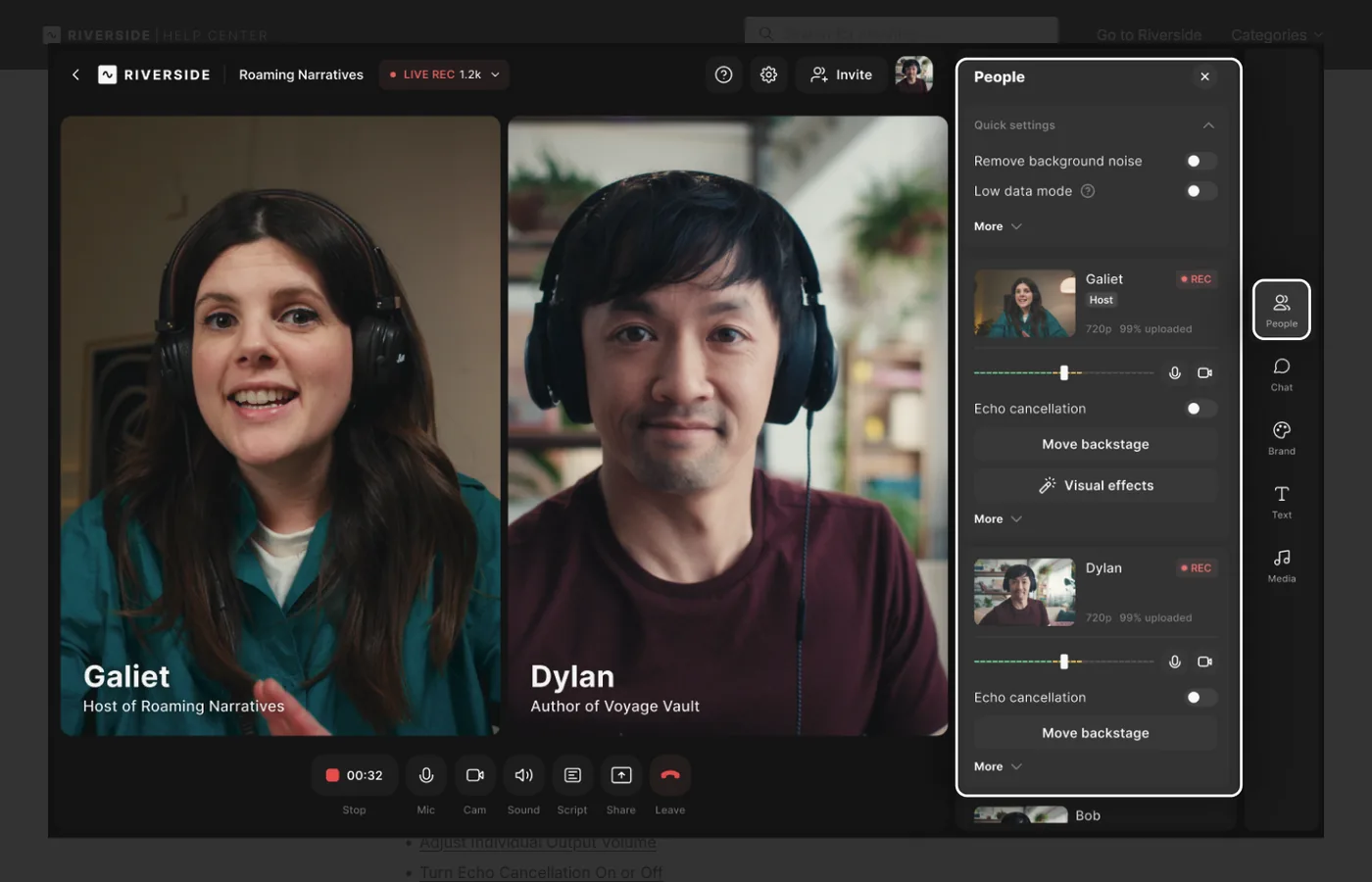
Riverside’s strength is recording: it captures studio-grade audio and video locally on every participant’s device, so guest internet quality never degrades the final files. Local recording is the feature podcasters cite most when choosing Riverside over a video-call tool.
Local-First Recording Quality
Local-first recording is Riverside’s defining feature, explained in the Riverside local recording help article. Your guest could be on hotel WiFi in another country, and you’ll still get broadcast-quality audio because the recording happens on their device, not through the internet stream.
In many cases, the live preview stutters and pixelates, but the final exported files come out crystal clear. That’s the local recording architecture working as designed.
Separate Track Export
Every participant gets their own audio and video track. This matters for:
- Noise removal: Clean up one person’s audio without affecting others
- Levels adjustment: Boost a quiet guest without boosting a loud host
- Crosstalk editing: Remove overlapping speech cleanly
- Advanced mixing: Apply different processing to different voices
Zoom and Meet give you a combined track. Riverside gives you stems.
Producer Mode
For interview podcasts with a team, producer mode lets someone monitor the recording, manage technical issues, and communicate with the host - without appearing on camera or in the recording.
Magic Clips (AI Highlights)
Riverside added AI-powered clip generation in 2025. It analyzes your recording and suggests short-form clips for social media. Not as comprehensive as Descript’s editing suite, but useful for quick repurposing. See the Riverside Creator Resources for tutorials on maximizing these AI features.
Learn more: Riverside overview and pricing
Riverside limitations and who it’s not for: Riverside’s editing tools are basic timeline cuts - no text-based editing, no Underlord-style AI rewrites, and Magic Clips only handles short-form repurposing. Separate-track export is locked to the Pro plan (around $24 per month annual), and the free tier caps at 2 hours of recording per month. Skip Riverside if you need an AI-driven post-production suite or your podcast is solo commentary rather than remote interviews.
Comparison Table: Editor Features
Descript leads on editor features, offering text-based editing, one-click filler-word removal, and an AI assistant, while Riverside provides traditional timeline cuts and full multi-track support. The table below compares the two editors side by side.
| Editing Feature | Descript | Riverside |
|---|---|---|
| Editing Paradigm | Text-based (transcript) | Timeline-based (traditional) |
| Learning Curve | Low (if you can edit text) | Medium (standard NLE) |
| Filler Word Removal | One-click AI | Manual |
| Silence Removal | Automatic | Manual |
| Multi-track Support | Limited | Full |
| Color Correction | Basic | Basic |
| AI Assistant | Yes (Underlord) | Limited (clips only) |
| Export Formats | MP4, MP3, WAV, SRT, etc. | MP4, MP3, WAV, stems |
The editing comparison isn’t really fair because the tools have different goals. Descript is trying to make editing disappear through AI automation. Riverside is trying to capture the best possible raw material for you to edit elsewhere.
Pricing Comparison: Descript vs Riverside 2026
Descript starts at $16 per month (or $12 annually) and Riverside starts at $19 per month (or $15 annually), with both vendors offering a free tier - Descript caps free use at 60 minutes of media, Riverside at 2 hours of recording. The plan tables below break down each tier.
Descript Pricing
| Plan | Monthly | Annual (per month) | Key Limits |
|---|---|---|---|
| Free | $0 | $0 | 60 min media, 720p export, watermark |
| Hobbyist | $16 | $12 | 10 hours media, 1080p, basic AI |
| Creator | $24 | $18 | 30 hours media, 4K, full Underlord, Overdub |
| Business | $50 | $40 | 40 hours media, team features, AI translation |
Riverside Pricing
| Plan | Monthly | Annual (per month) | Key Limits |
|---|---|---|---|
| Free | $0 | $0 | 2 hours recording, 720p |
| Standard | $19 | $15 | 5 hours recording, 1080p, transcription |
| Pro | $29 | $24 | 15 hours recording, 4K, separate tracks |
| Business | $49 | $39 | 25 hours, custom branding, priority support |
Value Analysis
Best free tier: Descript (60 minutes vs 2 hours, but Descript’s 60 includes editing features)
Best budget option: Riverside Standard (around $15 per month annual) if you mainly need recording; Descript Hobbyist (around $12 per month annual) if you mainly need editing
Best for serious podcasters: The combination - Riverside Pro for recording (around $24 per month) plus Descript Creator for editing (around $18 per month) = around $42 per month for a complete professional workflow
Best Picks by Use Case: Descript vs Riverside
Choose Descript If You:
- Record solo content (commentary, tutorials, screen recordings)
- Spend more time editing than recording
- Want AI to handle tedious post-production
- Edit dialogue-heavy content (podcasts, interviews, courses)
- Need to repurpose long content into shorts
- Value editing speed over recording quality
Choose Riverside If You:
- Record remote interviews with guests
- Need broadcast-quality audio regardless of internet
- Want separate audio tracks for professional mixing
- Run a team with producer roles
- Live stream while recording
- Already have an editing workflow you prefer
Use Both If You:
- Produce interview-based podcasts regularly
- Want the best recording quality AND the fastest editing
- Have the budget ($40-50/mo combined)
- Take podcast production seriously
The “use both” option is increasingly common among professional podcasters. Record in Riverside, export stems, import to Descript, edit with AI, export final product.
Final Verdict: Descript vs Riverside 2026
Riverside is the better choice for recording remote interviews, and Descript is the better choice for AI-powered editing - and serious podcasters get the best result by using both together. These tools are not really competitors - they are complements that happen to overlap at the edges.
Riverside is the best remote recording platform for podcasters. Full stop. If you interview guests remotely and care about audio quality, you should be using Riverside or something like it.
Descript is the best AI-powered editing tool for dialogue content. The text-based editing paradigm and Underlord AI assistant make post-production dramatically faster than traditional methods.
Recommendation
Solo podcasters: Start with Descript. The all-in-one approach handles recording and editing, and the AI features will save you hours per episode.
Interview podcasters on a budget: Start with Riverside Free/Standard for recording, edit in your existing tool (even the free DaVinci Resolve works).
Interview podcasters who value time: Use both. Record in Riverside, edit in Descript. The combined cost (around $42 per month) is easily worth it if you value your editing time at any reasonable hourly rate.
Video podcasters: Descript has the edge here because its video editing features (Eye Contact, AI Green Screen, captions) are more developed, as detailed on the Descript video editor product page.
FAQ
Common questions about Descript vs Riverside cover combined workflows, transcription accuracy, audio quality, and how each tool compares to Squadcast and Zencastr.
Can I use Descript and Riverside together?
Yes, and many professional podcasters do exactly this. Record your interview in Riverside to capture the highest possible quality audio. Export the separate tracks. Import to Descript. Edit using text-based editing and AI tools. Export your final episode.
Which has better transcription accuracy?
Both are excellent in 2026, typically 95%+ for clear English speech. Riverside supports more languages (100+) while Descript offers deeper integration between transcription and editing. For most users, accuracy is comparable.
Is Riverside worth it for solo podcasters?
Probably not. Riverside’s main advantage is local recording quality for remote guests. If you’re recording solo, Descript or even basic tools like Audacity will work fine. You’re paying for features you won’t use.
Can Descript match Riverside’s audio quality?
For local recording, yes - Descript can record at high quality. For remote interviews, no. Descript’s remote recording is cloud-dependent, while Riverside’s local-first architecture captures full quality regardless of internet conditions.
What about Squadcast or Zencastr?
Both are solid Riverside alternatives for remote recording. Squadcast is slightly cheaper; Zencastr has a generous free tier. Neither has Descript’s editing capabilities. If you’re comparing recording-only tools, Riverside leads on features and reliability.
Do either work for video podcasts?
Both support video, but with different strengths. Riverside records up to 4K video locally for each participant. Descript offers more video editing features (Eye Contact, AI Green Screen, captions). For video podcasts, the “record in Riverside, edit in Descript” workflow makes sense.
Related Reads
Related reads on Descript, Riverside, and the wider podcast stack cover adjacent tradeoffs and limitations across podcast and AI video editing tools:
- Descript: Complete Overview and Pricing
- Riverside: Complete Overview and Pricing
- Best AI Podcast Editing Tools
- AI Video Creation Tips: Work Smarter with AI Tools
- Remote Work Audio Setup Guide
- AI-Powered Analytics Platforms: Which Delivers Real ROI?
- Synthesia vs HeyGen 2026: Which AI Video Tool Wins?
- ChatGPT review
External Resources
External resources below link to the official Descript and Riverside blogs for tutorials, feature updates, and platform guides:
- Descript Blog - Official tutorials and feature updates
- Riverside Blog - Recording tips and platform guides