










Ahrefs is a research and intelligence platform while Surfer SEO is an on-page content optimization engine, so most Surfer SEO vs Ahrefs questions are really workflow questions, not head-to-head competitions. One discovers ranking opportunities. The other helps you execute them on the page.
Both tools have keyword research features, both analyze SERPs, and both cost a significant amount per month. Neither offers a meaningful Surfer SEO free version for extended use - both run on paid subscriptions, so Surfer SEO pricing and Ahrefs pricing factor heavily into the decision. Searchers often weigh this choice against Surfer SEO vs Semrush comparisons too, and budget-conscious teams sometimes look to lighter alternatives like NeuronWriter for content scoring at a lower price point.
Quick Verdict
Ahrefs wins for backlink research and competitive intelligence, while Surfer SEO wins for on-page content scoring - this is the detailed comparison for 2026. The right choice depends on your bottleneck, budget, and team size. Editorial disclosure: AI Productivity may earn a commission from links on this page; our rankings are editorially independent and based on vendor documentation and independent research rather than sponsored placement.
| Tool | Best For | Starting Price | Rating |
|---|---|---|---|
| Ahrefs | Backlink analysis, competitor research, comprehensive SEO intelligence | $129/mo (Lite) | |
| Surfer SEO | On-page optimization, content scoring, NLP-driven content creation | $89/mo (Essential) |
Choose Ahrefs if: You need deep backlink data, competitive research, rank tracking, and a full SEO suite to guide your entire strategy. In the Surfer SEO vs Ahrefs matchup, Ahrefs is the research-first choice.
Choose Surfer SEO if: You have keyword research covered and need help turning that research into optimized content that actually ranks.
Use both if: You run a content-heavy site where you need Ahrefs for strategy and Surfer for execution - this is the most common setup among serious SEO teams.
What Ahrefs Does (And Does Better Than Anyone)
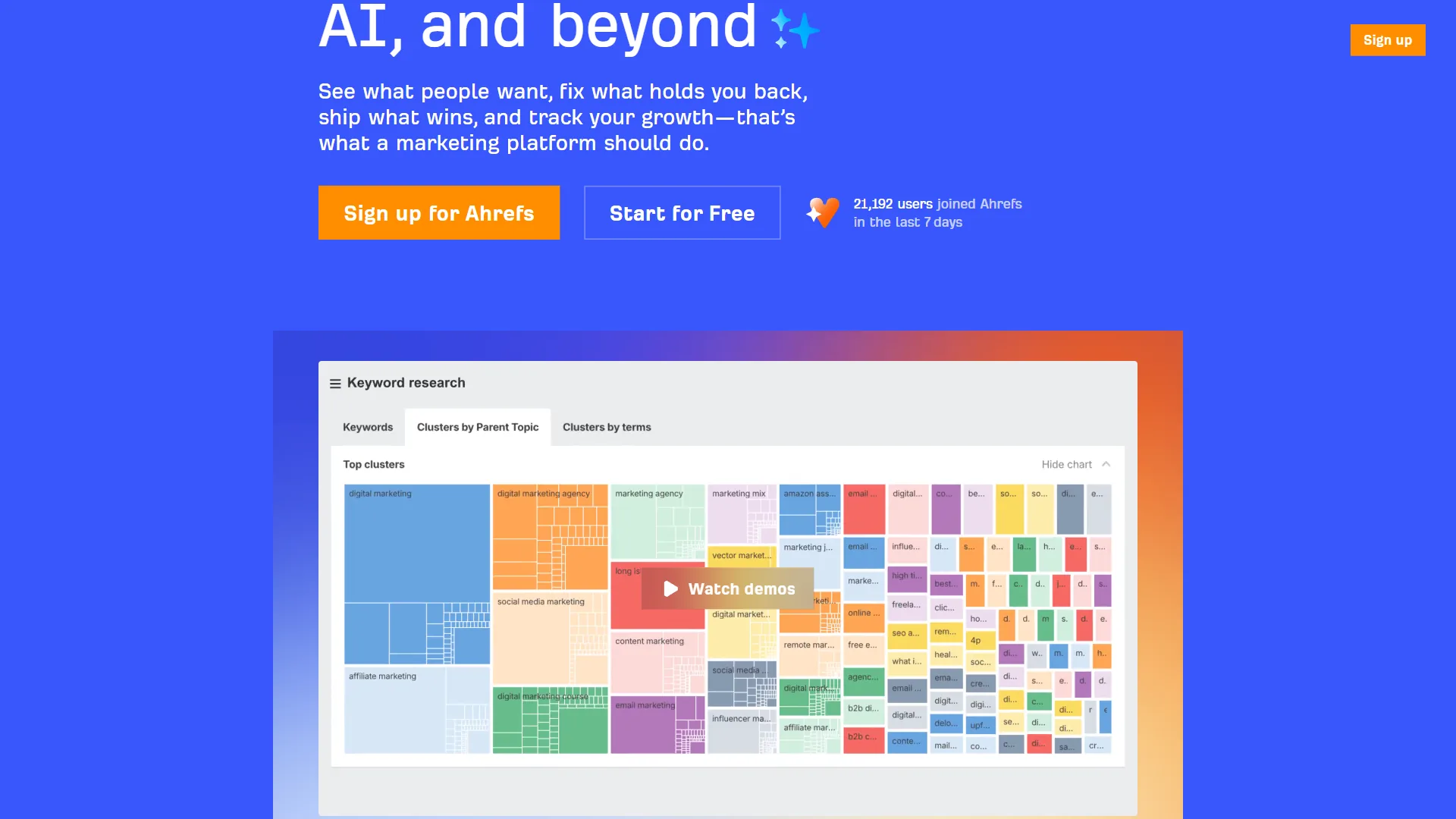
Ahrefs delivers the largest backlink index in the industry, with over 35 trillion links crawled and a 20-billion-keyword research database. That scale matters because backlink analysis is only as good as the data behind it. When you use Ahrefs’ Site Explorer to audit a competitor’s link profile, you are getting close to a complete picture of who links to them, from where, and with what anchor text. According to research by Ahrefs, “90.63% of pages get zero organic search traffic from Google” - making on-page optimization essential. A Backlinko analysis of 11.8M search results found the average first-page result contains 1,447 words, reinforcing why depth matters alongside link authority.
The platform breaks down into five core tools:
- Site Explorer - Domain traffic, backlink profile, top pages, paid search footprint
- Keywords Explorer - Volume, difficulty, CTR and SERP analysis across 10 search engines
- Content Explorer - Most-linked content in any niche for prospecting and ideation
- Rank Tracker - Keyword position monitoring with SERP feature tracking
- Site Audit - Technical SEO crawl with prioritized fixes
The breadth makes Ahrefs hard to replace - for agencies running a full strategy, it delivers almost everything in one interface.
How Much Does Ahrefs Cost in 2026?
| Plan | Monthly Price | Annual Price | Key Limits |
|---|---|---|---|
| Lite | $129/mo | $108/mo | 500 credits, 5 projects, 750 tracked keywords |
| Standard | $249/mo | $208/mo | 500 credits, 20 projects, 2,000 tracked keywords |
| Advanced | $449/mo | $374/mo | 500 credits, 50 projects, 5,000 tracked keywords |
| Enterprise | Custom | Custom | Unlimited projects, API access, custom seats |
Watch the credit system on Ahrefs pricing - Lite gives 500 credits per user monthly, and intensive research burns through them fast. Solo practitioners who do regular competitor research will want Standard.
Where Ahrefs Excels
Backlink analysis is genuinely best-in-class. No other tool updates its index as frequently or covers as many links - our backlink analysis tools comparison walks through how Ahrefs and lighter-weight competitors like Moz Pro stack up.
Competitive intelligence depth. Site Explorer, Content Explorer, and Keywords Explorer together show what competitors rank for, which links drive their authority, and what content earns the most engagement.
Keyword research at scale. The Keywords Explorer database covers over 20 billion keywords across 10 search engines, with SERP analysis detailed enough to tell you ranking content type and SERP feature presence - see our keyword research tools roundup for category context.
Brand Radar for AI search. Ahrefs’ Brand Radar tracks how your brand appears in AI-generated answers from ChatGPT, Perplexity, Google AI Overviews, and Gemini. The Google Search Central documentation on AI Overviews outlines what signals these answers prioritize.
Where Ahrefs Falls Short
The gap Ahrefs leaves is on-page execution. The platform shows what keywords to target and which competitors to beat, but it does not score your draft, suggest NLP terms, or give real-time feedback as you write - that gap is exactly where Surfer SEO operates.
Limitations and who Ahrefs is not for: The Lite plan’s credit system burns out fast on intensive research, and there is no real content-editor or NLP scoring. Skip Ahrefs if your bottleneck is writing optimized pages, or if a $129/mo entry price is hard to justify for one-or-two-article-per-month operations.
What Surfer SEO Does (And Does Better Than Anyone)
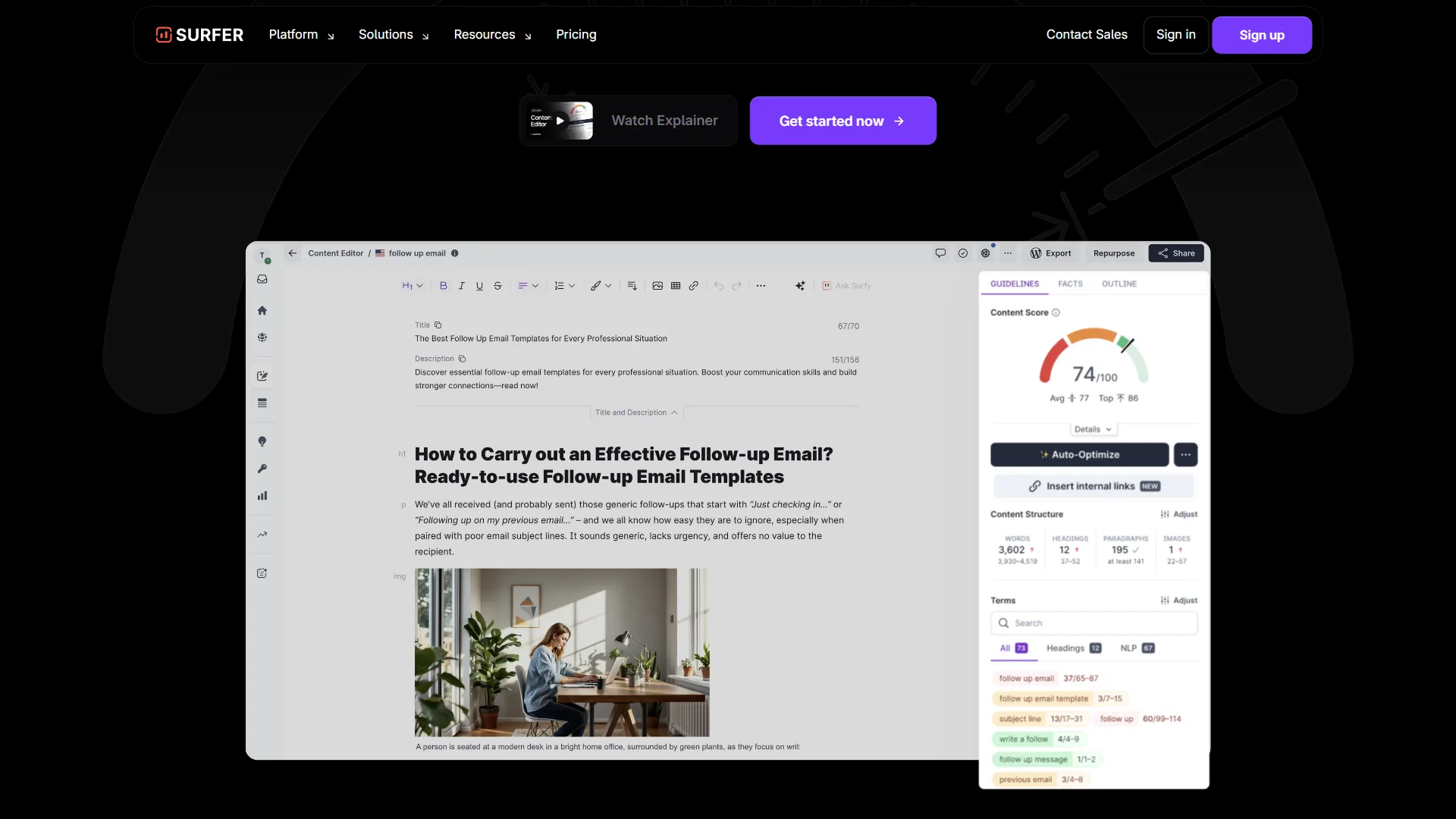
Surfer SEO’s core product is the Content Editor: a writing environment that analyzes top-ranking pages for your target keyword and gives real-time guidance on how to match or beat them. According to the Surfer SEO content score methodology, the score draws on hundreds of on-page signals extracted from top-ranking competitors. As you write, a sidebar tracks your content score (0-100), suggests NLP terms, recommends word count ranges, and flags heading-structure issues.
The underlying methodology is SERP analysis at scale - entity coverage, content structure, image usage, and semantic relationships across hundreds of on-page factors, not just keyword frequency. The result is content guidance grounded in what is actually ranking. According to Google Search Central guidance, matching searcher intent and on-page structure is foundational - exactly the gap Surfer fills. A 2024 Backlinko ranking factors study also notes that semantic relevance and topic coverage now outweigh raw keyword density.
How Much Does Surfer SEO Cost in 2026?
| Plan | Monthly Price | Annual Price | Key Features |
|---|---|---|---|
| Essential | $89/mo | $79/mo | 30 articles/mo, Content Editor, Audit, Keyword Research |
| Scale | $129/mo | $109/mo | 100 articles/mo, everything in Essential |
| Scale AI | $219/mo | $179/mo | 100 articles/mo, Surfer AI for automated content |
| Enterprise | Custom | Custom | Unlimited articles, white-label, API access |
Surfer’s pricing is article-based - the Essential plan’s 30-article monthly limit feels restrictive for high-volume operations, and teams publishing more than one article per day effectively need Scale.
Where Surfer SEO Excels
The Content Editor is the best on-page optimization tool available. The real-time feedback loop - write a sentence, watch the score update, see which NLP terms are still missing - is the difference between writing content and optimizing it.
Surfer AI for automated drafts. The Scale AI plan generates full article drafts optimized for your target keyword. The output is not publish-ready without editing, but it gives you an optimized starting structure with the right NLP coverage baked in - see our best AI writing tools breakdown for category context.
Content Audit at scale. Surfer’s Audit tool identifies existing pages losing rankings and shows the exact changes to make - for sites with large archives, this is where Surfer pays for itself fastest. The broader category lives in our SEO content tools roundup.
SERP Analyzer for deep competitive breakdowns. The SERP Analyzer shows average word counts, heading structures, image counts, and exact NLP term usage across the top-ranking pages.
Integrations where you work. Surfer integrates directly with Google Docs and WordPress, so the Content Editor works inside your existing workflow. The Jasper integration is also worth noting.
Where Surfer SEO Falls Short
Surfer is deliberately narrow. It has no meaningful backlink index, cannot tell you why a competitor outranks you from a domain-authority standpoint, and its keyword research is limited compared to Ahrefs’ Keywords Explorer - even budget tools like NeuronWriter handle on-page scoring without pretending to replace a research suite. Google’s helpful content guidance reinforces that no single optimization tool replaces editorial judgment.
Limitations and who Surfer SEO is not for: There is no backlink index, no technical site audit, no rank tracking across hundreds of keywords. Skip Surfer if link building or competitive intelligence is the bottleneck, or if your monthly content volume is below the Essential plan’s 30-article threshold.
How Do Surfer SEO and Ahrefs Compare Feature-by-Feature?
Ahrefs is best-in-class on backlinks, keyword research, rank tracking, and AI search visibility, while Surfer SEO is best-in-class on real-time content scoring, NLP suggestions, and writer integrations. The full comparison table below shows where each tool wins feature-by-feature.
| Feature | Ahrefs | Surfer SEO |
|---|---|---|
| Starting price | $129/mo | $89/mo |
| Backlink analysis | Best-in-class (35T+ links) | None |
| Keyword research | Comprehensive (20B+ keywords) | Basic |
| Content Editor | None | Best-in-class |
| Real-time content scoring | None | Core feature |
| NLP term suggestions | None | Core feature |
| Site audit (technical) | Comprehensive | None |
| Rank tracking | Yes (750-5,000 keywords) | No |
| Content audit | Basic | Strong |
| AI content generation | No | Yes (Scale AI plan) |
| Competitor research | Comprehensive | Limited |
| AI search visibility | Yes (Brand Radar) | No |
| Google Docs integration | No | Yes |
| WordPress integration | No | Yes |
| Free trial | 7-day trial | 7-day trial |
Which Tool Should You Choose by Use Case?
Choose Ahrefs if backlinks, technical audits, or competitive research drive your strategy, and choose Surfer SEO if writing on-page content is the bottleneck - many serious teams choose both to build a complete workflow.
Choose Ahrefs If:
-
You run an SEO agency or manage multiple clients. Ahrefs’ multi-project support is the agency standard - see our best AI SEO tools roundup for the toolkit landscape.
-
Link building is core to your strategy. Ahrefs has no real substitute for backlink research, link prospecting, and link-profile monitoring.
-
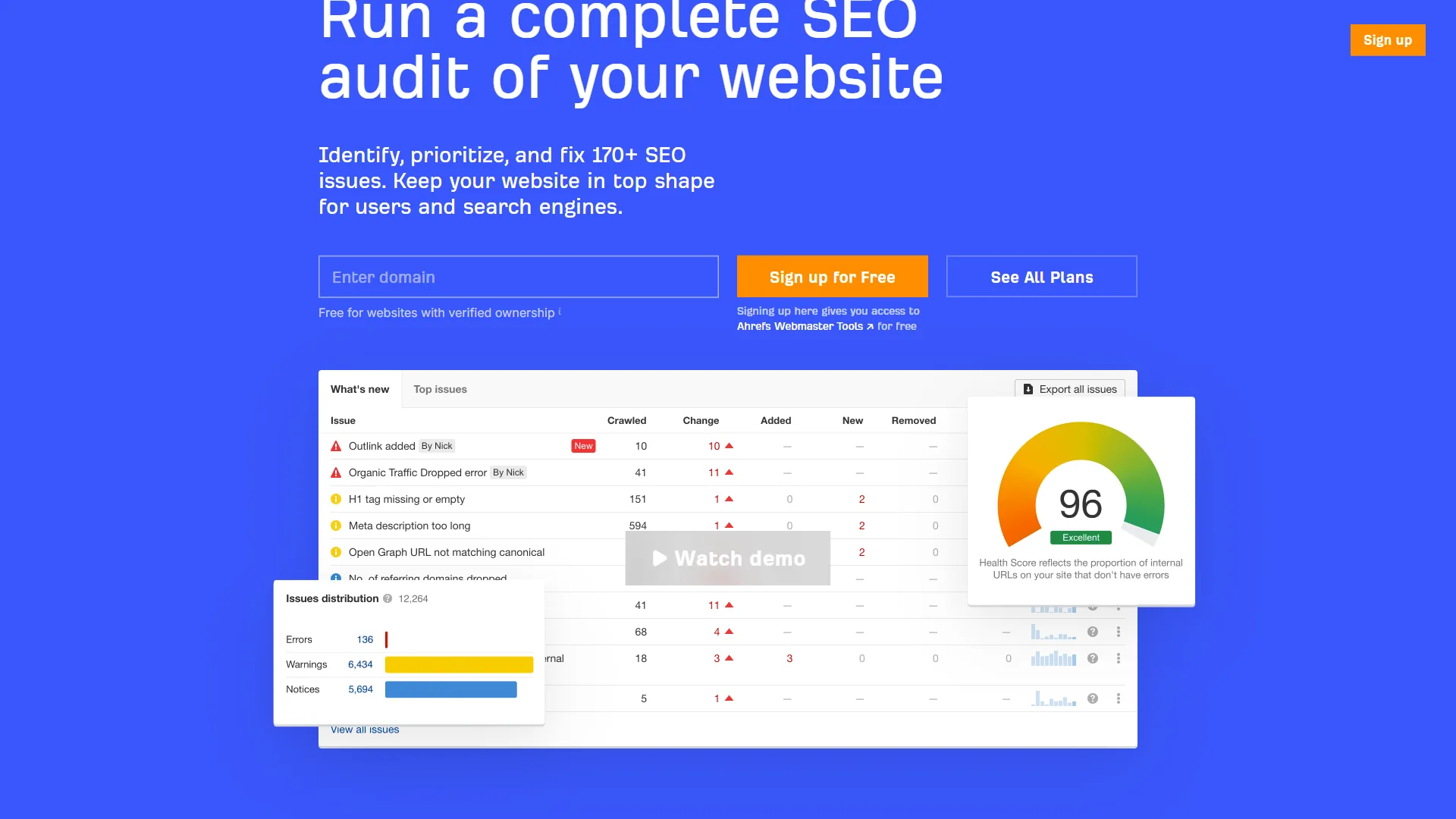
You need technical SEO coverage. Site Audit catches crawl errors, broken links, redirect chains, and Core Web Vitals issues that directly impact rankings.
-
Competitive research drives your content strategy. Content Gap and Site Explorer are built exactly for reverse-engineering what competitors rank for.
-
You want AI search visibility tracking. Brand Radar tracks how your brand appears in answers from ChatGPT, Perplexity, and Google AI Overviews.
Choose Surfer SEO If:
-
Content creation is your primary bottleneck. You know what to write about, but you need help making it competitive on the page - our Surfer SEO tips and tricks guide covers the Content Editor in depth.
-
You manage a content team. The Content Editor gives non-SEO writers a clear target score and specific guidance without manual briefing.
-
You publish at volume. For teams producing 10+ articles per month, the Content Editor ROI compounds quickly.
-
You have existing content needing rehabilitation. The Audit tool identifies pages that have slipped and shows the specific changes to make.
-
Your budget is tighter. At $89/month versus $129/month for Ahrefs Lite, Surfer is cheaper at entry and covers its use case thoroughly.
Use Both If:
The most effective content SEO workflow uses Ahrefs to research keywords, identify competitor gaps, and plan authority, then uses Surfer SEO to optimize the actual content before publishing. The combined cost ($218/month minimum, $170-190/month on annual plans) is often justified for teams publishing regularly.
Final Verdict: Start With Just Surfer SEO or Ahrefs?
Start with Ahrefs if strategy and keyword research are your bottleneck; start with Surfer SEO if writing optimized content is - which tool is best for you in 2026 depends entirely on whether your problem is upstream research or downstream execution.

If you are choosing one tool and cannot justify both budgets:
Start with Ahrefs if you are building a strategy from scratch, doing competitive research, or link building is part of your plan. A half-decent article on the right keyword outperforms a perfectly optimized article on the wrong keyword every time.
Start with Surfer SEO if you already have a content calendar and your problem is that content is not ranking despite covering the right topics. Surfer’s keyword research is limited but functional for article-level planning, and on-page optimization ROI is immediate and measurable.
The honest version: most solo operators on limited budgets should start with Ahrefs, because strategy comes before execution.
How Do SEO Teams Use Surfer and Ahrefs Together in Real Workflows?
SEO teams typically run Ahrefs at the strategy layer (monthly research, link prospecting, technical audits) and Surfer SEO at the execution layer (every article brief and on-page optimization pass). The right stack depends on your budget and content volume.
Solo content marketer ($89/mo budget): Surfer SEO. With briefs already in hand, Surfer pays for itself on the first article it helps rank.
Freelance SEO consultant ($129/mo budget): Ahrefs Lite. Client work requires competitive analysis, backlink auditing, and comprehensive keyword research. You can optimize on-page manually for now. Browse our best tools for SEO specialists for the full toolkit picture.
SaaS content team (5 writers, $300/mo budget): Ahrefs Standard ($249/mo) plus Surfer Essential ($89/mo annually = $79/mo). The combination gives you full research capability and systematic on-page optimization. Pair this with the workflow patterns in our content marketing tools guide to maximize each writer’s output.
SEO agency (multiple clients): Both tools on higher tiers. The ROI justifies it. Ahrefs Standard handles research and auditing across clients. Surfer Scale covers the content volume agencies typically produce. The Moz industry blog tracks how agency SEO stacks have evolved alongside AI-driven optimization.
The Bottom Line
The Surfer SEO vs Ahrefs question is ultimately a workflow question, not a competition between equals - they solve adjacent but different problems.
Ahrefs wins for teams that need comprehensive SEO intelligence (backlinks, competitor research, technical audits, rank tracking). At $129/month minimum, it is expensive but worth every dollar for anyone running a serious strategy where data quality matters.
Surfer SEO wins for content teams that need systematic on-page optimization. At $89/month, it solves the specific problem of “I know what to write, help me write it in a way that ranks.”
If you can only choose one, pick based on your current bottleneck - strategy and research go to Ahrefs, content execution and optimization go to Surfer SEO. If budget allows, use both: the combined workflow is the closest thing to a guaranteed system for producing content that ranks.
FAQ
Q: What is the main difference between Surfer SEO and Ahrefs?
Ahrefs is a full-stack SEO research platform built around backlink analysis and competitive intelligence. Surfer SEO is a content optimization engine that analyzes top-ranking pages for a target keyword and gives real-time guidance on NLP terms, word count, and heading structure. One discovers opportunities; the other helps you execute them.
Q: Can you use Surfer SEO and Ahrefs together?
Yes - using both is the most common setup among serious SEO teams. The typical workflow uses Ahrefs for keyword research and link strategy, then Surfer SEO to optimize content before publishing. Combined minimum cost is around $218 per month.
Q: Does Surfer SEO have backlink analysis?
No. Surfer SEO has no meaningful backlink index and cannot tell you why a competitor outranks you from a domain authority standpoint. Link prospecting and link profile monitoring require a dedicated tool like Ahrefs.
Q: Which tool is better for a solo content creator on a tight budget?
For a solo content marketer with briefs already, Surfer SEO at $89 per month is the stronger choice. If strategy and keyword research are the bottleneck, Ahrefs Lite at $129 per month provides the intelligence to identify what to write first.
Q: Does Ahrefs help with on-page content optimization?
Ahrefs leaves a clear gap on on-page execution. It shows which keywords to target but does not score your draft, suggest NLP terms, or give real-time feedback as you write - that is what Surfer SEO solves.
Related Reading
These guides extend the Surfer SEO vs Ahrefs decision with deeper reviews, alternatives, and adjacent comparisons across the SEO content tool category.
- Ahrefs Review - Full breakdown of features, pricing, and use cases
- Surfer SEO Review - Detailed look at Surfer’s content optimization tools
- Perplexity - AI search engine tracked by Ahrefs Brand Radar
- Gemini - Google AI platform monitored for brand visibility in AI search
- Ahrefs Alternatives 2026 - Seven tools tested if Ahrefs doesn’t fit your budget
- Semrush vs Ahrefs - Two full-suite SEO platforms compared head to head
- Best SEO Content Tools 2026 - Surfer SEO, Clearscope, Frase, and more compared
External Resources
These primary-source links go to vendor documentation and Google’s official guidance for further reading on the topics covered above.
- Ahrefs Blog - SEO research, case studies, and platform updates from the Ahrefs team
- Surfer SEO Blog - Content optimization guides and algorithm analysis from the Surfer team
- Google Search Central - Helpful Content Guidance - Google’s official documentation on what makes content rank