In 2026, you’ve spent hours recording voiceovers, then re-recording when you stumbled over a word. Or worse, you’ve listened to an AI voice drone through your script like a GPS giving directions. There’s a frustrating gap between the robotic efficiency of AI text-to-speech and the warmth of human narration.
But here’s the thing: that gap is closing fast. With the right AI voiceover tips, you can create synthetic voices that sound genuinely human. I’ve tested dozens of tools and techniques, and in this guide, I’ll share the specific strategies that actually work. We’ll focus heavily on practical ElevenLabs examples since it’s currently the most advanced platform for emotional control and natural-sounding output.
Why AI Voices Sound Robotic (And How to Fix It)
AI text-to-speech has come a long way from the monotone computer voices of the 1990s. Modern models like ElevenLabs’ Eleven v3 can handle emotion, pacing, and natural inflection. So why do most AI voiceovers still sound synthetic?
The problem isn’t usually the AI model itself — it’s how we use it. We dump raw scripts into the text box expecting the AI to figure out our intent. But AI needs guidance. Think of it like directing a voice actor who can’t see your face or read your body language. You need to be explicit about tone, pacing, and emotion.
The good news? Once you learn these techniques, you can consistently generate natural-sounding voiceovers in minutes instead of hours. Let’s dive into the specific tips that make the difference.
Tip 1: Master Script Preparation
Before you even touch the text-to-speech interface, your script needs proper structure. AI models process text sequentially and can get confused when tone shifts mid-paragraph or when sentences run too long.
Break scripts into focused sections. Instead of pasting your entire 2,000-word script at once, divide it into logical chunks of 200-300 words. This gives you finer control over each section’s tone and makes it easier to regenerate specific parts if needed.
Use shorter sentences. Aim for 15-20 words per sentence maximum. Long, complex sentences with multiple clauses confuse the AI’s pacing algorithm. Compare these examples:
❌ AVOID: "While many productivity tools claim to save time, the reality is that
most require extensive setup and learning curves that actually reduce efficiency
in the short term, though they may provide benefits over longer periods."

✅ BETTER: "Many productivity tools claim to save time. The reality? Most require
extensive setup. They have steep learning curves that reduce short-term efficiency.
The benefits come later."
Proofread for pronunciation. AI text-to-speech is literal. Misspellings and grammatical errors will affect pronunciation. Watch out for:
- Abbreviations (write “doctor” not “Dr.” unless you want “D R”)
- Industry jargon (add phonetic guidance for complex terms)
- Ambiguous words (read/read, lead/lead — context matters)
One simple trick that saves massive time: Read your script out loud before generating audio. If you stumble over a sentence, the AI probably will too.
Tip 2: Use Emotional Audio Tags
This is where ElevenLabs truly shines. While most text-to-speech platforms rely on punctuation alone, ElevenLabs supports emotional audio tags that give you director-level control over delivery.
The syntax is simple: wrap emotional cues in square brackets. Here are the main tags available:
[whispers] - Quieter, intimate tone
[excited] - Higher energy, enthusiastic
[laughs] - Adds natural laughter
[sighs] - Conveys resignation or contentment
[pauses] - Brief hesitation
[shouting] - Louder, more forceful (use sparingly)
Practical example: Let’s say you’re creating a tutorial video about AI tools. Compare these two scripts:
❌ WITHOUT TAGS:
"After testing this tool for three weeks, I have to admit, I was shocked by
the results. It completely changed my workflow."

✅ WITH TAGS:
"After testing this tool for three weeks, I have to admit, [excited] I was
shocked by the results. It completely changed my workflow."
The second version conveys genuine enthusiasm. The AI raises the pitch slightly and adds energy to “shocked” and “changed my workflow.”
You can combine tags for nuanced delivery:
"[whispers] Here's the secret nobody talks about. [pauses] [excited] It's
actually free for the first 10,000 characters every month."
This creates anticipation (whispers), gives the listener time to process (pauses), then delivers the payoff with enthusiasm (excited).
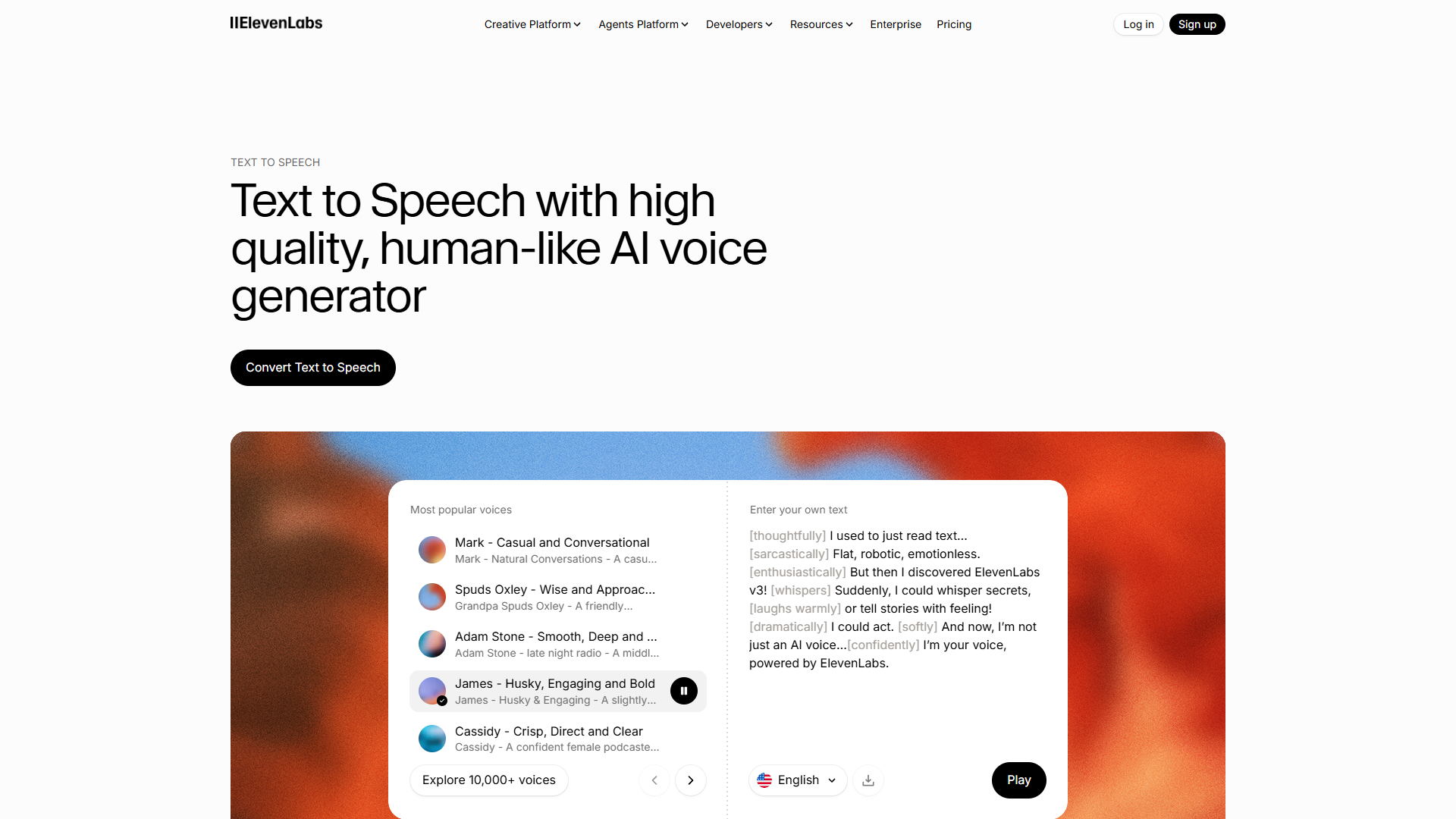
Important caveat: Don’t overuse tags. If every sentence has an emotional marker, it sounds theatrical and forced. Use them strategically at key moments where emotion genuinely matters.
Tip 3: Control Pacing with Pauses
Pacing separates natural speech from robotic narration. Humans pause constantly — to breathe, emphasize a point, or let information sink in. AI needs explicit instructions to do the same.
SSML break tags give you precise control. ElevenLabs and most professional text-to-speech platforms support Speech Synthesis Markup Language (SSML). The <break> tag specifies exact pause duration:
Basic pause: <break time="0.5s" />
Longer dramatic pause: <break time="1.5s" />
Breath pause: <break time="0.3s" />
When to use breaks:
- After questions: Give listeners time to think
- Before important points: Build anticipation
- Between sections: Signal topic transitions
- After statistics: Let numbers sink in
Example in context:
"We tested 47 AI productivity tools. <break time="0.8s" /> Only three were
worth the investment. <break time="1s" /> Here's why."
Punctuation for pacing also works if you don’t need precise timing:
- Ellipses (…) - Suggests hesitation or trailing off
- Em dashes ( — ) - Indicates interruption or abrupt shift
- Commas - Natural breathing points (use liberally)
Compare these:
❌ NO PACING:
"The results were impressive. The tool saved me 15 hours per week.
That's 60 hours per month."

✓ WITH PACING:
"The results were... impressive. <break time="0.5s" /> The tool saved me
15 hours per week. <break time="0.8s" /> That's 60 hours per month."
The second version gives weight to the numbers and creates a more conversational rhythm.
Tip 4: Handle Numbers and Technical Content
Numbers and technical terms trip up AI voices more than anything else. Here’s how to handle them cleanly.
Dates: Write them out or use MM/DD/YYYY format consistently:
❌ AVOID: "12/3" (could be Dec 3 or March 12)
✓ BETTER: "December 3rd" or "12/03/2025"
Large numbers: Use commas and specify how to read them:
❌ CONFUSING: "15000" (might say "fifteen zero zero zero")
✓ CLEAR: "15,000" (reliably says "fifteen thousand")
Decimals and percentages: Write them as words when precision matters:
"Three point five percent" vs "3.5%" (both work, but first is clearer)Technical terms and codes: Use the <phoneme> or <say-as> SSML tags for complex pronunciations:
API keys: <say-as interpret-as="characters">A-P-I</say-as>
Product codes: <say-as interpret-as="spell-out">XTR-2847</say-as>
URLs and email addresses: Write them phonetically:
❌ AVOID: "Visit https://example.com"
✓ BETTER: "Visit example dot com"

❌ AVOID: "Email support@company.io"
✓ BETTER: "Email support at company dot I O"
Acronyms: Decide case-by-case whether to spell out or pronounce as a word:
NASA - Usually pronounced as word ("nassa")
HTML - Usually spelled ("H T M L")
ASAP - Context-dependent (spell for formal, word for casual)
If the AI mispronounces a term, ElevenLabs Creator tier and above includes pronunciation dictionaries where you can add custom phonetic spellings that persist across all your projects.
Tip 5: Choose the Right Voice and Settings
Voice selection dramatically affects perceived naturalness. ElevenLabs offers 100+ pre-made voices across 70+ languages, but choosing randomly is a mistake.
Match voice to content type:
- Tutorial/educational: Clear, moderate pace, neutral accent
- Marketing/sales: Energetic, warm, slightly faster
- Meditation/wellness: Calm, slower, soothing tones
- News/journalism: Authoritative, consistent, professional
Test multiple voices. ElevenLabs free tier includes access to all voices, so audition 3-5 options with the same 30-second script sample. You’ll immediately hear which voices naturally fit your content.
Adjust voice settings. Most platforms offer these controls:
- Stability (0-100%): Higher = more consistent and predictable. Lower = more expressive but variable. Use 60-75% for balanced results.
- Similarity (0-100%): How closely to match the original voice characteristics. Keep at 75%+ for natural sound.
- Style exaggeration (0-100%): Amplifies emotional delivery. Start at 0% and increase only if the voice sounds too flat.
Voice gender and age matter. Research shows listeners perceive different voices as more credible for different topics:
- Technical/software content: Often performs better with mid-range voices (neither too young nor too old sounding)
- Financial advice: Deeper, mature voices score higher on trust
- Creative/lifestyle content: Varied — test multiple options
Don’t assume your personal preference matches your audience. Run A/B tests if possible.
Tip 6: Clone Your Voice for Consistency
If you’re creating ongoing content (podcast series, course modules, brand videos), voice cloning ensures perfect consistency across all episodes.
How it works: You upload 1-30 minutes of clear audio of your voice (or a voice actor’s). The AI analyzes speech patterns, pitch, rhythm, and creates a custom voice model. ElevenLabs offers two tiers:
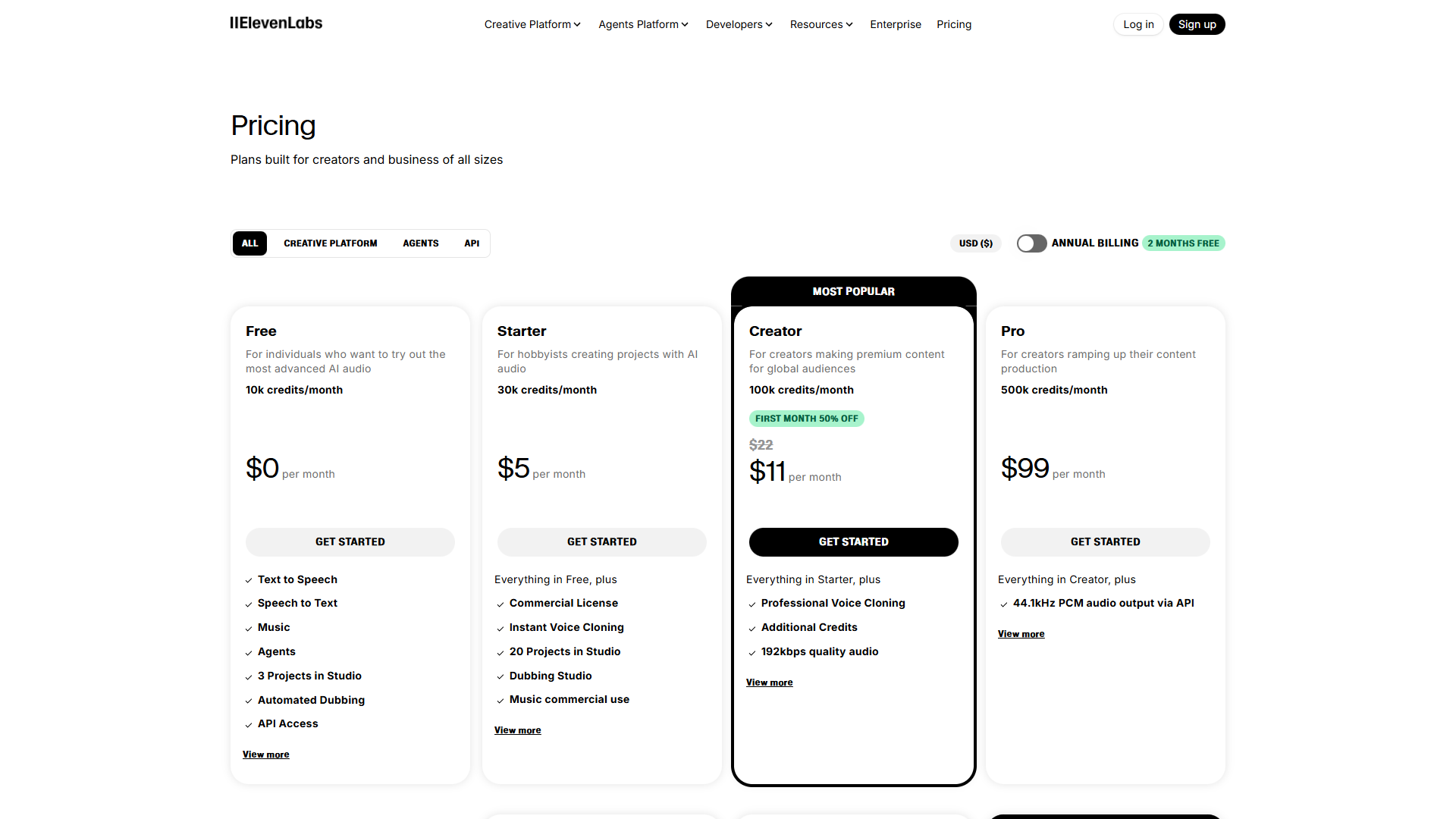
Instant Voice Cloning (Starter plan, $5/month):
- Requires 1-2 minutes of audio
- Good for quick projects
- Less precise than professional cloning
Professional Voice Cloning (Creator plan, $22/month):
- Requires 30+ minutes of audio
- Highly accurate reproduction
- Captures subtle emotional range
When voice cloning makes sense:
- Brand consistency: Your company’s explainer videos all sound identical
- Time savings: Record once, generate unlimited variations
- Accessibility: Create content in multiple languages with your voice
- Scalability: Produce 20 videos in the time it takes to record one
Real-world ROI example: A course creator I spoke with used to spend 8 hours recording and editing audio per module. With voice cloning, they now generate audio in 45 minutes — including edits and re-generations. That’s a 10x time saving.
Quality tips for voice cloning:
- Record in a quiet environment (no background noise)
- Use a decent microphone (even smartphone quality works)
- Speak naturally — don’t perform or exaggerate
- Include varied content (questions, statements, different emotions)
- Read for at least 10 minutes to capture enough voice data
ElevenLabs Creator tier ($22/month) includes one professional voice clone, which is the sweet spot for most users. The free tier doesn’t include cloning, and Starter tier ($5/month) offers basic instant cloning that’s suitable for testing but not production use.
Quick Reference: ElevenLabs Audio Tag Cheat Sheet
Here’s a copy-paste reference for the most useful emotional tags and formatting:
=== EMOTIONAL TAGS ===
[whispers] - Intimate, quiet tone
[excited] - High energy, enthusiastic
[laughs] - Natural laughter
[sighs] - Resignation or contentment
[pauses] - Brief hesitation
[shouting] - Forceful (use sparingly)

=== PACING CONTROLS ===
<break time="0.5s" /> - Half-second pause
<break time="1s" /> - One-second pause
... - Hesitation (ellipsis)
 --  - Interruption (em dash)

=== TECHNICAL CONTENT ===
Write dates: "December 29th, 2025"
Large numbers: "15,000" (with commas)
URLs: "example dot com" (phonetic)
Spell codes: <say-as interpret-as="spell-out">ABC-123</say-as>

=== EXAMPLE SCRIPT ===
"After testing [excited] 47 different AI tools, <break time="0.8s" />
I found something surprising. [whispers] Most of them... [pauses] weren't
worth the investment. But three stood out. Here's why."
Bookmark this section and reference it while writing scripts. The tags become second nature after a few projects.
What to Avoid
Even with perfect technique, certain practices will make your AI voiceovers sound unnatural:
Over-processing audio. Don’t add heavy reverb, compression, or effects to “improve” the AI voice. Modern AI models already sound natural — heavy processing makes them sound synthetic again. Minimal EQ and noise reduction are fine; anything beyond that degrades quality.
Mixing voice styles mid-project. If you start with a calm, professional voice for your intro, don’t switch to an energetic sales voice halfway through. Consistency builds trust. Choose one voice and stick with it for the entire piece.
Ignoring natural speech patterns. AI can say anything, but that doesn’t mean it should. Avoid:
- Sentences longer than you’d comfortably say in one breath
- Jargon without explanation
- Lists longer than 5 items without breaks
- Monotone delivery for emotional content
Skipping the preview. Always generate a 30-second preview before committing to the full script. ElevenLabs and most platforms offer instant previews. Use them. It’s faster to fix issues in the script than to regenerate 10 minutes of audio.
Forgetting your audience. A voice that sounds perfect to you might not resonate with your target audience. If you’re creating content for a specific demographic (age group, profession, region), test your voice choice with actual representatives from that group.
Cheapening out on character limits. ElevenLabs free tier offers 10,000 characters per month (roughly 12-15 minutes of audio). That’s great for testing, but if you’re producing regular content, the Starter plan at $5/month for 30,000 characters is a worthwhile investment. Running out of characters mid-project is frustrating and breaks your workflow.
For more productivity insights, explore our guides on Best Ai Voice Generators 2025, Ai Transcription Comparison. For alternative voice generation platforms, check out Murf AI for business voiceovers or WellSaid Labs for enterprise use cases.
Final Thoughts
The best AI voiceover tips come down to one principle: treat the AI like a voice actor who needs direction. Be explicit about tone, pacing, and emotion. Structure your scripts for clarity. Test, iterate, and refine.
Start with ElevenLabs’ free tier to practice these techniques. Focus first on emotional tags and script structure — those deliver the biggest quality improvements. Once you’re comfortable, experiment with voice cloning and advanced SSML controls.
The gap between robotic AI voices and human narration isn’t just closing — it’s nearly gone. With these AI voiceover tips, you can create professional-quality audio in a fraction of the time traditional recording requires. The question isn’t whether AI voices can sound human anymore. It’s whether you’re using them effectively.
Rating:
Try it yourself: Start with ElevenLabs’ free tier to test these techniques with 10,000 characters per month. No credit card required.
External Resources
For official documentation and updates:
- ElevenLabs — Official website
- OpenAI — Additional resource