After managing 50+ projects across Monday.com, Asana, and ClickUp over 18 months — from marketing campaigns to product launches — I’ve learned that choosing the wrong project management tool is expensive. Not because of the subscription cost, but because of the adoption failure, productivity dip during migration, and the inevitable “let’s try a different tool” conversation 6 months later.
I tested every major PM platform with real projects and real teams. Here’s what actually works in December 2025 — including the AI agents that matter, the automation limits that will bite you, and honest recommendations based on team size and budget.
Quick Verdict: Which PM Tool Should You Choose?
When exploring best project management tools 2025, consider the following.
Choose Monday.com if:
- You have a team of 3+ with mixed technical abilities
- Visual project management matters more than feature depth
- You need serious automation (25,000/month on Pro)
- AI agents (monday agents, monday magic) fit your workflow
- Budget is $12-24/seat/month
Choose Asana if:
- You want cleaner UI and faster onboarding
- Timeline views and dependencies are critical
- AI Studio automation appeals to your team
- You’re managing structured workflows without heavy customization
- Budget is $11-25/seat/month
Choose ClickUp if:
- You want maximum features at minimum price
- Your team tolerates a steeper learning curve
- Docs + databases + PM in one platform matters
- ClickUp Brain’s multi-model AI interests you
- Budget is $7-12/seat/month
Choose Notion if:
- Documentation is as important as task management
- You need flexible databases more than structured PM
- AI Agents with multi-model support (GPT-5, Claude Opus 4.1) appeal to you
- You’re willing to build custom workflows from scratch
- Budget is $10-15/seat/month
Choose Trello if:
- You need simple Kanban boards, nothing more
- Team refuses to learn complex tools
- Budget is $5/seat or free
- Advanced PM features would go unused
Monday.com: The Visual Powerhouse
Monday.com is the best visual PM tool for teams needing instant project status understanding — color-coded boards, status columns, and timeline views make projects clear at a glance.
Key strengths:
- monday agents create boards from natural language, handle end-to-end task execution
- Automation: 250/mo (Standard), 25,000/mo (Pro), 250,000/mo (Enterprise)
- 288% ROI documented (Forrester), 15,600 hours saved, Motorola hit 346%
Limitations: 3-seat minimum ($36/mo min), advanced reporting locked to Enterprise, 10+ hours to master automations.
Monday.com Pricing (December 2026)
| Plan | Per Seat | Automations | Best For |
|---|---|---|---|
| Free | $0 | None | 2 users exploring |
| Basic | $9 | None | Small teams |
| Standard | $12 | 250/mo | Views + integrations |
| Pro | $19 | 25,000/mo | Complex workflows |
Cost example: 10 users on Pro = $2,280/year vs. Asana Advanced $2,988/year (saves $708).
Asana: The Cleaner UI Choice
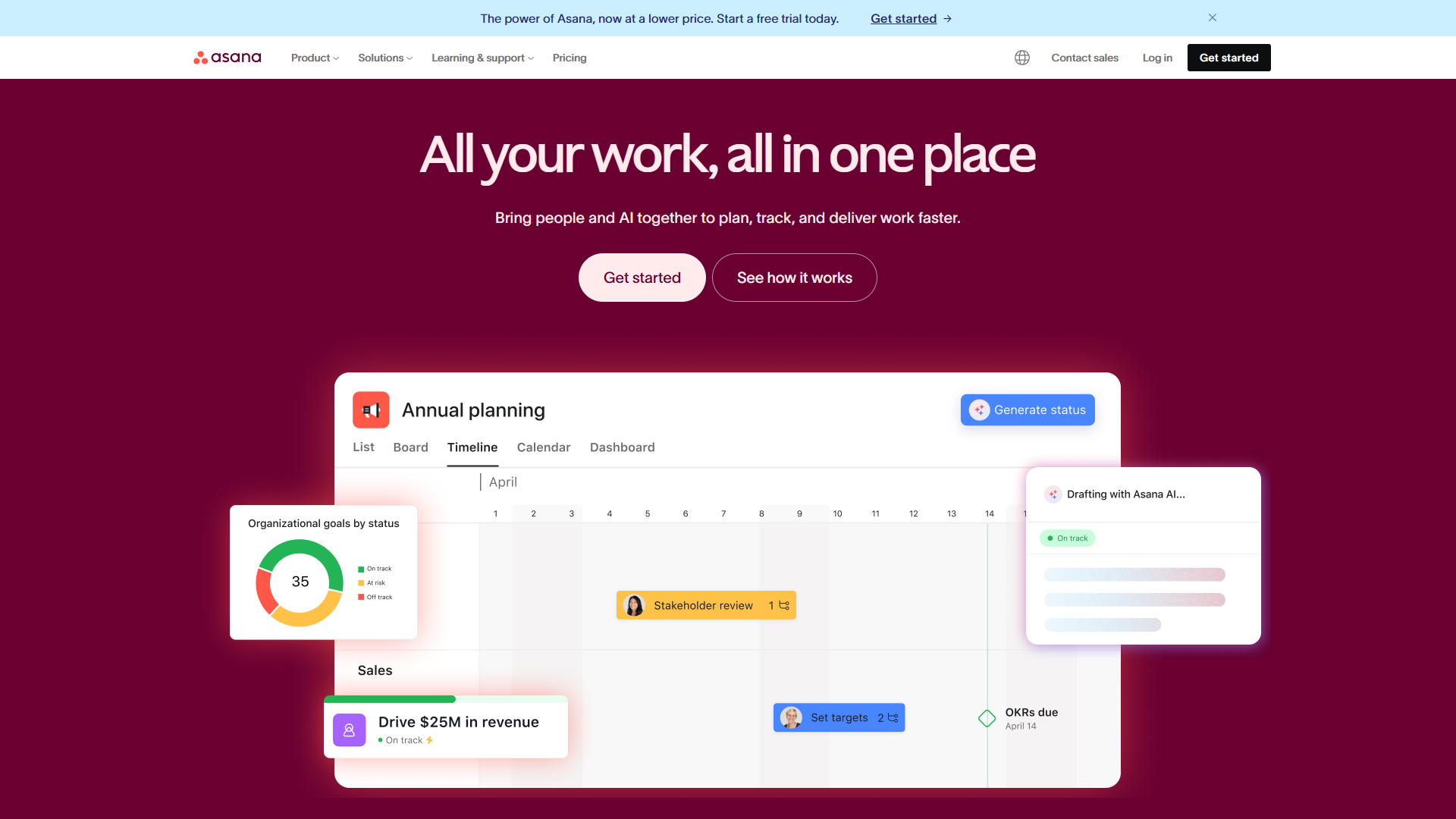
Asana prioritizes clean design over feature density — list view, timeline, and portfolio interfaces feel calm vs. Monday.com’s colorful boards.
Key strengths:
- AI Studio enables no-code workflow automation with natural language (all paid tiers)
- 437% ROI documented, Zoom saves 133 work weeks/year, 57% on-time delivery improvement
- 200+ integrations (Slack, Teams, Salesforce, Google Workspace)
Limitations: AI Teammates (autonomous agents) require undisclosed premium pricing, less visual than Monday.com, free tier caps at 10 users.
Asana Pricing (December 2025)
| Plan | Per Seat | AI Studio | Automations |
|---|---|---|---|
| Personal | $0 | None | None |
| Starter | $10.99 | Basic | 250/mo |
| Advanced | $24.99 | Basic | 25,000/mo |
| Enterprise | Custom | Full | Unlimited |
Cost example: 10 users on Advanced = $2,998/year vs. Monday.com Pro $2,280/year (costs $718 more).
ClickUp: The Feature-Dense Value Play
ClickUp prioritizes feature completeness — $7/seat Unlimited tier includes features that cost $12-24/seat elsewhere: unlimited storage, dashboards, Gantt charts, goals, native time tracking.
Key strengths:
- ClickUp Brain (Nov 2025) supports GPT-5, Claude Opus 4.1, o3 models + searches 100+ connected apps
- 35+ views: List, Board, Gantt, Timeline, Calendar, Mind Map, Workload
- 384% ROI documented (Nucleus Research), 576 hours saved weekly
Limitations: Feature overload (teams spend 3 months configuring), cluttered UI, AI costs extra ($9-28/user/month add-on).
ClickUp Pricing (December 2025)
| Plan | Per Seat | Storage | AI Cost |
|---|---|---|---|
| Free | $0 | 100 MB | Trial only |
| Unlimited | $7 | Unlimited | $9/user add-on |
| Business | $12 | Unlimited | $9/user add-on |
Cost example: 10 users on Business = $1,440/year. With Brain = $2,520/year. Without AI, saves $840 vs. Monday.com.
Notion: The Database-First Approach
Notion is a flexible database platform with AI agents — build any workflow from primitives (Jira replicas, CRMs, content calendars).
Key strengths:
- AI Agents (Sept 2025) support GPT-5, Claude Opus 4.1, o3 with context from comments, calendar, Slack
- Documentation + PM combined eliminates tool gap
- 35% search time reduction (Osaka Gas case study)
Limitations: Not dedicated PM (no native dependencies/time tracking), AI requires Business tier ($15/seat), mobile app lags desktop.
Notion Pricing (December 2025)
| Plan | Per Seat | AI Access | Best For |
|---|---|---|---|
| Free | $0 | Trial only | Individuals |
| Plus | $10 | None | Small teams |
| Business | $15 | Unlimited | Teams needing AI |
Cost example: 10 users on Business = $1,800/year (includes AI). ClickUp Business = $1,440/year without AI.
Trello: Simple Kanban Done Right
Trello is the original visual project management tool. After years of using it for personal task management and watching teams outgrow it, I know exactly when Trello wins and when you need more.
When Trello Is the Right Choice
Maximum simplicity. Boards, lists, cards. That’s it. If your team refuses to learn complex tools or your workflow is genuinely simple, Trello’s constraints become features.
Free tier is genuinely useful. Unlimited cards, unlimited storage for attachments, 10 boards per workspace. For personal use or tiny teams, this covers most needs.
Fast onboarding. I’ve onboarded team members on Trello in 10 minutes. Try achieving that with ClickUp’s 35+ views or Monday.com’s automation builder.
When Trello Falls Short
No native Gantt, timeline, or dependencies. If you need to visualize project timelines or track task dependencies, you need Power-Ups (add-ons) or a different tool.
Automation is limited. Butler automations exist but pale compared to Monday.com’s 25,000/month or ClickUp’s no-code workflows.
Scales poorly. 50+ card boards become unwieldy. Enterprise teams inevitably outgrow Trello into more structured tools.
Trello Pricing (December 2025)
| Plan | Per Seat (Annual) | Best For |
|---|---|---|
| Free | $0 | Personal use, tiny teams |
| Standard | $5 | Basic team features |
| Premium | $10 | Views, dashboards |
| Enterprise | Custom | Large organizations |
Head-to-Head: AI Agent Comparison
| Feature | Monday.com | Asana | ClickUp | Notion |
|---|---|---|---|---|
| AI Branding | monday agents | AI Teammates | Autopilot Agents | AI Agents |
| LLM Models | Proprietary | Proprietary | GPT-5, Claude, o3 | GPT-5, Claude, o3 |
| Autonomous Execution | Yes | Beta | Yes | Yes |
| Workflow Automation | Yes | Yes | Yes | Limited |
| Meeting Transcription | No | No | Yes (AI Notetaker) | Yes |
| Cross-App Search | Limited | Limited | Yes (100+ apps) | Yes (Slack connector) |
| Min Tier for AI | Basic | Starter | Paid add-on | Business |
| AI Monthly Cost (10 users) | Included | Included | $90-280 | Included |
AI Winner: ClickUp for capability depth, Notion for context awareness, Monday.com and Asana for included-in-subscription simplicity.
Head-to-Head: Automation Limits by Tier
This is where Monday.com’s automation limits analysis reveals real differences:
| Tool | Low Tier | Mid Tier | High Tier | Enterprise |
|---|---|---|---|---|
| Monday.com | None (Basic) | 250/mo (Standard) | 25,000/mo (Pro) | 250,000/mo |
| Asana | None (Starter) | 250/mo (Starter) | 25,000/mo (Advanced) | Unlimited |
| ClickUp | Limited (Free) | Basic (Unlimited) | 250+/mo (Business) | Unlimited |
| Notion | None (Free) | Basic (Plus) | Advanced (Business) | Unlimited |
Key insight: Teams running 1,000+ automations monthly need Monday.com Pro, Asana Advanced, or ClickUp Business minimum. Budget accordingly.
Enterprise vs SMB Recommendation Framework
For SMB Teams (3-25 people)
| Priority | Recommended Tool |
|---|---|
| Visual clarity | Monday.com |
| Clean UI | Asana |
| Maximum features | ClickUp |
| Docs + PM | Notion |
| Maximum simplicity | Trello |
| Lowest cost | ClickUp Unlimited ($7/seat) |
For Mid-Market Teams (25-100 people)
| Priority | Recommended Tool |
|---|---|
| High automation volume | Monday.com Pro |
| Structured workflows | Asana Advanced |
| Feature depth + AI | ClickUp Business + Brain |
| Documentation-heavy | Notion Business |
For Enterprise Teams (100+ people)
| Priority | Recommended Tool |
|---|---|
| Visual + automation | Monday.com Enterprise |
| Clean + compliant | Asana Enterprise+ |
| Maximum flexibility | ClickUp Enterprise |
| Wiki + PM unified | Notion Enterprise |
Pricing Comparison: Real Scenarios
Scenario 1: Startup (5 users, basic needs)
| Tool | Plan | Annual Cost |
|---|---|---|
| Trello | Free | $0 |
| ClickUp | Unlimited | $420 |
| Notion | Plus | $600 |
| Monday.com | Basic | $540 (3-seat min) |
| Asana | Starter | $660 |
Winner: Trello Free or ClickUp Unlimited for value.
Scenario 2: Growing Team (15 users, automation needed)
| Tool | Plan | Annual Cost |
|---|---|---|
| ClickUp | Business | $2,160 |
| Monday.com | Pro | $3,420 |
| Notion | Business | $2,700 |
| Asana | Advanced | $4,498 |
Winner: ClickUp Business saves $1,260 vs. Monday.com, $2,338 vs. Asana.
Scenario 3: Enterprise (50 users, full features)
| Tool | Plan | Annual Cost |
|---|---|---|
| ClickUp | Business + Brain | $13,200 |
| Monday.com | Pro | $11,400 |
| Notion | Business | $9,000 |
| Asana | Advanced | $14,994 |
Winner: Notion Business if AI included meets needs; Monday.com Pro for automation focus.
Migration Considerations
| From → To | Time Investment | Best When |
|---|---|---|
| Trello → ClickUp/Monday | 1-2 weeks | Need more features, similar visual DNA |
| Monday.com → Asana | 2-4 weeks | Prefer cleaner UI over visual boards |
| Asana → ClickUp | 2-4 weeks | Need more features, want multi-model AI |
| Any → Notion | 4-6 weeks | Building custom databases required |
Feature Comparison Matrix
| Feature | Monday.com | Asana | ClickUp | Notion | Trello |
|---|---|---|---|---|---|
| Visual Boards | Excellent | Good | Good | Good | Excellent |
| Timeline/Gantt | Yes (Standard+) | Yes (Starter+) | Yes (All) | Via databases | Power-Up |
| Dependencies | Yes (Pro) | Yes (Starter+) | Yes (All) | Manual | Power-Up |
| Time Tracking | Yes (Pro) | Yes (Advanced) | Yes (All) | Via integrations | No |
| AI Features | Excellent | Good | Excellent | Excellent | Limited |
| Automation | Excellent | Good | Excellent | Good | Basic |
| Mobile App | Good | Good | Good | Average | Good |
| Learning Curve | Medium | Low | High | High | Very Low |
| Free Tier | 2 users | 10 users | Unlimited users | Unlimited | 10 boards |
| Min Paid Cost | $27/mo | Free | Free | Free | Free |
Final Verdict
For best project management tools 2025, | Priority | Best Choice | Why | |----------|-------------|-----| | Visual teams | Monday.com | 288% ROI, instant status understanding | | Clean UI | Asana | 437% ROI, 57% on-time improvement | | Maximum value | ClickUp | $7/seat, 35+ views, multi-model AI | | Documentation-heavy | Notion | Database flexibility + AI Agents | | Maximum simplicity | Trello | Kanban basics, fast onboarding |
My setup: Monday.com for visual client projects, Notion for docs-heavy work, ClickUp Unlimited for budget-sensitive recommendations.
FAQ
Best AI? ClickUp Brain (model flexibility), Notion (context awareness), Monday agents (smooth execution).
Multiple tools? Possible via Zapier, but creates duplicate entry. Single-platform is simpler.
Hidden costs? Training: 5-10 hours/user for complex tools, 2-3 hours for simple ones.
Wait for better AI? No — all tools update quarterly. PM chaos today costs more than marginally better AI tomorrow.
Tools Mentioned
- Monday.com - Visual project management with AI agents
- Asana - Clean UI with AI Studio automation
- ClickUp - Feature-dense PM with multi-model AI
- Notion - Database-first workspace with AI Agents
- Trello - Simple Kanban boards
For more information about best project management tools 2025, see the resources below.
External Resources
For official documentation and updates from these project management platforms:
- Monday.com Blog — Work management insights and monday agents feature updates
- Asana Resources — Project management guides and AI Studio tutorials
- ClickUp Blog — Productivity tips and ClickUp Brain AI updates
- Notion Blog — Workspace templates and AI Agents announcements
Bottom line: Monday.com for visual teams, Asana for clean UI lovers, ClickUp for maximum value, Notion for documentation-heavy workflows, Trello for maximum simplicity. Start with free tiers, validate fit with real projects, then invest. The best PM tool is the one your team actually uses consistently.